Quick Start Guide
7
Quick Start Guide
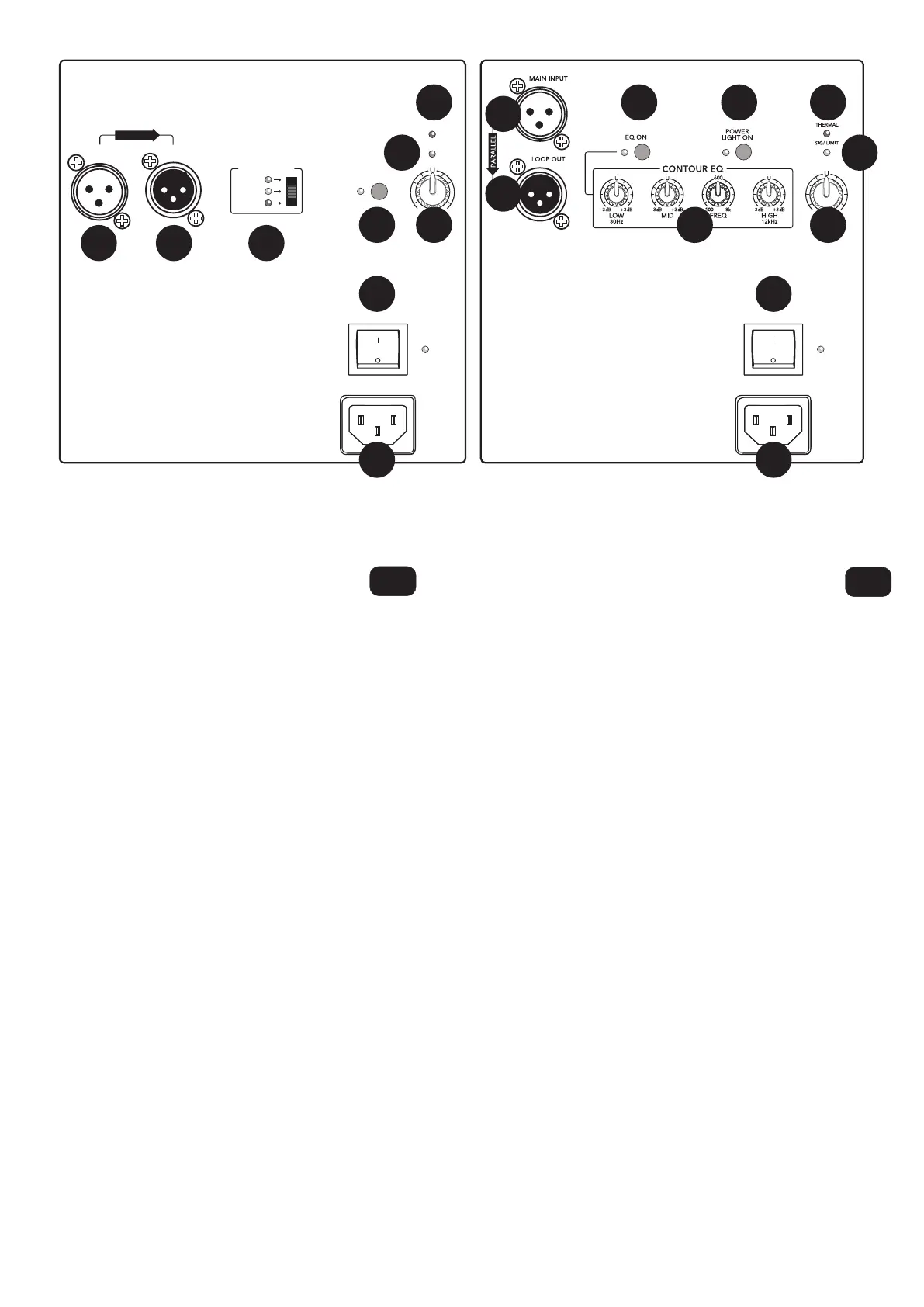
Rear Panel Descriptions –
1. Power Connector Connect the supplied AC power cord to this
IEC jack.
2. Power Switch Turns the loudspeaker on and off.
3. Main Input Connect a balanced line-level signal from a mixer
or other signal source using an XLR connector.
4. Loop Output This male XLR connector produces exactly the
same signal that is connected to the input jack for connecting
additional speakers.
5. Voicing Mode Optimizes speaker voicing for the selected
application.
6. Power Light On Switch Illuminates the front panel LED.
7. Level Adjusts the overall signal level of the input. Turn it down
if the accompanying OL LED illuminates solid red.
8. Signal and Limit LED Illuminates green to indicate signal
or red when a signal activates the limiter.
9. Thermal LED Illuminates when the thermal protection circuit
is activated.
10. EQ Knobs Boosts or cuts the level at certain frequencies to
enhance the sound.
11. EQ Switch Turns the EQ on and off.
1. Toma de corriente Conecte en esta toma IEC el cable
de alimentación incluido.
2. Interruptor de encendido Le permite encender y apagar
este altavoz.
3. Main Input Conecte una señal balanceada de nivel de línea
procedente de un mezclador u otra fuente de señal usando un
conector XLR.
4. Loop Out Este conector de tipo XLR macho emite exactamente
la misma señal que es conectada en la toma de entrada y se usa
para la conexión de altavoces adicionales.
5. Voicing Mode Selector que le permite optimizar la respuesta
del altavoz para una aplicación concreta.
6. Interruptor Power Light On Hace que se ilumine el piloto
del panel frontal.
7. Level Este mando ajusta el nivel de señal global de la entrada.
Reduzca su ajuste si el piloto OL que está al lado se queda
iluminado fijo en rojo.
8. Piloto de señal y limitación Piloto de señal y limitación:
se ilumina en verde para indicar la presencia de señal o en
rojo cuando una señal activa el limitador.
9. Piloto Thermal Se ilumina cuando se activa el circuito
de protección térmica o contra el recalentamiento.
10. Mandos EQ Realzan o cortan el nivel en determinadas
frecuencias para intensificar el sonido.
11. Interruptor EQ Activa o desactiva el EQ.
EN
Descripción del panel trasero –
ES
HD1521 / HD1531HD1221
POWER
LIGHT ON
SIG/ LIMIT
THERMAL
MAIN
INPUT
LOOP
OUT
LEVEL
+6dB 6dB
-
VOICING MODE
NORMAL
CONTOUR
MONITOR
POWER
ON
PARALLEL
+6dB–6dB
POWER
ON
1
2
3
3
4
4 5
6
611
107
9
88
9
7
1
2



 To Next Page