7
Owner’s Manual
Owner’s Manual
House of Worship System
Microphones
press HI-Z
button
Keyboards
Drum
Machine
C300z Passive Speakers
House System
(plays mono main mix)
C200 Passive Stage Monitors
(plays mon 1 output)
Power
Amplifier
dual-mono
mode
Rear Panel
Front Panel
Power Amp Mode
switch set to
Mains/Mon 1
Adjust
Vocal
Compression
SRM150 Powered Monitor
(plays mon 1 output)
Passive Subwoofers
(plays main mix below 100 Hz)
Acoustic Guitar
and Mic
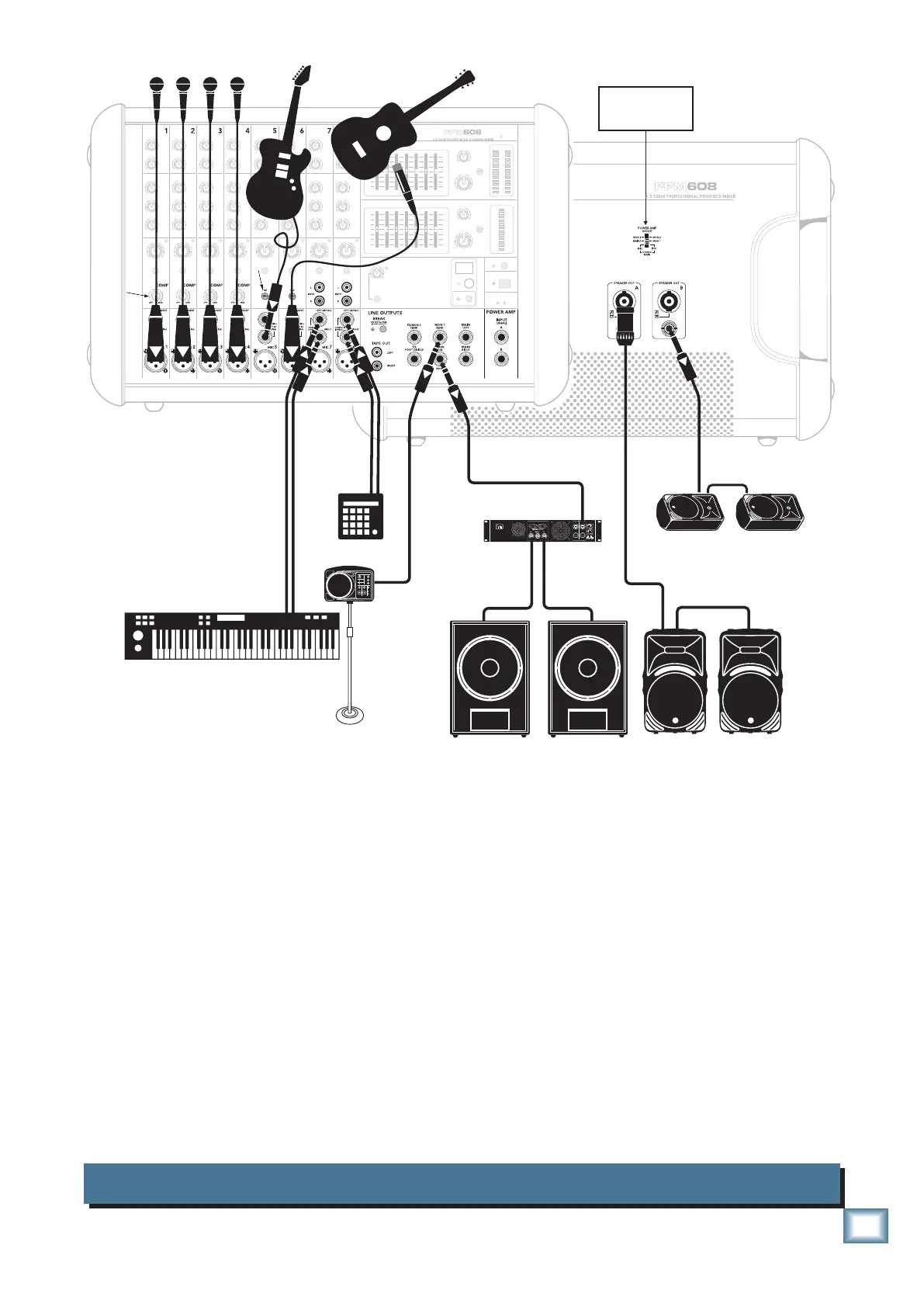
This diagram shows microphones attached to the mic inputs of channels 1 to 4, an electric guitar
connected directly to channel 5 (with hi-z switch pressed in), an acoustic guitar microphone connected to
channel 6 mic in, a keyboard attached to channel 7's stereo inputs, and a drum machine to channel 8.
A Mackie SRM150 powered monitor is connected to the monitor 1 send, and acts as a personal stage
monitor to the keyboard player. The mon 1 knobs of each channel allow you to set up a monitor mix that
is independent of the main mix. Use the monitor 1 graphic EQ to adjust the stage monitor EQ as desired.
The power amp mode switch is set to play the mono main mix on ch. A, and monitor 1 mix on ch. B.
Mackie C300z passive speakers are connected to the channel A speaker-level power output of the
powered mixer, and they play the main mono mix to your audience.
C200 passive stage monitors are connected to the channel B speaker-level power output of the
powered mixer. These play the stage monitor mix 1 to your performers.
Passive subwoofers are powered by a power amplifier connected to the main mix sub out, to reinforce
the low end in your main mix.


 To Next Page