17
Stereo
The stereo control is located in the left arm rest and is connected to two rear mounted
speakers. See manufacturer’s operator manual for complete instructions.
Basic Functions
Power
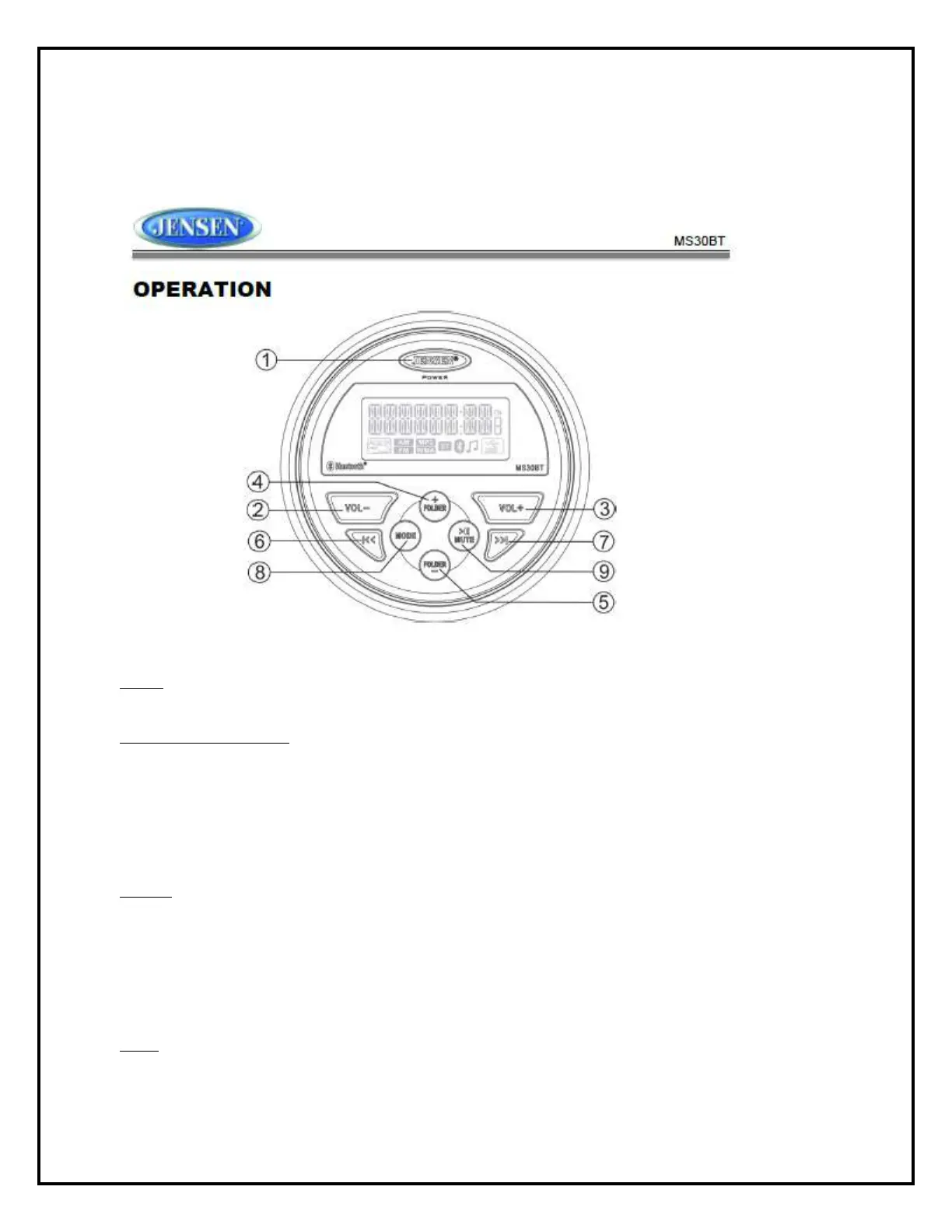
Press the JENSEN power button (1) to turn the unit on/off.
Restore Factory Settings
Perform the following steps to reset the radio to factory default settings:
1. Press and hold the power button (1) to display the software version.
2. Press the VOL+ button (3) to display “RESET”
3. Press the power button to confirm factory default restore. After reset, the unit will default to FM
mode.
Volume
Press the VOL +button (3) to increase the volume.
Press the VOL -button (2) to decrease the volume.
Press and hold either button to change the volume level quickly.
Mute - Press the MUTE button (9) to silence the audio output in tuner, AUX or USB mode. Press
again to restore the previous volume level.
Mode
Press the MODE button (8) to select a mode of operation: FM, AM, AUX, USB and Bluetooth.



 To Next Page