EasyManua.ls Logo

Madison MAD-HIGHPOWER300 - User Manual

Madison MAD-HIGHPOWER300
16 pages
Print Icon
To Next Page IconTo Next Page
Loading...
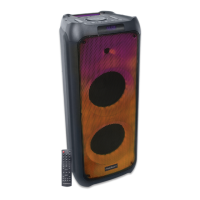
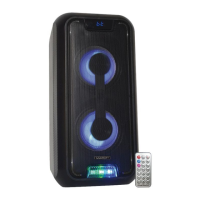
STAND-ALONE SOUND BOX
MAD-HIGHPOWER300
GB Instruction Manual
F Manuel d’Utilisation
D Bedienungsanleitung
NL Handleiding
ES Manual de instrucciones
Imported from China by
LOTRONIC SA
Av. Z. Gramme 9
B-1480 Saintes
The CE declaration is available for downloading on our website www.lotronic.net
La déclaration CE est disponible en téléchargement sur notre site www.lotronic.net
Die CE-Erklärung steht auf unserer Website www.lotronic.net zum Download zur Verfügung
De CE-verklaring kan worden gedownload op onze website www.lotronic.net
La declaración CE está disponible para su descarga en nuestro sitio web www.lotronic.net

Questions and Answers

  • S
    Shelby GonzalezAug 3, 2025
    What to do if Madison MAD-HIGHPOWER300 have no sound when powered on?
    • S
      Sarah JohnsonAug 3, 2025
      If your Madison Speakers have no sound when powered on, there might be a few reasons. First, ensure a Line signal is connected as your input sound source. Next, check that the volume isn't at its lowest setting and adjust it accordingly. Finally, confirm that a USB or SD card is properly inserted into the speakers.
  • K
    Kara SanchezAug 8, 2025
    Why do my Madison Speakers have a lot of noise?
    • C
      Casey VelasquezAug 8, 2025
      Your Madison Speakers might produce excessive noise due to several factors. Here's what to check: 1. Ensure wired microphones are not too close to the speaker. 2. Turn off any wired microphones when not in use. 3. Reduce the microphone volume. 4. Keep mobile phones away from the speaker during calls. 5. Keep the speaker away from other equipment that may cause interference.
  • K
    Kimberly MartinAug 13, 2025
    How to fix no sound from the microphone on Madison Speakers?
    • K
      kathy37Aug 13, 2025
      If you're experiencing no sound from the microphone on your Madison Speakers, consider these solutions: Ensure the microphone socket is fully plugged in. Verify that the microphone switch is powered on. Adjust the microphone volume to an audible level.
  • M
    Maxwell ThomasAug 18, 2025
    How to resolve sound distortion in Madison MAD-HIGHPOWER300?
    • W
      williamsmichealAug 18, 2025
      Sound distortion in your Madison Speakers can often be resolved by: Lowering the volume, as it might be too loud. Checking and changing the audio file, as there might be an error. Adjusting the Bass/Treble by “MENU” and “Main volume”.
  • A
    Anna SmithAug 23, 2025
    What to do if Madison MAD-HIGHPOWER300 Speakers have no sound from USB/SD card?
    • C
      Charles MorrowAug 23, 2025
      If your Madison Speakers aren't playing sound from a USB or SD card, it could be due to a few reasons: The song format might be incompatible; ensure your songs are in MP3 or WMA format. An illegal operation might have caused a failure; try powering the device off and then on again. The USB or SD card might not be inserted properly; ensure it is correctly inserted.
  • A
    Adam PhillipsAug 28, 2025
    How to fix Blue-connect failure on Madison Speakers?
    • S
      Shirley HudsonAug 29, 2025
      To fix a Blue-connect failure on your Madison Speakers: If Blue-connect is disconnected, find the correct device name or press the "MENU" button to restore factory settings. If Blue-connect is connected but there's no voice, confirm that you are connected to the right device name. If the Blue-connect effective distance is too short, try to keep away from barriers such as walls and glasses.

Summary

Instruction Manual

Precautions

Important safety guidelines and warnings before using the product.

Important Information

Key notes on usage, ventilation, and battery charging.

Accessories

Lists all items included in the package with the unit.

Description of Top Panel

Details the functions of buttons and ports on the speaker's top.

Remote Control Functions

Remote Control Operation

Explains the purpose of each button on the remote control.

Instructions for Use

Bluetooth Pairing Mode

Step-by-step guide to connect the speaker via Bluetooth.

Line In Mode

How to connect and play audio via the AUX input.

USB Mode

Instructions for playing music from a USB drive.

TF Card Mode

Guide to playing music from a TF (MicroSD) card.

Specifications

Technical Specifications

Lists detailed technical data like power, frequency range, and dimensions.

Troubleshooting

No Sound Output Issues

Solutions for issues with no sound after powering up.

Sound Distortion Problems

Explains causes and fixes for distorted audio playback.

Microphone Audio Issues

Troubleshooting steps for microphone audio issues.

USB;SD Card Playback Errors

Solutions for problems playing audio from USB or SD cards.

Speaker Noise Problems

Addresses causes and solutions for excessive noise from the speaker.

Bluetooth Connection Failures

Troubleshooting steps for Bluetooth connection problems.

Madison MAD-HIGHPOWER300 Specifications

General IconGeneral
BrandMadison
ModelMAD-HIGHPOWER300
CategorySpeakers
LanguageEnglish

Related product manuals