Magellan RoadMate 2000 Screens 7
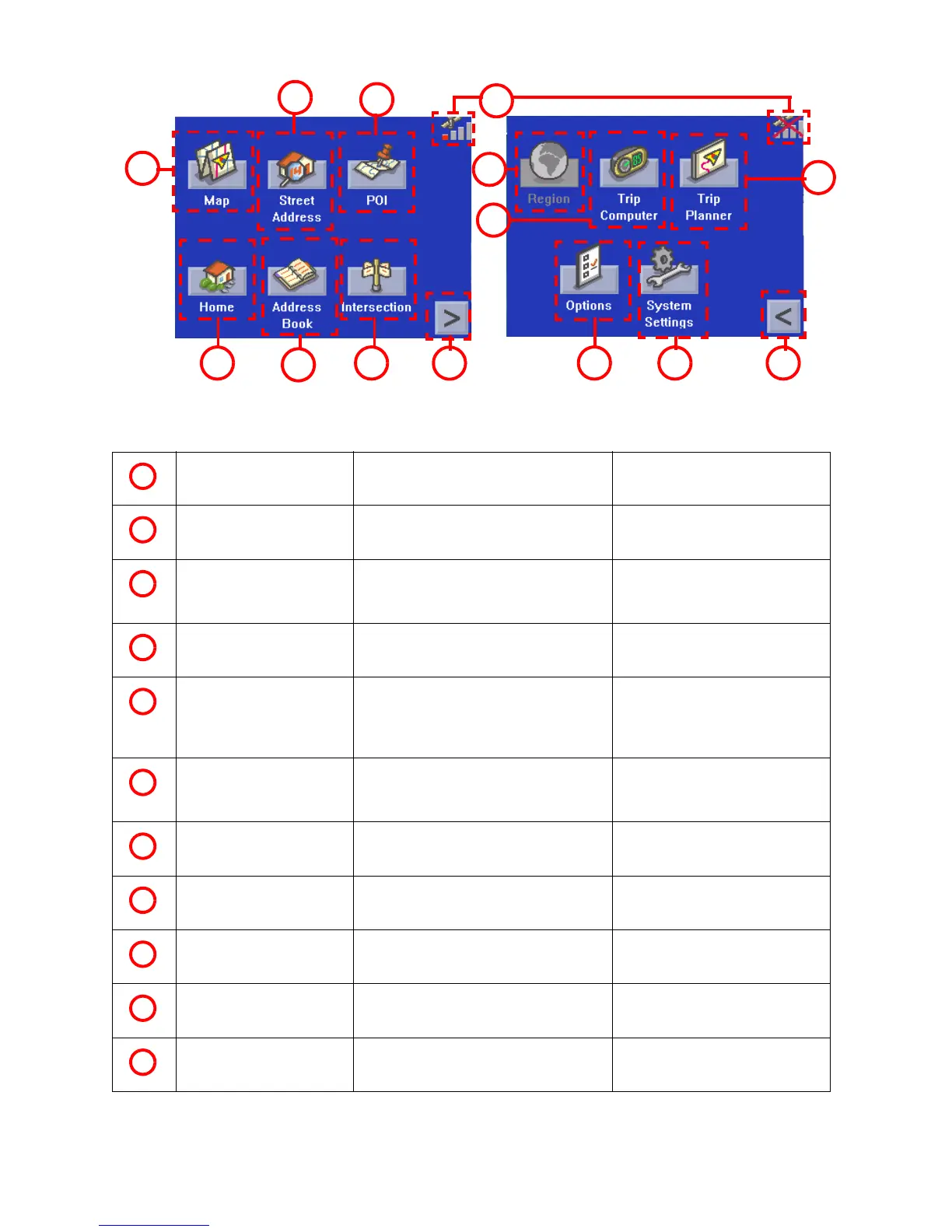
Main Menu - No Active Route
Map Button Used to access the Map Screen
Street Address Button Create a trip using a street address as
the destination.
POI Button Create a trip using a point of interest
from the POI database as the
destination.
Satellite Status Displays a bar graph indicating satellite
signal strength.
When tapped displays the
Satellite Status screen.
Home Button. Save your home address in the
Magellan RoadMate 2000 and easily
create a trip with your home as the
destination.
Address Book Button Access addresses saved to the address
book. Can also be to re-route to a
previous destination.
Intersection Button Create a route to an intersection.
Menu Page 2 Accesses the second page of the route
main menu.
Options Button Accesses the options menu.
System Setting Button Accesses system setting features.
Menu Page 1 Accesses the first page of the route
main menu.
7
8
2
3
4
5
1
9
10
11
12
14
6
13
1
2
3
4
5
6
7
8
9
10
11











 To Next Page