N477 User Manual Page 19
3. Different detours are calculated using
the same routing method that was used
to create the route. The list of alternate
routes is displayed along with Estimated
Time of Arrival for each. (ETA)
(Optional) You can check the Maneuver
List of an alternate route if you tap the
button on the right.
4. Tap the desired alternate route.
You can also tap Route Options to change the
routing method.
Multiple destination trips
Once you create a route, you can add
destinations and change the route sequence.
You can also save trips to OneTouch.
Creating a multiple destination trip
To create a multiple destination trip, create
a regular trip (route) by any of the usual
methods. The route can be your intended end
point or any of your intended destinations
along the trip.
1. Select Menu, then Edit Trip.
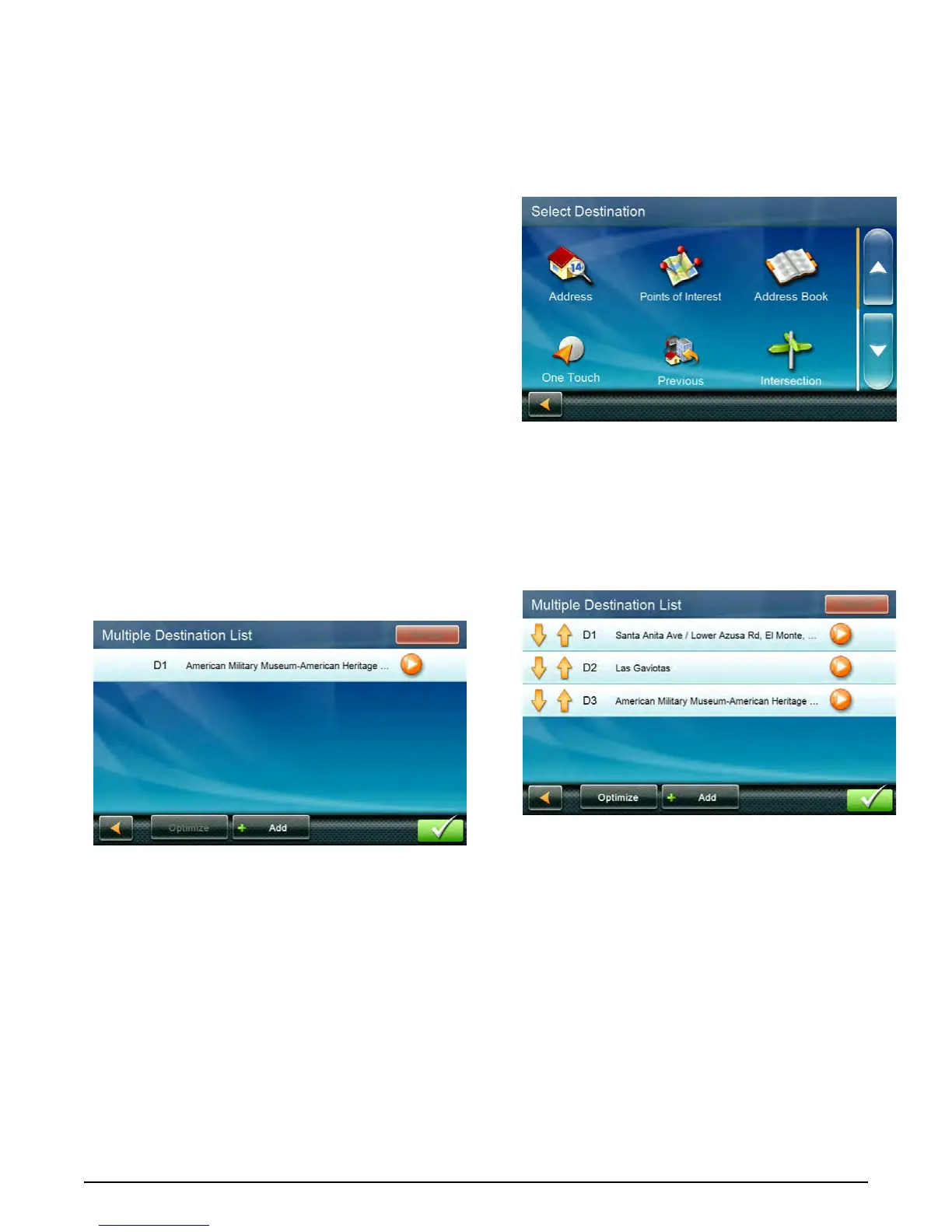
2. The Multiple Destination List screen is
displayed. Tap Add.
3. The Select Destination screen is shown.
You can search or select a destination by
any of the usual means.
(Address, Intersection, City Center, Points
of Interest, etc.)
4. Tap the icon for the method you want .
Then search or select a destination.
5. When you select a destination, the
Multiple Destination List screen is displayed
with the last location you added at the
bottom.


 To Next Page