4
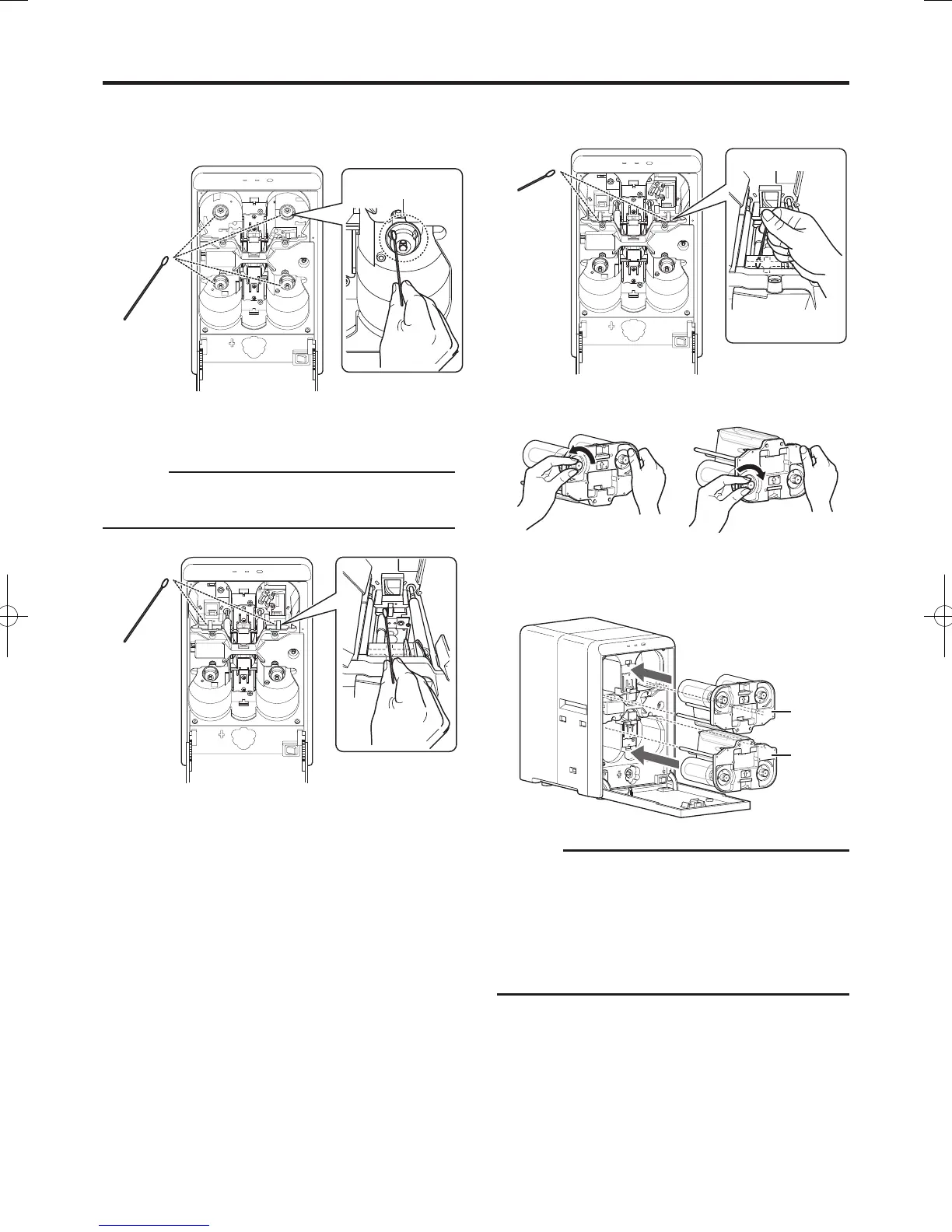
Apply alcohol to a cotton swab (large), and use it to
wipe the bobbin holder (x4)
(Cotton swab and alcohol: sold separately)
5
Apply alcohol to a cotton swab (large), and use it to
wipe the guide rail (x2) at the back
Cautions:
Do not touch the sensor and other parts inside the
laminator. Doing so may cause the unit to malfunction.
●
6
Apply alcohol to a cotton swab (small), and use it
to wipe the guide rail (x2) in front
7
Remove any slack in the laminate film
8
Insert the film cassette all the way in along the
guide rail until a “click” sound is heard, and close
the laminator door
Cautions:
Make sure to insert the film cassette all the way in until
a “click” sound is heard. Failure to do so may result in
defective patch or card jam.
If the film cassette is inserted upside down, it cannot
be inserted all the way in and the cassette button does
not lock in place. Also, you will not be able to close the
laminator door.
●
●
Bobbin holder
Orange
Yellowish-
green


 To Next Page