Why can't my Magnavox Blu-ray Player play music files from a disc?
- MMatthew NelsonSep 18, 2025
Make sure that the disc was recorded in the UDF, ISO9660 or JOLIET format. Confirm that the bitrate and sampling frequency are compatible with this unit.
Why can't my Magnavox Blu-ray Player play music files from a disc?
Make sure that the disc was recorded in the UDF, ISO9660 or JOLIET format. Confirm that the bitrate and sampling frequency are compatible with this unit.
How to fix Magnavox Blu-ray Player with no power?
If your Magnavox Blu-ray Player has no power, ensure the AC power cord is properly connected. If it is, try using a different power outlet. As a last resort, unplug the AC power cord, wait 5-10 seconds, and then plug it back in to try powering on the unit.
Why is there no sound or picture on my Magnavox MBP1700 Blu-ray Player?
If you're not getting any sound or picture from your Magnavox Blu-ray Player, first make sure that both the TV and the Blu-ray player are turned on. Next, confirm that the connections to the TV are correctly set up according to the connection guide. Also, verify whether the connected TV or device supports HDCP, as the unit requires HDCP support to output a video signal.
How to fix no audio/video signal via HDMI on Magnavox MBP1700?
If you're not getting any audio or video signal on your display device via HDMI cable with your Magnavox Blu-ray Player, make sure the display device is set to the correct input or video source. Try performing an HDMI hotplug by disconnecting the HDMI cable from the display device, turning on both devices, and then reconnecting the HDMI cable. Also, verify if the HDMI cable is a certified version. The audio / video signal will not be sent to a non-certified HDMI device.
Why can't my Magnavox MBP1700 Blu-ray Player find a music file?
Make sure that the file extension is FLAC or WAV for music files.
How to fix no audio signal from surround system of the audio system on Magnavox Blu-ray?
Make sure the audio system is turned on. Check the Input mode on the audio system if it is on the correct channel. Check if the surround system is compatible with either bitstream or LPCM. Increase the volume level on the surround system.
Why can't my Magnavox Blu-ray Player read the contents of my USB memory stick?
If your Magnavox Blu-ray Player cannot read the contents on the USB memory stick, the USB memory stick may not be compatible with this unit, or the contents may be damaged. Turn off the unit, then turn it back on. To soft reset the unit, press and hold the power button on the front panel for 10 seconds to shut down the unit to standby mode, or perform a hard reset by unplugging the AC power cord from the AC outlet for 5-10 seconds.
Why can't my Magnavox Blu-ray Player play BD-Video?
If your Magnavox Blu-ray Player cannot play back BD-Video, connect a USB memory stick (256MB or more of available memory) which is formatted on this unit, as some discs require memory when playing back the content. Also, do not disconnect the USB memory stick during playback.
Why can't my Magnavox Blu-ray Player read discs?
If your Magnavox Blu-ray Player cannot read a Blu-ray Disc™ / DVD / CD disc, the issue may be condensation; let the unit sit and dry for 1 or 2 hours. Check to see if the disc is compatible with this unit. Wipe dirt off the disc from the center to the outside or replace the disc.
What to do if buttons do not work on Magnavox MBP1700 Blu-ray Player?
If the buttons on your Magnavox Blu-ray Player do not work or the unit stops responding, perform a soft reset by pressing and holding the power button on the front panel for 10 seconds to shut down the unit, or perform a hard reset by unplugging the AC power cord from the AC outlet for 5-10 seconds.
Safety instructions to avoid electrical shock and fire, and guidance on location and handling.
Details the process of connecting the player to an HDTV using an HDMI cable.
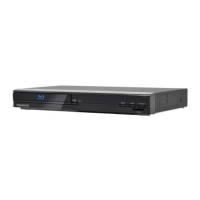
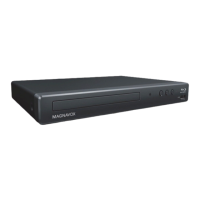
Details the components and controls located on the front of the player.
Describes the connections and ports available on the rear of the player.
Explains the functions of each button on the remote control.
Details how to connect the player to a television using an HDMI cable.
Guide to completing the initial setup process, including language and other settings.
Lists the types of discs and files supported for playback by the unit.
Lists discs and file types that the unit cannot play back.
Instructions on how to play back discs, including starting, pausing, and stopping playback.
Guide to playing music, photo, and AVCHD files from a USB memory stick.
Details all customizable settings for language, audio, subtitle, security, and system.
Settings related to TV screen aspect ratio, resolution, and picture control.
Details the fun-Link (HDMI CEC) feature for integrated system control.
How to set and configure the HDMI video output resolution and frame rate.
How to set up and manage parental control levels and change the password.
Instructions for updating the player's software via disc or USB memory stick.
Common issues with power, sound, picture, and remote control, with solutions.
Solutions for playback problems, USB compatibility, and file access issues.
Fixes for disc compatibility, choppy audio, and surround sound connection problems.
Technical specifications including signal system, power, dimensions, weight, and terminals.
| Type | Blu-ray Player |
|---|---|
| Output Resolution | 1080p |
| Video Upscaling | Yes |
| HDMI Output | 1 |
| USB Port | 1 |
| Ethernet Port | Yes |
| Wireless Connectivity | No |
| Region Code | Region A (Blu-ray), Region 1 (DVD) |
| Playable Media Format | DVD, CD |
| Audio Output | Analog |