The SBP2® Pendant Pushbutton Station is a control device designed for operating overhead material handling systems, such as cranes and hoists. It is manufactured by Magnetek Material Handling Electromotive Systems and distributed by Ergonomic Partners. The device is available in various configurations, ranging from 2-button to 12-button enclosures, accommodating different control needs.
Function Description:
The SBP2 pendant pushbutton station provides a human interface for controlling material handling equipment. It features multiple pushbuttons, which can be configured for single-speed, two-speed, or three-speed operations, as well as momentary or maintained on/off functions. The station allows operators to control various movements and functions of the crane or hoist, such as "Up," "Down," "Forward," "Reverse," and "Start/Stop." Some models include selector switches for additional control options. Pilot lights are also available to indicate operational status.
Important Technical Specifications:
- Enclosure Sizes: Available in 2-, 4-, 6-, 8-, 10-, and 12-button configurations.
- Switch Types:
- Single Speed 2-Button Switch (N.O./N.C. per button, or with two N.O. contacts).
- Two-Speed 2-Button Switch.
- Three-Speed 2-Button Switch.
- Momentary On/Off 2-Button Switch.
- Maintained On/Off 2-Button Switch (N.O./N.C. per button).
- Button Covers: Available in Black (for single-, two-, three-speed switches, and oil resistant), Red (for On/Off switches), and Green (for On/Off switches).
- Selector Switches: 2-Position and 3-Position (N.C. or N.O. in center) options.
- Pilot Lights: 120 Volt Red, Green, White, and Yellow pilot lights, designed to mount in standard button holes.
- Special Switches: Red Mushroom On/Off Switch (Push/Pull).
- Enclosure Material: Polycarbonate, UV stabilized, and impact resistant.
- Cable Grip Kit (CG-KIT): Includes nut, washer, and six grommets for various cable diameters:
- .375"-.437" (Grommet #00-4987)
- .437"-.562" (Grommet #00-4980)
- .500"-.625" (Grommet #00-4981)
- .562"-.687" (Grommet #00-4982)
- .625"-.750" (Grommet #00-4983)
- .687"-.812" (Grommet #00-4984)
- Wiring: Requires UL Listed round crimp-style terminals for connections.
- Environmental Considerations: Designed to prevent water and dust ingress when properly installed with the correct cable grip.
Usage Features:
- Ergonomic Design: The pendant station is designed for comfortable and safe operation, with optically clear grade lenses and highly visible yellow enclosures.
- Customization: A wide range of replacement parts and accessories allows for customization to specific application requirements, including different switch types, button covers, selector switches, and pilot lights.
- Strain Relief: Features extensive pull-out protection through dual strain relief split rings and a pendant cord grip top configuration, ensuring the cable is securely held and no tension is exerted directly on the pushbutton cable.
- Durability: Constructed with corrosion-resistant hardware, silicone rubber "O" ring seals, and a polycarbonate enclosure that is UV stabilized and impact resistant. Rear enclosure features ultrasonically welded threaded inserts for easy assembly and upgrading.
- Safety Features: Enclosure rib protects against premature actuation of switches. Interlock mechanisms ensure safe operation, preventing conflicting commands.
- Installation Height: Recommended installation height is approximately 3'-6" from the ground.
Maintenance Features:
- Pre-Operation Inspection: Before each use, operators should ensure the unit's exterior is sound, buttons function normally (return to off position when released), labels are correct, and there is no dirt, sand, or moisture buildup. The cable should be inspected for damage, and the strain relief wire (if applicable) must be installed.
- Regular Maintenance: On a continual basis, the interlock mechanism should be checked for proper operation, and buttons should return to the off position when released. The pendant's condition should be inspected regularly, with frequency depending on the duty cycle.
- Repair and Replacement: If cracks or abnormalities are detected in any part (enclosure, button caps, cable armor, cable), the part must be replaced immediately to prevent electrical shock or improper crane/hoist function. Damaged switch gaskets and labels should also be replaced to prevent contamination of switch contacts.
- Disassembly: The enclosure can be disassembled by unscrewing the pendant cable grip nut, removing the top cover (two screws), and removing the back cover (enclosure screws) to access internal components for wiring or repair.
- Cleaning: The unit should not be exposed to cleaning solvents that could penetrate and damage the enclosure.
- Contaminant Prevention: During installation or repair, care must be taken to prevent contaminants (e.g., "talc" from cables, cutting/stripping debris) from falling into the enclosure or switch contact areas, as this can lead to unsafe operating conditions. All contaminants must be removed before sealing the enclosure.
- Wiring Access: The design allows for easy access to terminal screws for wiring, with clear marking information provided in the manual.
Safety Precautions:
- Qualified Personnel: Only qualified personnel should install, inspect, and service the equipment.
- Lockout/Tagout: Prior to any installation, inspection, or repair, power must be disconnected at the source, and proper lockout/tagout procedures (as outlined in ANSI Z244.1) must be followed.
- High Voltage: High voltages are present in the control panel, junction boxes, pendant's electrical components, and connections. Do not make or break electrical connections without disconnecting power.
- Cable Integrity: Do not use split or cracked cable. Ensure the cable grip properly fits the cable to prevent water/dust penetration.
- Enclosure Tightening: When reassembling, enclosure screws should not exceed 9 inch-pounds of torque to avoid damage.
- Environmental Exposure: Avoid exposing the unit to cold air blasts that cause condensation or immersing it in water.
- Physical Handling: Do not let the pendant slam into hard objects or turn knobs/switches beyond their travel limits.
- Emergency Stop: If a problem occurs during operation, stop immediately and contact maintenance personnel.

 Need help?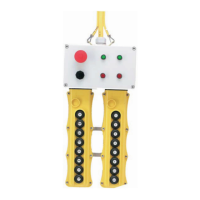

 To Next Page

 General