7
5. BATTERY REPLACEMENT
5.1. How to connect test leads.
a) On MΩ Range: Connect the red test lead into the “VΩ” terminal
and the black lead into the “COM” terminal.
b) On 200Ω and ACV Range: Connect the red test lead into the “VΩ”
terminal and the black lead into terminal “COM”
5.2. Battery Check-UP & Replacement
a) As battery power is not sufficient. LCD will display. Replacement of
6 pcs new batteries, type 1.5V size “AA” is required.
b) Place back the battery cover and four the screws.
5.3. Test leads check
Set the range select switch to the 200Ω range. With the tip
and alligator clip of the test leads connected. The indicator
should read 00.0Ω. When the leads are not connected the
display will read infinity indicated by “1”. This will ensure that
test lead are under working condition.
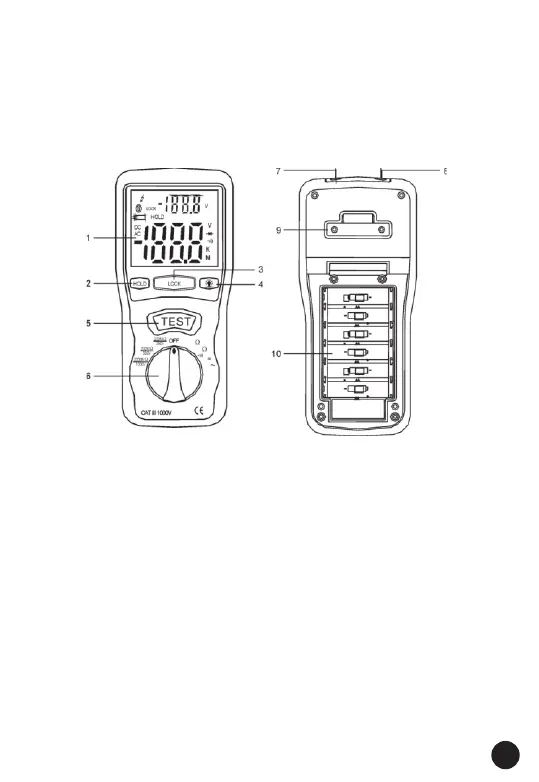
4. PARTS & CONTROLS
1. Digital Display
2. Data Hold Button
3. Lock Button
4. Backlight Button
5. Test Button
6. Rotary Function switch
7. VΩ Jack
8. COM input jack
9. Pothook
10. Battery Cover



 To Next Page