6
Programming:
There are two methods of Programming TEMPI's Channels: HUMAN and MACHINE.
HUMAN Programming is simple:
[Tap] the Channel Button(s) at the rate you would like the associated Channel Output(s) to move.
MACHINE Programming is simple:
[Hold] PGM_A for DIVISIONS (÷) or PGM_B for MULTIPLES (*) and [tap] the associated Channel Button the number of times
corresponding to the desired DIVISION (÷) or MULTIPLE (*).
For example:
To MACHINE Program Channel-3 to “÷4“ (divide by four): [HOLD] PGM_A + [TAP] Channel Button-3 (4) times.
To MACHINE Program Channel-4 to “*6” (multiply by six): [HOLD] PGM_B + [TAP] Channel Button-4 (6) times.
Once a Channel is Programmed, whether by HUMAN or MACHINE, it may be ne-tuned by [holding] the associated
Channel Button and tapping PGM_A to slow down the clock incrementally or PGM_B to speed it up incrementally.
Note: All (6) Channels are synchronized according to the associated Channel settings and Leading Tempo.
Hint: feel free to skip ahead to Tips and Tricks on Page 28.
PRoGRaMMInG
IS sIMPLE!!
TEMPI is deep, but all you really need to know: patch a clock to the Leading Tempo Input and tap any Channel Button at a clock
rate of your choice. The Channel Button's LEDs ash to indicate the current clock rate, which changes in speed to match your taps.
A clock of that Tempo is available at each of the respective Channel Outputs. Adjusting the (6) tempi relative to one another will
create seemingly-innite rhythmic variations on the theme that is your patch. Much joy may be had without any further
knowledge, but I am certain you will want to know more, so read on.
TEMPI is a (6) Channel, polyphonic, time-shifting module. It provides an intuitive method for the creation and recalling of complex
clocking arrangements within a modular synthesizer system.
User Interface:
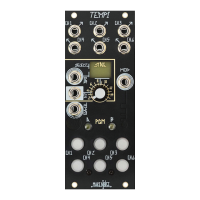
The primary User Interface and Programming elements for the module are (6) large, illuminated buttons (Channel Button 1-6) and
(2) smaller illuminated buttons: PGM_A and PGM_B. The module is able to store up to (64) clock/timing scenarios called States,
arranged in (4) Banks of (16) States. A center Bank LED is used to indicate the current Bank by color. Changes in States are
indicated by the Channel Buttons’ ashing LEDs.
There are Inputs for External Leading Tempo, a Gate Input for Mod, State Select via a CV Input (with Combo Pot for attenuation)
and/or Select Gate Input. The primary goal of this module is to have the maximum amount of artist-controlled musical variation
with a minimum amount of data input.
Firmware:
This manual is for TEMPI Firmware version tempi31. TEMPI modules running tempi31 will have an LED sequence on power up
where 1, 2, 3, 4, and 5 ash. TEMPI’s with serial numbers 1544 and above ship with tempi31 preloaded.
Download the latest rmware from: http://www.makenoisemusic.com/modules/tempi.


 To Next Page