24
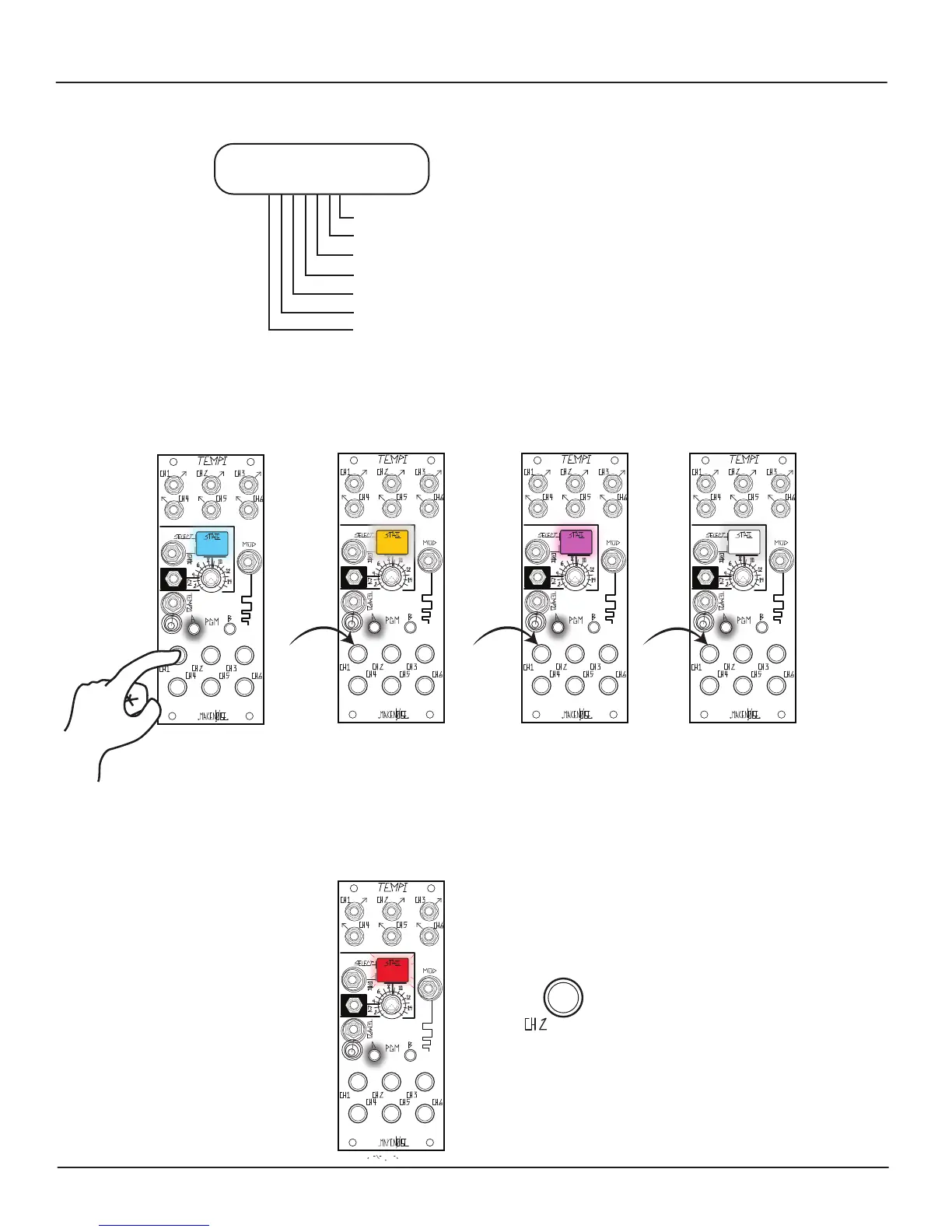
Bank1 = Blue Bank2 = Amber Bank3 = Pink
Bank4 =White
The State LED color reects Bank change as follows:
Bank Edit Settings
[Press] Button-1 to Select Bank
[Press] Button-2 to Store All Banks and current Leading Tempo
[Press] Button-3 to Follow Select & Tempo Busses
[Press] Button-4 to Copy selected Bank
[Press] Button-5 to Paste over selected Bank
[Press] Button-6 to Mutate over selected Bank
[Press] PGM_A to Exit Bank Edit
Bank Edit
[Double Press] PGM_A:
Select Bank:
[Double Press] PGM_A
+
[Press] Button-2
to Store All Banks
(LED Colors May Vary)
In order to enter the Bank Edit Programming page, double press PGM_A. The PGM_A LED ashes in order to indicate Bank Edit.
To exit the Bank Edit Programming page, double press PGM_A again.
While on the Bank Edit Programming page, press Button-1 in order to sequential Select Bank1, Bank2, Bank3, or Bank4.
Store All Banks:
While on the Bank Edit Page, to Store all contents of all Banks (i.e. All States and Leading Tempo), press Button-2. The State LED
ashes Red in order to indicate Store complete.


 To Next Page