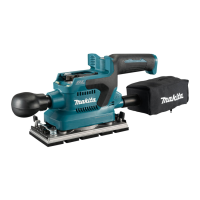
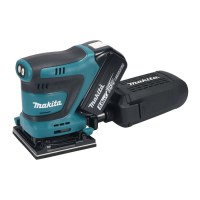
The Makita DBO380 and DBO381 are cordless finishing sanders designed for sanding large surfaces of wood, plastic, metal, and painted surfaces. These tools are part of Makita's cordless range, offering portability and convenience for various sanding applications.
Important Technical Specifications:
The DBO380 and DBO381 models share many specifications, with key differences noted.
- Pad size: 92 mm x 185 mm
- Abrasive paper size: 93 mm x 228 mm
- Orbits per minute:
- High: 12,000 min⁻¹
- Medium: 8,000 min⁻¹
- Low: 4,000 min⁻¹
- Overall length (with front grip): 336 mm
- Rated voltage: D.C. 18 V
- Net weight: 1.9 - 2.2 kg (This may vary depending on the attachment(s), including the battery cartridge. The lightest and heaviest combinations, according to EPTA-Procedure 01/2014, are shown in the table.)
Applicable Battery Cartridge and Charger:
- Battery cartridge: BL1815N, BL1820B, BL1830B, BL1840B, BL1850B, BL1860B
- Charger: DC18RC, DC18RD, DC18RE, DC18SD, DC18SE, DC18SF, DC18SH
- WARNING: Only use the battery cartridges and chargers listed above. Use of any other battery cartridges and chargers may cause injury and/or fire.
Noise Levels (A-weighted, according to EN62841-2-4):
- Model DBO380:
- Sound pressure level (LPA): 72 dB(A)
- Uncertainty (K): 3 dB(A)
- Model DBO381:
- Sound pressure level (LPA): 72 dB(A)
- Uncertainty (K): 3 dB(A)
- The noise level under working may exceed 80 dB (A).
- WARNING: Wear ear protection. The noise emission during actual use of the power tool can differ from the declared value(s) depending on the ways in which the tool is used, especially what kind of workpiece is processed. Be sure to identify safety measures to protect the operator that are based on an estimation of exposure in the actual conditions of use.
Vibration Levels (tri-axial vector sum, according to EN62841-2-4):
- Model DBO380:
- Work mode: sanding metal plate
- Vibration emission (ah): 3.6 m/s²
- Uncertainty (K): 1.5 m/s²
- Model DBO381:
- Work mode: sanding metal plate
- Vibration emission (ah): 3.6 m/s²
- Uncertainty (K): 1.5 m/s²
- WARNING: The vibration emission during actual use of the power tool can differ from the declared value(s) depending on the ways in which the tool is used, especially what kind of workpiece is processed. Be sure to identify safety measures to protect the operator that are based on an estimation of exposure in the actual conditions of use.
Usage Features:
- Battery Cartridge Installation/Removal: Always switch off the tool before installing or removing the battery cartridge. Hold the tool and battery cartridge firmly to prevent slipping and potential injury. To remove, slide the button on the front of the cartridge and pull it out. To install, align the tongue with the groove and push until it clicks into place. A red indicator means it's not fully locked.
- Battery Protector: A battery protector (supplied with the tool) can be installed on BL1830B, BL1840B, BL1850B, and BL1860B battery models to safeguard the battery cartridge. Always remove the battery cartridge before installing/uninstalling the protector.
- Remaining Battery Capacity Indication: For battery cartridges with an indicator, press the check button to illuminate indicator lamps for a few seconds, showing remaining capacity (75%-100%, 50%-75%, 25%-50%, 0%-25%, Charge the battery, or Battery may have malfunctioned). The first (far left) indicator lamp will blink when the battery protection system works.
- Tool/Battery Protection System: The tool has an automatic protection system that cuts off power to the motor to extend tool and battery life under certain conditions:
- Overload protection: If the tool or battery draws abnormally high current, it stops without indication. Turn off the tool, stop the application, then restart.
- Overheat protection: If the tool or battery overheats, it stops automatically. Let it cool down before restarting.
- Overdischarge protection: If battery capacity is low, the tool stops automatically. Remove and charge the battery.
- Switch Action (Turning On/Off): Press the power/speed select button on the top of the main handle to start the tool at its highest orbital speed. Press the stop button to pause or cease operation.
- Changing Tool Speed: The orbital speed can be adjusted to three modes (High, Medium, Low) by pressing the power/speed select button.
- 3 (High): 12,000 min⁻¹
- 2 (Medium): 8,000 min⁻¹
- 1 (Low): 4,000 min⁻¹
- NOTICE: Continuous operation at low speeds can overload the motor. Sanding at high orbital speed can heat and melt the workpiece.
- Electronic Function: The tool is equipped with electronic functions for easy operation.
- Constant Speed Control: This function maintains a constant orbital speed for a fine finish.
- Installing/Removing Abrasive Paper:
- Standard Abrasive Paper: Push and hold down the clamp lever, slide it away from the stopper, and pull it outwards to create space. Slip one end of the paper into the space, set the clamp lever back to lock it, then repeat for the other end. Ensure proper tension. To remove, release clamps on both ends.
- Hook-and-Loop Abrasive Paper (Optional Accessory): Remove the four screws securing the standard pad, replace it with an optional hook-and-loop pad, and re-tighten the screws. Remove dirt from the pad, then attach the hook-and-loop abrasive paper, aligning dust-suction holes. To remove, peel it off from the edge.
- Installing/Removing Dust Bag (Optional Accessory): Attach the dust bag over the tapered dust spout at the back of the motor housing, ensuring the dust inlet goes as far as possible to prevent it from coming off. The zipper slider should face downwards. Empty the bag when it's half full for optimal dust collection.
- Installing/Removing Dust Box (Optional Accessory): Attach the dust box over the tapered dust spout, ensuring the dust nozzle goes as far as possible. Empty the box when it's half full. To empty, remove the box, detach the nozzle by pressing locking latches, and shake/tap gently.
- Replacing Filter: Remove the dust box and detach the dust nozzle. Hold the inner top edge of the cardboard opening and pull it off downwards to disengage it from the upper hooking tab. Take the filter out. Replace by engaging the bottom edge of the cardboard opening in the lower hooking tab and pushing the top edge inwards until it clips into the upper hooking tab. Ensure logos on the dust box, filter, and dust nozzle are aligned during reassembly.
- Removing/Installing Front Grip: The detachable front grip allows sanding in tight or confined areas. To uninstall, push and hold the grip towards the motor housing, rotate 90 degrees, then pull it apart. To install, insert the grip end into the slot, aligning outlines, push firmly, and rotate 90 degrees with the gripping surface facing upwards.
- Connecting with Vacuum Cleaner (Optional Accessory): For clean sanding, connect a Makita vacuum cleaner. Use an optional hose (28 mm) or a combination of front cuffs (22 mm) and hose provided with the cleaner.
- Sanding Operation:
- CAUTION: Never run the tool without abrasive paper, as it can damage the pad. Never force the tool, as excessive pressure decreases efficiency and damages paper/tool life.
- Sanding Open Areas: Hold the tool firmly with both hands (one on the handle, one on the front grip). Turn on the tool, wait for full speed, then gently place it on the workpiece. Keep the pad level and apply slight pressure.
- Sanding Confined Areas: Detach the front grip. Hold the handle with one hand. Turn on the tool, wait for full speed, then gently place it on the workpiece. Keep the pad level and apply slight pressure. Move the tool along curves, wall faces, and other confined spaces, using the front and corner edges of the pad as needed.
Wireless Activation Function (For model DBO381 only):
This function enables automatic operation of a supported vacuum cleaner along with the tool's switch operation, providing clean and comfortable sanding.
- Installation of Wireless Unit (Optional Accessory): Place the tool on a flat, stable surface. Clean dust/dirt from the tool before installation. Touch a static-discharging material before handling the wireless unit. Open the lid on the tool, insert the wireless unit (aligning projections with recessed portions), and close the lid. Always use the hooks on the back of the lid when removing the unit.
- Tool Registration for Vacuum Cleaner: A Makita vacuum cleaner supporting the wireless activation function is required. Install batteries in both the vacuum cleaner and the tool. Set the stand-by switch on the vacuum cleaner to "AUTO". Press the wireless activation button on the vacuum cleaner for 3 seconds until the lamp blinks green, then press the wireless activation button on the tool in the same way. If successful, lamps light up green for 2 seconds and then blink blue.
- Starting Wireless Activation Function: After registration, install the wireless unit in the tool. Push the wireless activation button on the tool briefly; the lamp will blink blue. Pull the tool's switch trigger; the vacuum cleaner should run. To stop, push the wireless activation button on the tool.
- Wireless Activation Lamp Status: The lamp indicates the function's status:
- Standby (Blue): On (2 hours) - function available; Blinking (When tool is running) - function available and tool running.
- Tool Registration (Green): Blinking (20 seconds) - ready for registration; On (2 seconds) - registration finished, lamp blinks blue.
- Cancelling Tool Registration (Red): Blinking (20 seconds) - ready for cancellation; On (2 seconds) - cancellation finished, lamp blinks blue.
- Others (Red): On (3 seconds) - power supplied, function starting up.
- Off: Function stopped.
Maintenance Features:
- General Maintenance: Always ensure the tool is switched off and the battery cartridge is removed before inspection or maintenance. Never use gasoline, benzine, thinner, alcohol, or similar substances, as they can cause discoloration, deformation, or cracks.
- Cleaning: After use, wipe the tool with a dry cloth or a cloth slightly moistened with soapy water at regular intervals.
- Repairs: For product safety and reliability, all repairs, maintenance, or adjustments should be performed by Makita Authorized or Factory Service Centers, using genuine Makita replacement parts.
- Battery Life Tips: Charge the battery cartridge before it's completely discharged. Never recharge a fully charged cartridge. Charge at room temperature (10 °C - 40 °C / 50 °F - 104 °F). Let hot cartridges cool before charging. Remove the battery cartridge from the tool or charger when not in use. Charge the battery cartridge if not used for more than six months.

 Need help?

 To Next Page
 General