Need help?
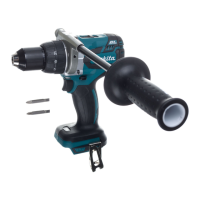
Do you have a question about the Makita DDF484Z and is the answer not in the manual?
Provides critical safety guidelines for operating power tools, including work area, children, and bystander safety.
Details essential electrical safety precautions for power tools, covering plugs, grounding, and cord usage.
Outlines personal safety measures such as staying alert, using protective equipment, and preventing unintentional starting.
Covers safe operation and maintenance of power tools, including proper use, care, and storage.
Provides safety instructions and best practices for using and caring for battery-powered tools.
Specific safety advice for cordless driver drills, focusing on auxiliary handles, grip, and contact with wiring.
System automatically cuts off power when the tool draws abnormally high current to prevent damage.
Tool automatically stops if it overheats, requiring a cool-down period before reuse.
System stops the tool when battery capacity is insufficient, prompting recharge.
Instructions for installing an optional hook for temporarily hanging the tool.
Guide for attaching the driver bit holder to the tool for convenient storage.
Steps for attaching the side grip for improved control and stability during operation.
Guidance on performing screwdriving tasks, including torque adjustment and pilot hole drilling.
Instructions for drilling in wood and metal, including proper techniques and precautions.
 General
| Soft grip | Yes |
|---|---|
| Chuck type | Keyless |
| Product design | Pistol grip drill |
| Number of gears | 2 |
| Torque settings | 21 |
| Chuck capacity (max) | 13 mm |
| Chuck capacity (min) | 1.5 mm |
| Idle speed (1st gear) | 500 RPM |
| Idle speed (2nd gear) | 2000 RPM |
| Drilling diameter in wood (max) | 38 mm |
| Maximum torque (hard applications) | 54 N⋅m |
| Maximum torque (soft applications) | 30 N⋅m |
| Product color | Black, Blue |
| Power source | Battery |
| Battery voltage | 18 V |
| Carrying case | No |
 Weight and Dimensions
| Depth | 172 mm |
|---|---|
| Width | 79 mm |
| Height | 261 mm |
| Weight | 1600 g |

 To Next Page