This document provides instructions for the Makita Cordless Cleaner LC06, a portable vacuum cleaner designed for household use. It emphasizes important safety precautions, operational procedures, and maintenance guidelines to ensure safe and effective use of the appliance.
Function Description
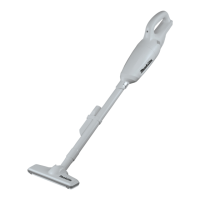
The Makita Cordless Cleaner LC06 is a handheld vacuum cleaner powered by a Makita battery cartridge. Its primary function is to pick up dry dust and debris. The cleaner operates by pulling a switch trigger, which also activates a built-in lamp to illuminate the cleaning area. The appliance is equipped with a battery protection system that automatically cuts off power to the motor when the battery capacity is low, helping to extend battery life.
Usage Features
Battery Installation and Removal:
To install the battery cartridge, align the tongue on the cartridge with the groove in the housing and slide it in until it clicks into place. A red indicator on the button will disappear when the battery is fully locked. To remove the battery, slide it out while simultaneously sliding the button on the front of the cartridge. It is crucial to ensure the battery is fully inserted to prevent accidental detachment and potential injury.
Battery Capacity Indicator:
For battery cartridges equipped with an indicator, pressing the check button will light up indicator lamps for a few seconds, showing the remaining battery capacity. This allows users to monitor battery life and plan recharging accordingly.
Switch Action:
The cleaner is activated by pulling the switch trigger and stopped by releasing it. Before operation, always verify that the switch trigger actuates properly and returns to the "OFF" position when released.
Lighting Up the Lamp:
The cleaner features a built-in lamp that turns on when the switch trigger is pulled, providing illumination during cleaning. The lamp turns off when the switch is released.
Disposing of Dust:
To maintain optimal suction, the cleaner should be emptied before the capsule becomes too full. To dispose of dust, point the suction inlet downwards, twist the capsule in the direction of the arrow, and slowly disconnect it. Accumulated dust inside the capsule and off the prefilter should be removed. Tapping the capsule 4 or 5 times can help dislodge dust sticking to the filter. It is recommended to place a garbage bag beneath the capsule when opening to prevent dust spillage.
Reassembly after Dust Disposal:
After emptying, the filter and prefilter must be correctly reinstalled. The filter should be placed straight onto the cleaner unit without being peeled back. The prefilter is then twisted into place, ensuring its securing lip is firmly locked into the cleaner unit. Incorrect installation of the filter or prefilter can lead to dust entering the motor housing and causing motor failure.
Attachments:
The cleaner can be used with various attachments for different cleaning tasks:
- Nozzle: Attaches directly to the cleaner for cleaning tables, desks, furniture, and other surfaces. It slips on easily.
- Extension Wand (Straight Pipe): Fits between the nozzle and the cleaner body, allowing for floor cleaning in a standing position or reaching high places.
- Corner Nozzle: Designed for cleaning corners and crevices, such as in a car or furniture.
- Cleaning without Nozzle: The cleaner can also be used without any attachments to pick up powder and dust.
To connect attachments, twist and insert them in the direction of the arrow until secure. To disconnect, twist and extract them in the opposite direction. Improper connection or disconnection can loosen the capsule.
Maintenance Features
General Cleaning:
The exterior of the cleaner body should be wiped periodically with a cloth dampened in soapy water. The suction opening, dust bag/paper filter mounting area, and dust stopper should also be cleaned.
Filter Cleaning:
When the filter becomes clogged with dust and the cleaner's suction power weakens, it should be washed in soapy water. After washing, the filter must be thoroughly dried before reuse. An insufficiently dried filter can lead to poor suction and shorten the motor's service life.
Troubleshooting:
The manual provides a troubleshooting guide for common issues like weak suction power or the cleaner not working. It suggests checking if the capsule is full, the filter is clogged, or the battery cartridge is exhausted. For these issues, the recommended solutions are to empty the capsule, clean/wash the filter, or charge the battery cartridge, respectively.
Important Maintenance Notes:
- Always ensure the tool is switched off and the battery cartridge is removed before performing any inspection or maintenance.
- Never use gasoline, benzine, thinner, alcohol, or similar substances for cleaning, as these can cause discoloration, deformation, or cracks.
- Avoid leaning the cleaner against a wall without additional support, as it may fall and be damaged.
- For product safety and reliability, all repairs, maintenance, or adjustments should be performed by Makita Authorized or Factory Service Centers using genuine Makita replacement parts. Users should not attempt to repair the cleaner themselves.
Optional Accessories:
Makita offers various optional accessories for the cleaner, including an extension wand (straight pipe), nozzle, nozzle for carpet, shelf brush, corner nozzle, round brush, flexible hose, filter, prefilter, and genuine Makita batteries and chargers. These accessories are recommended for use with the specified Makita tool, and using other attachments may pose a risk of injury.


 To Next Page
 General