Need help?
Do you have a question about the Makita XOB03 and is the answer not in the manual?
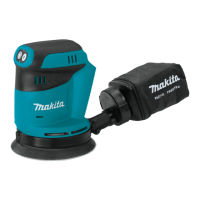
Details on model number, pad size, and abrasive paper size.
Orbits per minute, overall length, rated voltage, and net weight.
Read all warnings; protect against electric shock.
Stay alert, use PPE, prevent accidental starts, and remove tools.
Keep clean, avoid explosive atmospheres, and keep others away.
Proper use, switch checks, and disconnection for maintenance.
Charger, pack usage, and terminal safety guidelines.
Use eye protection, hold firmly, avoid water, do not leave running.
Read instructions, avoid disassembly, prevent shorts, stop if issues arise.
Charge before discharge, avoid overcharging, use room temperature.
Handle carefully, keep from children, use with Makita tools.
System cuts power for overload, overheat, and overdischarge.
How to check remaining battery capacity using indicator lamps.
Turning tool on/off and changing orbital speed modes.
Constant speed control for a fine finish.
Secure abrasive paper using clamp levers.
Steps for attaching paper from the tool package.
How to cut and install paper from the market.
Install hook-and-loop pad and attach paper securely.
Attach and empty dust box or dust bag.
Procedure for replacing the dust box filter.
Detach and reattach the front grip for confined spaces.
Connect tool to Makita vacuum cleaner hose.
Proper techniques for open and confined areas.
Enables automatic vacuum operation; install wireless unit.
Link tool and vacuum cleaner for wireless control.
Ensure registration before activating the system.
Connect hose and use buttons to activate wireless function.
Table describing lamp colors and durations for status indication.
Steps to remove tool registration from vacuum cleaner.
Addresses lamp, registration, syncing, and unwanted operation problems.
Service by authorized centers; wipe after use.
Use specified accessories for safety and performance.
Refer to warranty sheet or website for terms.
Details dust hazards and protective measures.
 General
| Type | Random Orbit Sander |
|---|---|
| Power Source | Cordless |
| Voltage | 18V |
| Speed | Variable |
| Pad Size | 5" |
| Sanding Action | Random Orbit |
| Variable Speed Control | Yes |
| Dust Collection | Yes |
| Dust Extraction | Yes |
| Battery Compatibility | 18V LXT Lithium-Ion |
| Net Weight | 3.5 lbs |


 To Next Page