10
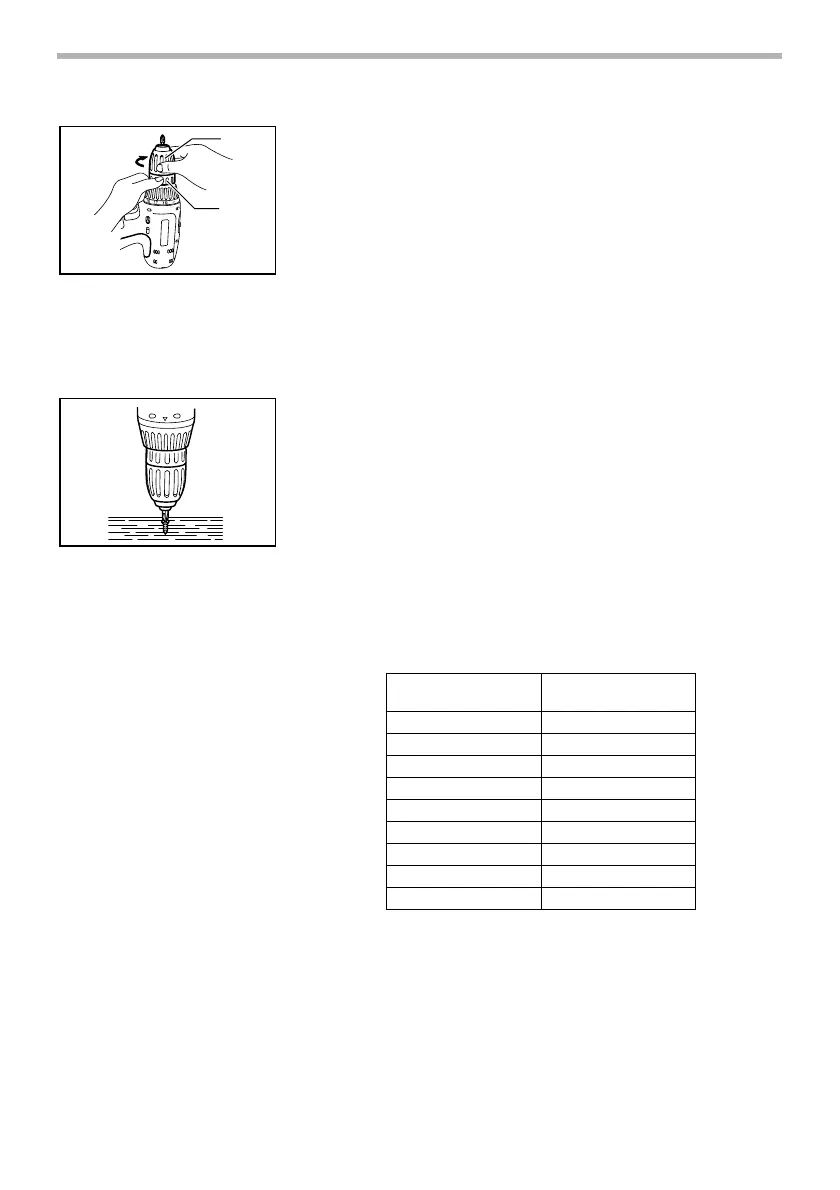
Installing or removing driver bit or drill bit
Hold the ring and turn the sleeve counterclockwise to open
the chuck jaws. Place the bit in the chuck as far as it will go.
Hold the ring firmly and turn the sleeve clockwise to tighten
the chuck.
To remove the bit, hold the ring and turn the sleeve counter-
clockwise.
OPERATION
Screwdriving operation
Place the point of the driver bit in the screw head and apply
pressure to the tool. Start the tool slowly and then increase
the speed gradually. Release the switch trigger as soon as
the clutch cuts in.
NOTE:
• Make sure that the driver bit is inserted straight in the
screw head, or the screw and/or bit may be damaged.
• When driving wood screws, predrill pilot holes to make
driving easier and to prevent splitting of the workpiece.
See the chart.
C00006
NOTE:
• If the tool is operated continuously until the battery
cartridge has discharged, allow the tool to rest for 15
minutes before proceeding with a fresh battery.
1. Sleeve
2. Ring
1
2
003954
003955
Nominal diameter of
wood screw (mm)
Recommended size of
pilot hole (mm)
3.1 2.0 - 2.2
3.5 2.2 - 2.5
3.8 2.5 - 2.8
4.5 2.9 - 3.2
4.8 3.1 - 3.4
5.1 3.3 - 3.6
5.5 3.7 - 3.9
5.8 4.0 - 4.2
6.1 4.2 - 4.4


 To Next Page