9
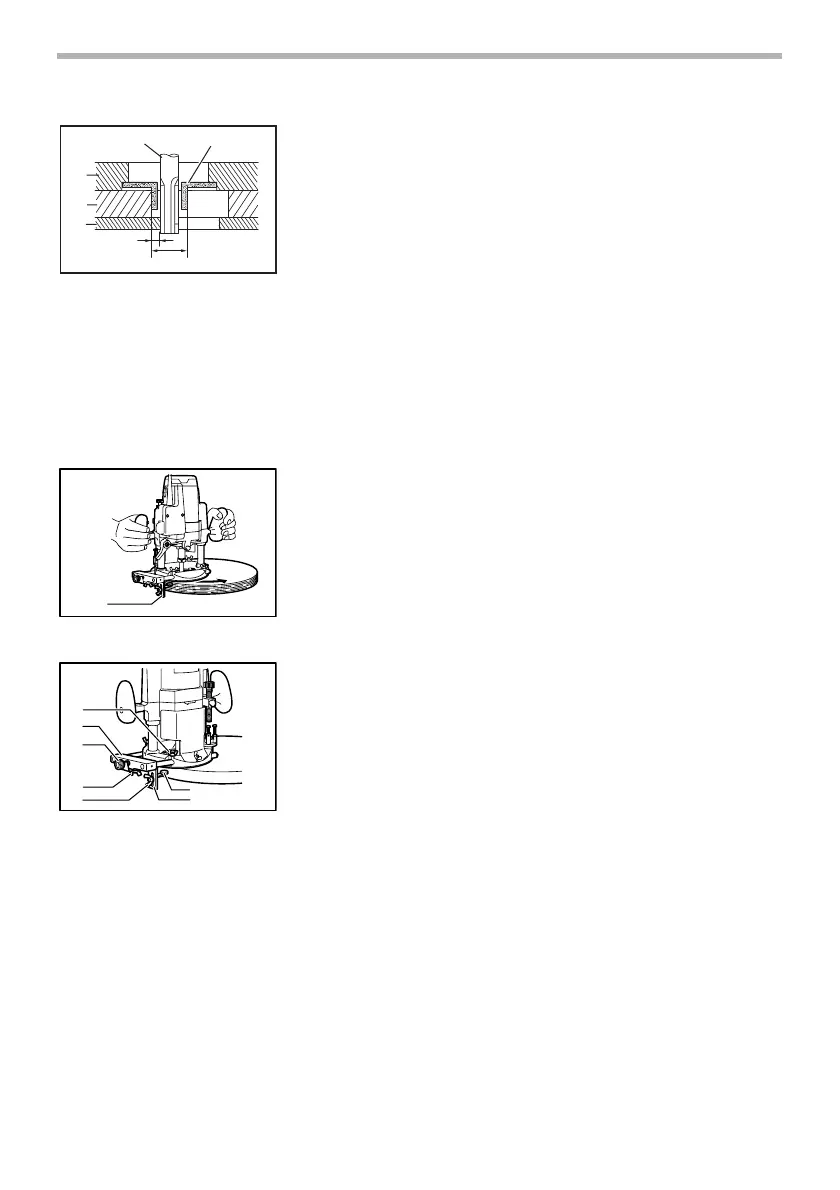
Secure the templet to the workpiece. Place the tool on the templet and move
the tool with the templet guide sliding along the side of the templet.
NOTE:
• The workpiece will be cut a slightly different size from the templet. Allow
for the distance (X) between the bit and the outside of the templet guide.
The distance (X) can be calculated by using the following equation:
Distance (X) = (outside diameter of the templet guide - bit diameter) / 2
Trimmer guide
Trimming, curved cuts in veneers for furniture and the like can be done easily
with the trimmer guide. The guide roller rides the curve and assures a fine cut.
Install the trimmer guide on the guide holder with the thumb screw (B). Insert
the guide holder into the holes in the tool base and tighten the thumb screw
(A). To adjust the distance between the bit and the trimmer guide, loosen the
thumb screw (B) and turn the fine adjusting screw (1.5 mm per turn). When
adjusting the guide roller up or down, loosen the thumb screw (C). After adjust-
ing, tighten all the thumb screws securely.
1. Bit
2. Base
3. Templet
4. Workpiece
5. Distance (X)
6. Outside diameter of the templet
guide
7. Templet guide
1
2
3
4
5
6
7
003695
1. Trimmer guide
1
004935
1. Wing bolt (A)
2. Guide holder
3. Fine adjusting screw
4. Wing bolt (B)
5. Wing bolt (C)
6. Giuide rollar
7. Trimmer guide
1
2
3
4
5
6
7
004936


 To Next Page