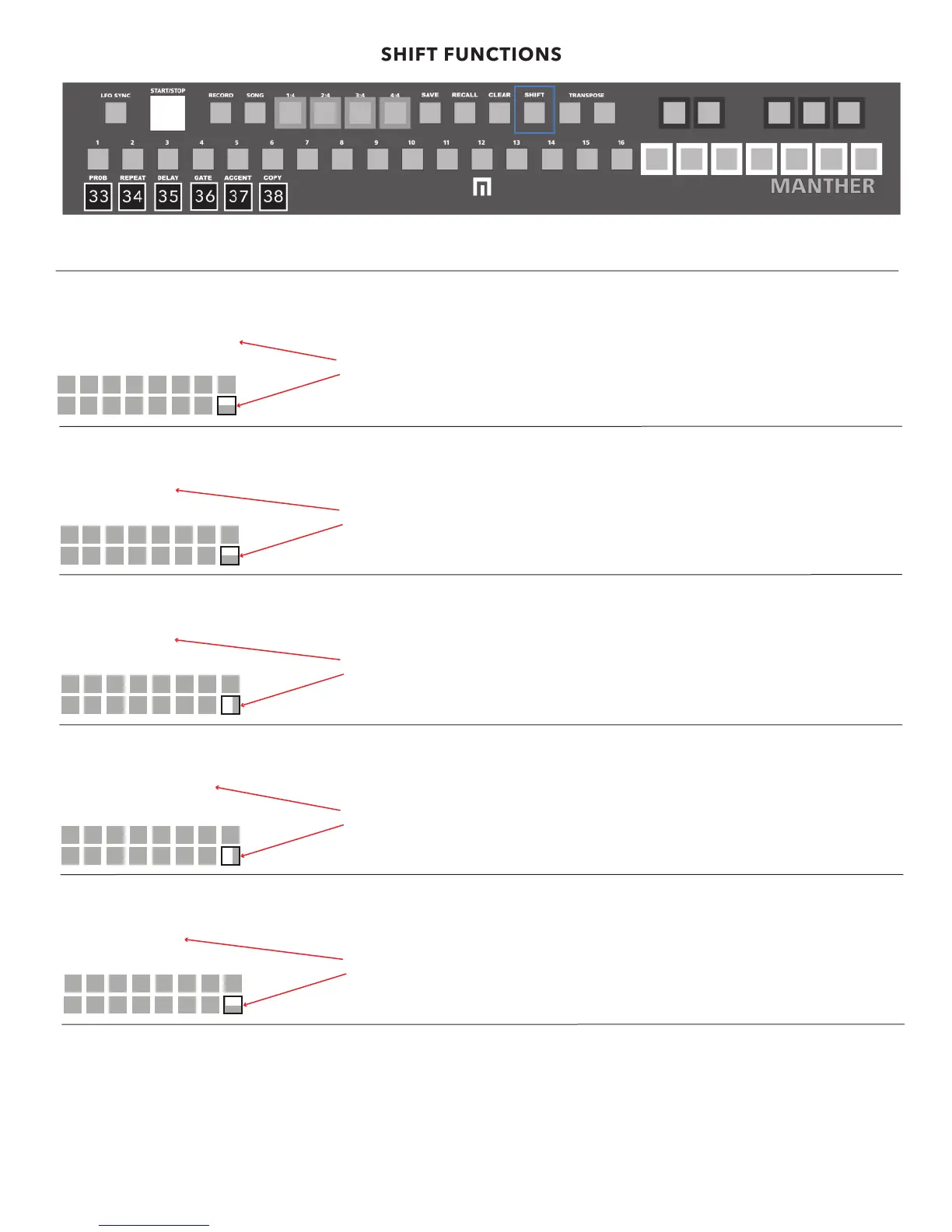
33 PROBABLITY MODE
SHIFT + PROBABILITY button will access menu for programming the probability that a particular step will fire.
Once you’ve recorded some steps in a sequence you can dive into more specific editing details by accessing the shift functions.
34 REPEAT MODE
SHIFT + REPEAT button will access menu for programming amount of repeats per step.
SHIFT FUNCTIONS
PROBABILITY | 50
STEPS 1-16
Turn the MENU encoder to change the level of probabilty a GATE will fire (default is set
to 100). Push down the MENU encloder while moving it for even finer adjustments.
Then press one of the STEP buttons to assign that probability level to that step. To EXIT
press SHIFT again.
Turn the MENU encoder to change the amount a step will REPEAT (1-4 repeats are
available). Then press one of the STEP buttons to assign that repeat count to that step.
To EXIT press SHIFT again.
REPEAT | 2
STEPS 1-16
35 GATE DELAY MODE
SHIFT + DELAY button will access menu for programming amount of gate delay per step.
Turn the MENU encoder to change the amount a step will DELAY (1-100). Push down
the MENU encloder while moving it for even finer adjustments. Then press one of the
STEP buttons to assign that repeat count to that step. To EXIT press SHIFT again.
DELAY | 80
STEPS 1-16
36 GATE MODE
SHIFT + GATE button will access menu for programming gates and gate time per step. By default, gates are ON for each step.
Turn the MENU encoder to change the gate length (1-100 and default is set to 50).
Push down the MENU encloder while moving it for even finer adjustments. Then press
one of the STEP buttons to assign that gate length to that step. To EXIT press SHIFT
again.
GATE TIME | 80
STEPS 1-16
37 ACCENT MODE
SHIFT + ACCENT button will access menu for programming accents per step.
T
urn the MENU encoder to change the accent/volume per step (1-100). Push
down the MENU encloder while moving it for even finer adjustments. Then press
one of the STEP buttons to assign the accent to that step. To EXIT press SHIFT again.
ACCENT | 80
STEPS 1-16
38 COPY MODE
SHIFT + COPY to enter mode then select the step you want to copy, then the step you want to copy to. To EXIT press SHIFT again.
copy step
from: 1
to: 3
11


 To Next Page