VCO
The VCO is the main sound source for the MANTHER. It outputs SQUARE, SAW, TRIANGLE, NOISE AND SUB OSCILLATOR to the
SOURCE MIXER for further control.
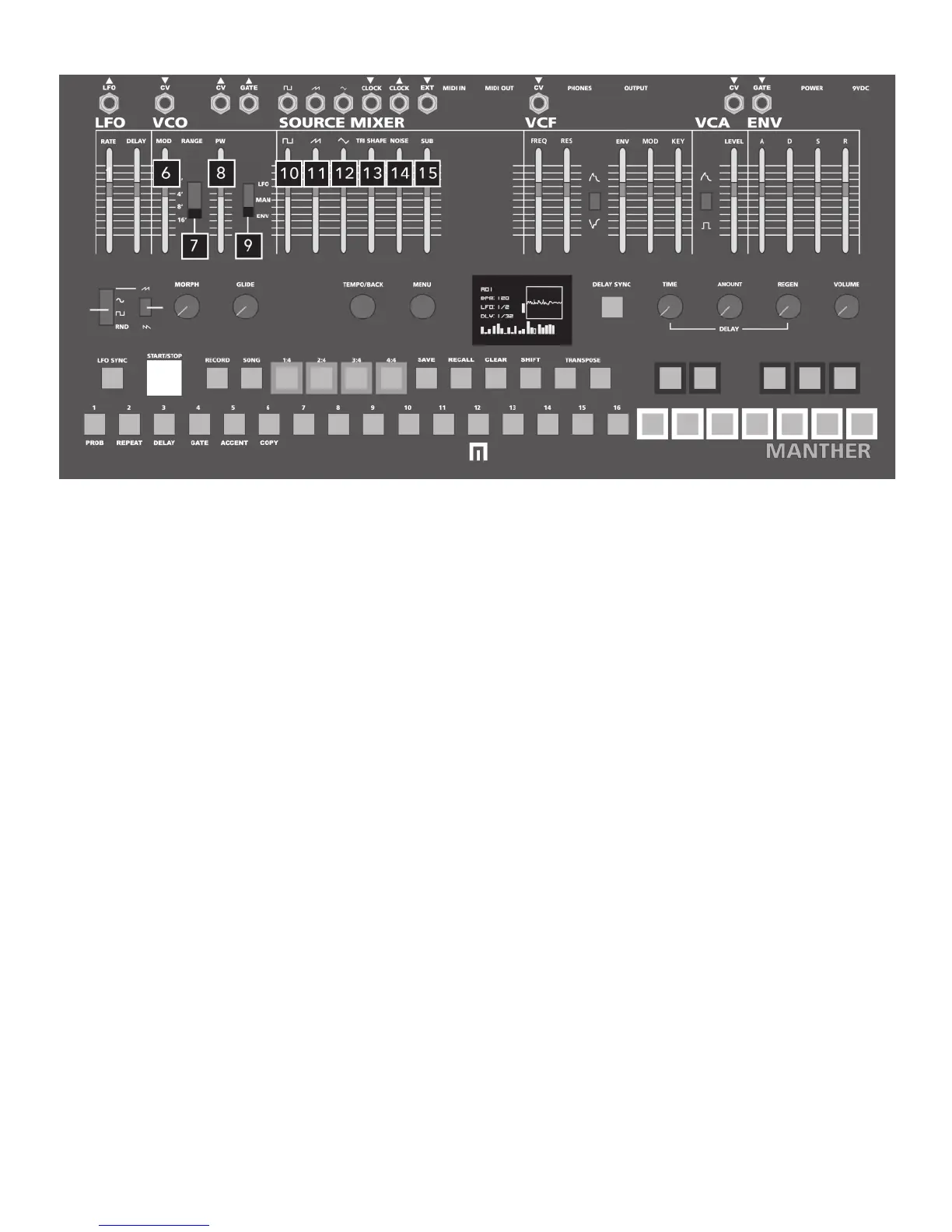
6 VCO FREQUENCY MODULATION
Turning the VCO MODULATION SLIDER up increases the amount of LFO modulation applied to the VCO’s frequency.
7 VCO OCTAVE RANGE SWITCH
16’ tracks with SEQUENCER and MIDI notes, 8’ is an octave above, 4’ is two octaves above, and 2’ is three octaves above.
8 VCO PULSEWIDTH SLIDER
When PWM SOURCE SWITCH (#9) is set to MANUAL, the PW AMOUNT SLIDER varies the pulsewidth of the square wave. When the
PWM SOURCE SWITCH is set to LFO or ENV, the PW AMOUNT SLIDER acts as an attenuator for pulsewidth modulation.
9 VCO PULSEWDITH MODULATION SWITCH
Switch between LFO, MANUAL or ENVELOPE to control pulsewidth of the SQUARE WAVE. See #8 above for additional info.
VCO & SOURCE MIXER
SOURCE MIXER
SQUARE, SAW and TRIANGLE waveforms are summed together along with NOISE and SUB OSCILLATOR. Here you can control the
volume of each waveform in this mix. TRI SHAPE controls the character and amplitude of the TRIANGLE waveform.
10 SQUARE WAVE LEVEL
11 SAW WAVE LEVEL
12 TRIANGLE WAVE LEVEL
13 TRIANGLE SHAPE / WAVEFOLD CONTROL
14 NOISE LEVEL
15 SUB OSC LEVEL
Additional SOURCE MIXER parameters in the MENU:
WAVEFOLDER: The TRI setting is default (wavefolding of triangle)
and can be changed to VCF where wavefolder folds signal after VCF (fold all).
SUB SHAPE: Changes the sub oscillator from 0 (sine) to 100 (square) mix
SEMITONE: Changes semitones of sub oscillator.
CENTS: Changes semitones of sub oscillator in cents (fine tuning).
Wavefolder tri
sub shape 97
semitones -12
cents o
6


 To Next Page