SELECT, MUTE, OFFSET AND
ATTENUATION PER CHANNEL
PG. 5
QUAD VCA MANUAL V.1
SELECT MUTE
ATTN
OFFSET
MIX
IN CV OUT
1
2
3
4
SCAN
REMOTE
1
2
3
4
+
-
0
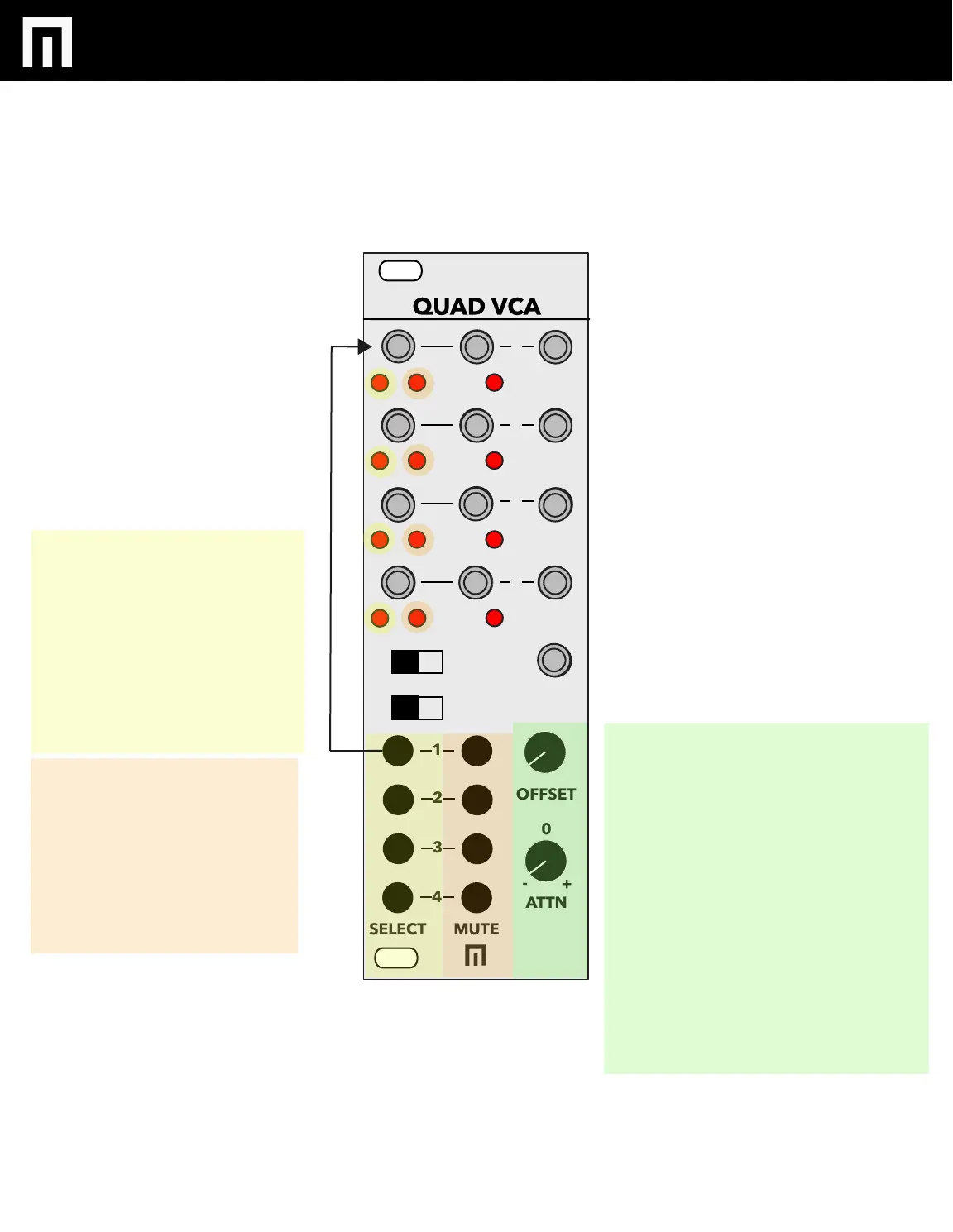
CHANNEL SELECT 1-4:
Press the SELECT buttons
1-4 to then edit Offset and
Attenuation for channels 1-4.
The red LED on the left of
the channel inputs indicate
the channel selected for
editing.
MUTE CHANNELS 1-4:
Press the MUTE buttons 1-4
to mute a channel. The
mutes are popless.
LEDs to the right of the
Input channels indicate
mute status.
OFFSET:
Once a channel is selected, adjusts
the DC offset of the CV input for
that channel. Center the control to
use bipolar CV controls like LFOs.
With no CV inputs signal, Offset
acts like a volume control.
ATTENUATION/ATTENUVERTER:
Adjusts the amount of gain con-
trolled by voltage at the CV input.
Turn CCW to invert the response
of the incoming CV signal. CV
signal fully attenuates at the center
of the control.


 To Next Page