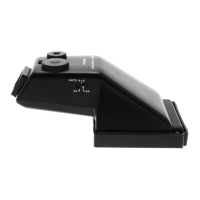
3. Before metering, make sure that the lens’ A-M Selector is set to its ‘A’ position. If the A-M Selector is
set to ‘M’, correct metering cannot be obtained.
4. Make sure the camera’s Exposure Coupling Pin properly engages the lens’ Aperture Ring Coupler, Fig.
3.
5. Setting the Exposure Mode
Average Mode
Set the Metering Mode Selector (2) to its ‘AV’ setting. The finder will average the exposure
over the entire frame.
Spot Mode
Set the Metering Mode Selector (2) to ‘SP’. The finder will use the light from the central area
of the frame to determine exposures.
Auto-Shift Mode
Set the Metering Mode Selector (2) to ‘AUTO A-S’. The finder will automatically switch
between ‘AV’ and ‘SP’ Modes based on the lighting condition.
6. After selecting the exposure mode, push the camera’s Shutter Release Button down halfway. The
finder’s display will illuminate and display the mode and the correct shutter speed for the aperture set
on the lens.
If two shutter speeds are displayed, the exposure will be based on an intermediate value. For
example, if both 1/60 and 1/125 are displayed, the exposure will be at a speed between
these two values.
Manual Photography
1. Set the camera’s Shutter Speed Dial to a setting other than ‘A’ and ‘AEL’, Fig. 5.
2. Press the camera’s Shutter Release Button down halfway. The correct shutter speed for the aperture
set on the lens will blink in the viewfinder.
3. If two shutter speeds blink, an intermediate speed will be selected and the shutter speed set on the
camera will illuminate. To obtain a correct exposure, turn the lens’ Aperture Ring or the camera’s
Shutter Speed Dial until only one shutter speed is illuminated.
The finder’s display will illuminate for 10 seconds and then turn off to conserve battery
power. To re-illuminate the display, press the camera’s Shutter Speed dial down halfway.
AEL (AE Lock) Photography
The AEL setting is very useful for making exposure measurements for subjects that are not in the center of the
frame.
Although the AEL setting can be used with any exposure mode, it is most effective with spot metering.
1. Set the camera’s Shutter Speed Dial to its ‘AEL’ setting, Fig. 6.
2. While looking through the viewfinder, keep the camera’s Shutter Speed Button pushed down halfway
and center the most important part of the subject in the center circle of the frame. The finder will
memorize the exposure information. While keeping the Shutter Speed Button pressed down halfway,
recompose the subject, and then push the camera’s Shutter Release Button down all the way.
The Exposure Compensation Dial
While pressing the button in the center of the Exposure Dial, turn the dial to select the desired amount of


 To Next Page