8
© 2014 Mammoth Air Purier | Version 06/25/2014
MAMMOTH xC User Manual
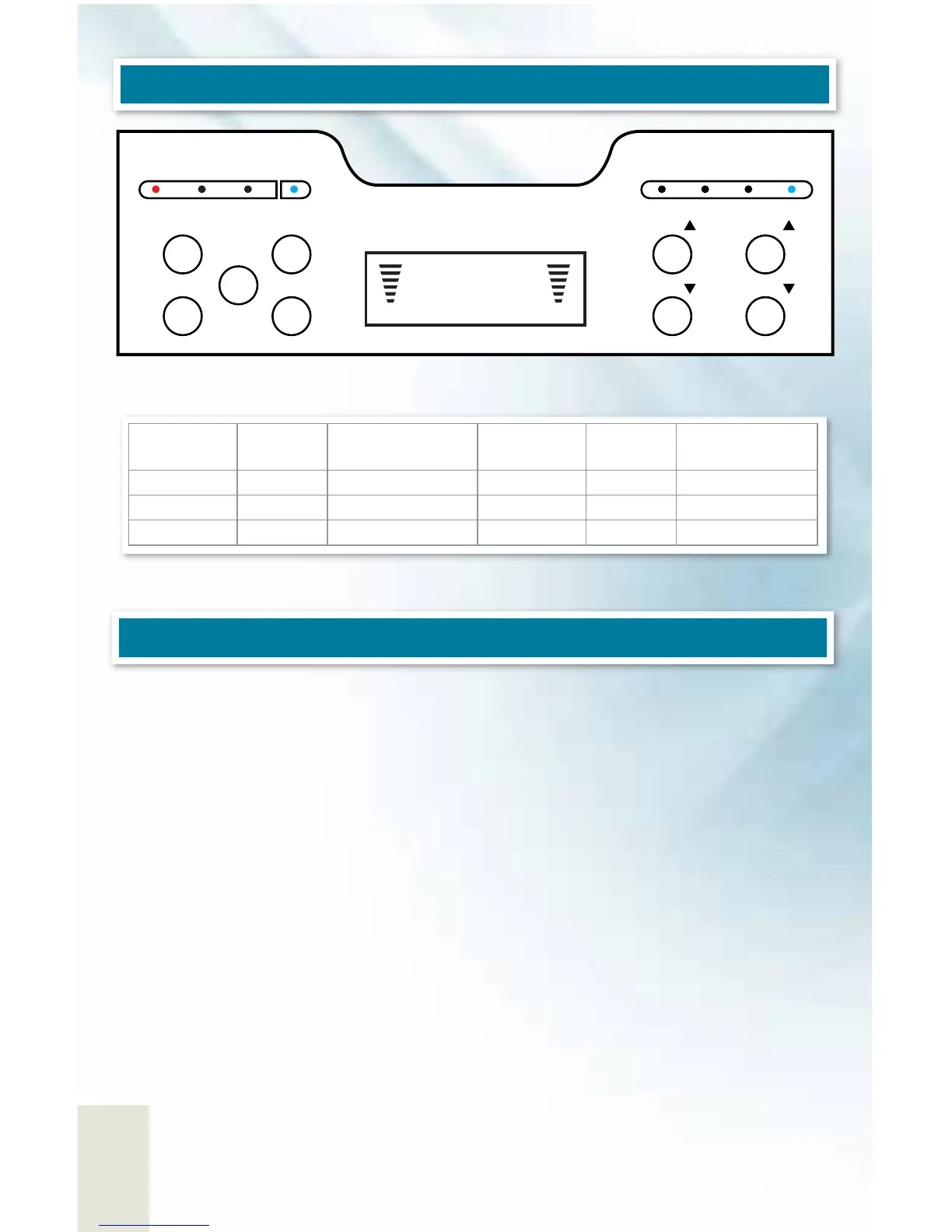
Press the “Time” button.
Both hour and minute will start ashing. This means the time is not programmable.
Press “Fan ∆” or “Fan ∆” to set hour.
Press “Ozone ∆” or “Ozone ∆” to set minute.
Press the “Time” button one more time to conrm setting
Using the Timer for Turning the Fan (and Unit) On/O and Ozone On/
O
This unit has two (2) timer that can be enabled separately and allows for greater control of
your air purier
OPERATION / SETTINGS AND CONTROLS
CONFIGURING TIME
Anion
HIGH EFFICIENT
AIR PURFIFY
12:20
Purify Fan
ON / OFFON / OFFU nit Timer
UV / Anion Time / Set
Ozone
Timer
Fan
Fan
Ozone
Ozone
ON /
OFF
Unit
Timer
Ozone
Timer
UV/
Anion
II I III IV
Purifying
Stage
Display
Active Area
(square feet)
Purifying
Stage
Display
Active Area
(square feet)
Stage 1 Purify I 0-700 Stage 4 Purify IV 1800-2400
Stage 2 Purify II 600-1200 Stage 5 Purify V 2400-3000
Stage 3 Purify III 1200-1800
Purify, which controls Ozone, can be left o while the rest of the air purier functions is on.



 To Next Page