1
2
ISTRUZIONI PER L’USO
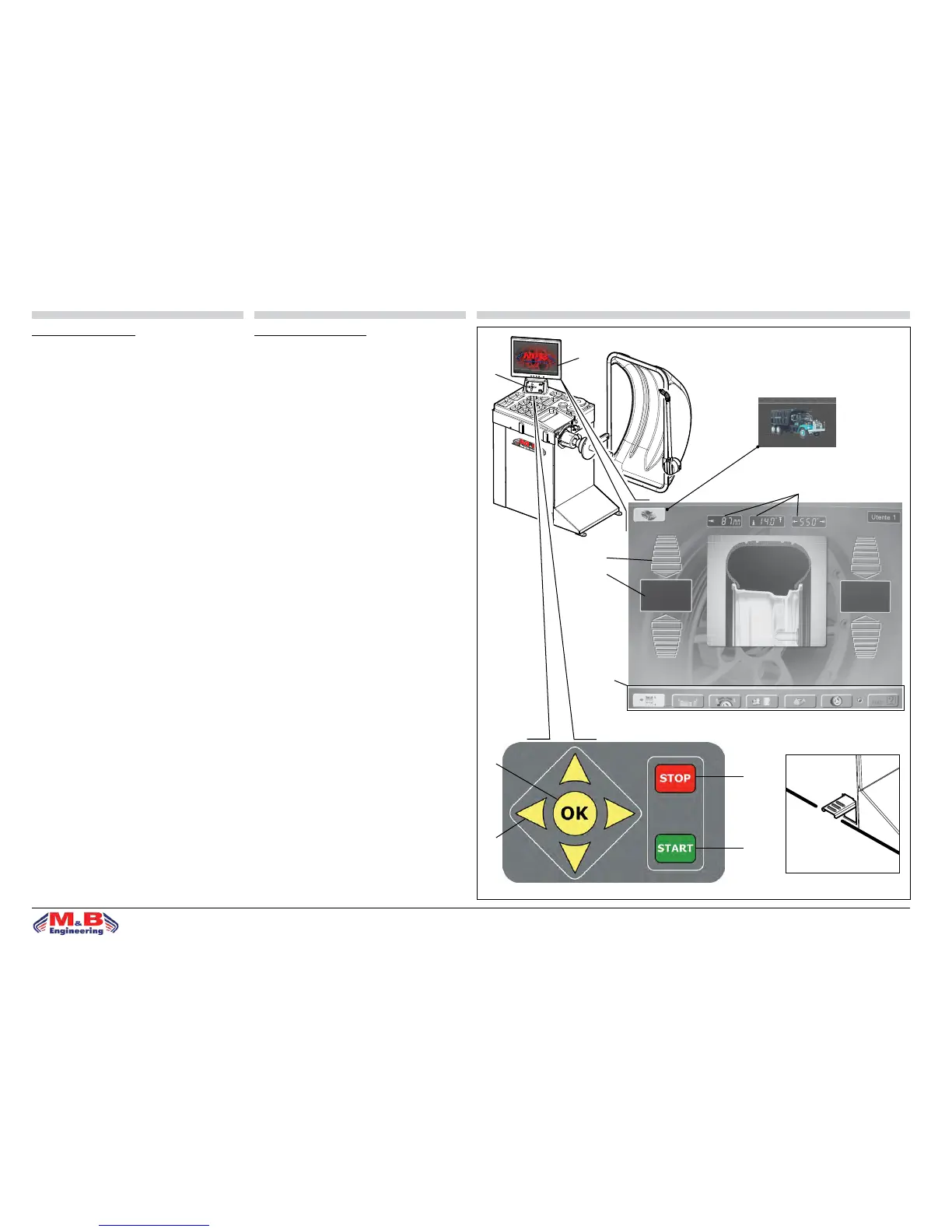
PANNELLO COMANDI - LEGENDA
1. Video a colori ad alta denizione
2. Tasti richiamo funzioni
3. STOP: tasto di arresto
4. START: tasto di avviamento
5. OK: tasto ingresso dati
6. Tasti per programmazione dati
7. Visualizzatori valore squilibrio
8. Indicatori direzione punto di squilibrio
9. Visualizzatori dati ruota
10. Visualizzatori per tasti funzione
N.B.: Quando la rotazione non è eettuata tramite il mo-
tore elettrico, premendo il pedale freno (g.18c) si blocca
la rotazione della ruota.
• le funzioni della macchina sono raggruppate in diverse
pagine; l’accesso alle varie pagine avviene attraverso una
struttura a menù;
• pannello comandi: tasti direzionali per la selezione dei
menù; tasto OK per entrare nel menù scelto.
N.B.: Quando la macchina lavora in modalità autocarro,
nel riquadro in alto a sinistra comparirà l’immagine di
g.18.1.
g.18
g.18.1
3
ITALIANO ENGLISH
4
5
6
9
8
7
10
INSTRUCTIONS FOR USE
CONTROL PANEL - KEY
1. High denition colour monitor
2. Functions back keys
3. STOP: stop key
4. START: start-up key
5. OK: data conrmation key
6. Data programming keys
7. Imbalance gure displays
8. Imbalance point direction indicators
9. Wheel data displays
10. Function key displays
N.B.: When the wheel is not being driven by the electrical
motor, pressing the brake pedal (g.18c) locks the rota-
tion of the wheel.
• The machine functions are grouped on dierent pages.
The pages are accessed using a menu system.
• Control panel: directional keys selecting in the menus,
OK key for conrm data.
N.B.: When the machine operates in van mode, a van ima-
ge will appear on the top left corner g.18.1.
g.18c
g.18a
g.18b


 To Next Page