ITALIANO ENGLISH
CALIBRATING THE WHEEL BALANCER
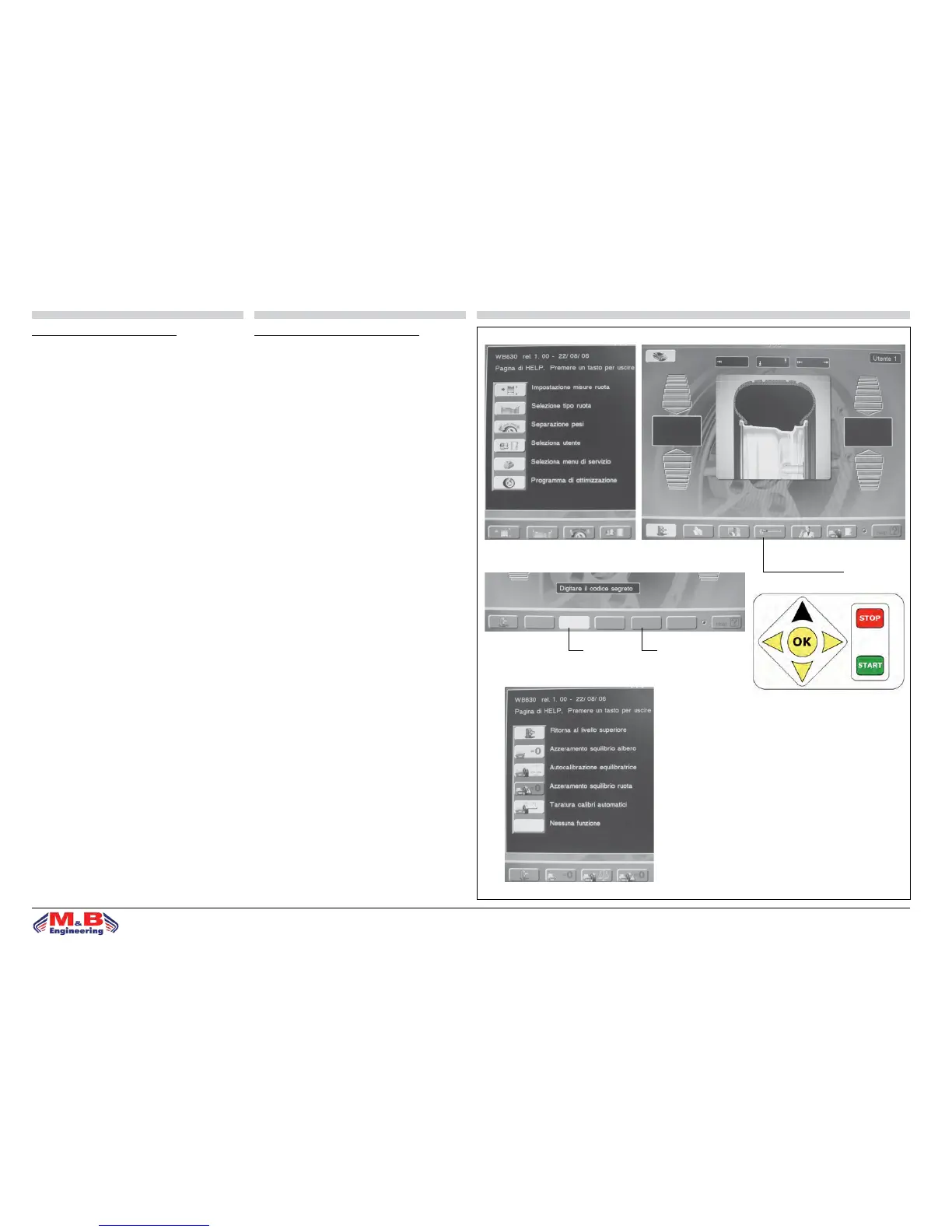
From the MAIN PAGE press key to open the SERVICE MENU
(g. 28). From here press key to open the window “Menu
calibration wheel balancer” (g. 29); here requesting the
access code for the reserved machine functions: to pro-
ceed press access code 3-5 (g.30) and press “UP” key
(g. 31). The CALIBRATION MENU now opens oering the
following functions (g. 32):
• correcting adapter imbalance
• calibrating the automatic gauges
• balancing machine autocalibration
• temporary wheel balancing
CALIBRAZIONE EQUILIBRATRICE
Dalla PAGINA PRINCIPALE premere il tasto “Seleziona
menu di servizio” (g. 28); da qui premere il tasto “Menu’
calibrazione equilibratrice” (g. 29); si attiva la nestra
di richiesta del codice di accesso alle funzioni riservate:
per procedere occorre digitare correttamente il codice di
accesso 3-5 (g. 30) e premere il tasto “UP” (g. 31)
nell’Action Center: in questo modo il programma entra nel
MENÙ di CALIBRAZIONE costituito dalle seguenti funzioni
(g. 32):
• correzione squilibrio angia
• taratura calibri automatici
• autotaratura equilibratrice
• equilibratura momentanea di una ruota
g.28 g.29
MENU’ CALIBRAZIONE
EQUILIBRATRICE
g.30
3 5
UP
g.31
g.32


 To Next Page