EasyManua.ls Logo

MangoKit MD3 - User Manual

MangoKit MD3
10 pages
Print Icon
To Next Page IconTo Next Page
Loading...
Table of Contents
1 Introduction - --------------------------------------01
1.1 Safety instruction ---------------------------------------01
1.2 Features ---------------------------------------02
1.3 Carton contents ---------------------------------------02
2 Controls, connectors and display
2.1 Main controls ---------------------------------------02
2.2 Connectors ----------------------------------------04
3 Started and setup ---------------------------------------05
4. DAB radio mode ---------------------------------------05
5 FM radio mode ---------------------------------------08
6 Bluetooth mode ---------------------------------------09
7 Alarms snooze and sleep ---------------------------------------10
7.1 Alarms ---------------------------------------10
7.2 Snooze ---------------------------------------11
7.3 Sleep ---------------------------------------12
8 System settings ---------------------------------------12
8.1 Equalizer ---------------------------------------13
8.2 Time/Date ---------------------------------------14
8.3 Backlight ---------------------------------------14
8.4 Language ---------------------------------------15
8.5 Factory reset ---------------------------------------15
9 Troubleshooting and error messages
9.1 Error messages -------------------------------------15
9.2 Troubleshooting --------------------------------------16
10 Technical Specification --------------------------------------17

Questions and Answers

Summary

Introduction and Safety

Safety Instructions

Provides essential safety guidelines for using the MD3 portable radio to prevent hazards.

Product Features

Details the main functionalities of the MD3, including DAB/FM radio and Bluetooth speaker capabilities.

Package Contents

Lists the items included in the product packaging for the MD3 portable radio.

Controls and Connectivity

Main Controls Overview

Identifies and explains the primary buttons and the control knob on the MD3 device.

Device Connectors

Details the available connectors on the MD3, including DC power input and headphone output.

Getting Started and Setup

Initial Setup Steps

Provides initial setup steps: placing the unit, extending the antenna, and connecting the power adapter.

DAB Radio Mode Operations

Scanning for DAB Stations

Guides users through the process of scanning for available DAB radio stations.

Manual DAB Tuning

Explains how to manually tune to specific DAB channels or frequencies for optimal reception.

DAB Playback Information

Describes the information displayed during DAB playback, including station name, track title, and slideshow.

DAB Audio Settings

Explains the Dynamic Range Compression (DRC) setting for adjusting audio loudness differences.

FM Radio Mode Operations

Selecting FM Stations

Guides users on selecting FM stations, including scanning and manual tuning options.

FM Playback Information

Details the information displayed during FM playback, including frequency, RDS data, and RadioText.

FM Scan and Audio Settings

Covers FM scan settings (strong stations only) and audio settings (stereo/mono) for optimal playback.

Bluetooth Connectivity

Bluetooth Display Status

Explains how the display indicates Bluetooth pairing and connection status.

Alarms, Snooze, and Sleep Timer

Setting Alarms

Provides instructions for setting and configuring the wake-up alarms, including source and duration.

Using the Snooze Function

Explains how to use the snooze function to temporarily silence a sounding alarm.

Setting the Sleep Timer

Details how to set the sleep timer to automatically turn off the radio after a specified period.

System Settings and Customization

Equalizer Settings

Allows users to create custom equalizer settings for treble, bass, and loudness.

Time and Date Configuration

Covers manual and automatic time/date setting and format selection for the MD3.

Backlight Adjustments

Explains the adjustable backlight brightness and timeout settings for the MD3 display.

Language Selection

Details how to change the system language from the default English setting.

Factory Reset Procedure

Guides users on how to reset the MD3 to its original factory default settings.

Troubleshooting and Error Messages

Error Message Guide

Lists common error messages encountered during operation and their potential causes and solutions.

General Troubleshooting Tips

Provides a troubleshooting guide for common problems, including FM/DAB reception and signal issues.

Technical Specifications

Overview

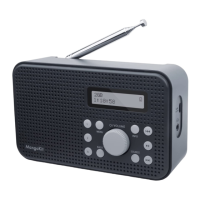
The MangoKit MD3 is a portable DAB & FM radio designed for versatile audio entertainment. It functions as a DAB/DAB+ digital radio, an FM radio with RDS (Radio Data System), and a Bluetooth wireless speaker for smart devices.

Function Description:

  • DAB/DAB+ Digital Radio: Offers a wide choice of channels and digital quality sound broadcast free-to-air. It displays station name, DLS (Dynamic Label Segment) information (programme name, track title, contact details), and slideshow images. Users can perform full scans, manual tunes, and prune unavailable stations. DRC (Dynamic Range Compression) can be enabled to reduce the difference between the loudest and quietest audio.
  • FM Radio with RDS: Receives analogue radio from the FM band and displays RDS information (station name, RadioText). Users can scan for stations, tune in 50 kHz steps, and choose to stop scans at strong stations only.
  • Bluetooth Mode: Acts as a wireless speaker, playing audio content from a connected Bluetooth-capable device. The display shows "Bluetooth Pairing" or "Bluetooth connected" status.
  • Alarms, Snooze, and Sleep: Features two versatile wake-up alarms with snooze functionality and a sleep function to automatically turn off the system after a set period. Alarms can use a buzzer or audio sources (DAB/FM last played station). Snooze periods are 5, 10, 15, and 30 minutes. Sleep delay times can be set for 15, 30, 45, 60, or 90 minutes.
  • System Settings: Allows users to tailor the MD3 with various options including:
    • Sleep: Sets a timer for the radio to turn off.
    • Alarm: Configures alarm times, frequency (Daily, Once, Weekends, Weekdays), wake-up time, source, duration, and volume.
    • Equaliser: Provides preset options (Normal, Classic, Jazz, Pop, Rock, Speech) and a "My EQ" setup for custom treble and bass bias (-7 to +7) and Loudness (On/Off).
    • Time/Date: Allows manual or automatic updates (from DAB/FM), 12/24 hour format, and date format (DD-MM-YYYY / MM-DD-YYYY).
    • Backlight: Offers three brightness settings (High, Mid, Low) for "On level" and "Dim level," and an adjustable timeout (10, 20, 30, 45, 60, 90, 120, 180 seconds) before dimming.
    • Language: Default is English, with other options available.
    • Factory Reset: Clears all user-defined settings, including time/date, preferences, and DAB station list.
    • Software upgrade/version: For system maintenance and information.

Important Technical Specifications:

  • Model: MD3
  • Type: Portable DAB & FM Radio
  • Speaker: 1 X 2.5" full range speaker
  • Power: 3W RMS
  • Power Supply: 5V DC or 4 x AA batteries (battery not included)
  • Dimension (mm): 17510654MM
  • Weight: 0.45KG

Usage Features:

  • Main Controls: Includes buttons for Preset (1, 2, 3+), Menu, Back, Source, Info, Next, Play/Pause, Previous, and a SELECT/VOLUME/MUTE/SNOOZE knob.
  • Preset Stations: Store up to 20 DAB/FM stations for quick recall.
  • Info Button: Cycles through additional information screens about the station or track playing. A long press switches DAB to full-screen slideshow.
  • Auto Scan: Long press Next or Previous buttons to auto-scan stations in FM mode.
  • Connectors: DC power input (5V) and Headphones out.
  • Battery Compartment: For portable use with AA batteries.
  • Antenna: Telescopic antenna for improved reception.
  • Display: Shows current mode, station information, time, and settings.

Maintenance Features:

  • Safety Instructions: Emphasizes not using near water, cleaning with a dry cloth, unplugging before cleaning, placing on a solid surface, avoiding enclosed spaces, keeping away from heat sources, protecting the power cord, and contacting authorized service for repairs.
  • Troubleshooting: Provides solutions for common issues like "Service not available," "Signal error," "No DAB Station," "No stations found," "FM Hiss/DAB burbling," and "No RadioText." Solutions often involve checking/moving the antenna, rescanning, or checking local coverage.
  • Error Messages: Explains messages such as "Time is not set," "Time Not saved," "Alarm Not saved," "Invalid Date," and "Software upgrade failed."
  • Factory Reset: Allows users to restore the device to its original default settings.
  • Software Upgrade: The device supports software upgrades.

MangoKit MD3 Specifications

General IconGeneral
BrandMangoKit
ModelMD3
CategoryRadio
LanguageEnglish

Related product manuals