USER’S MANUAL
34
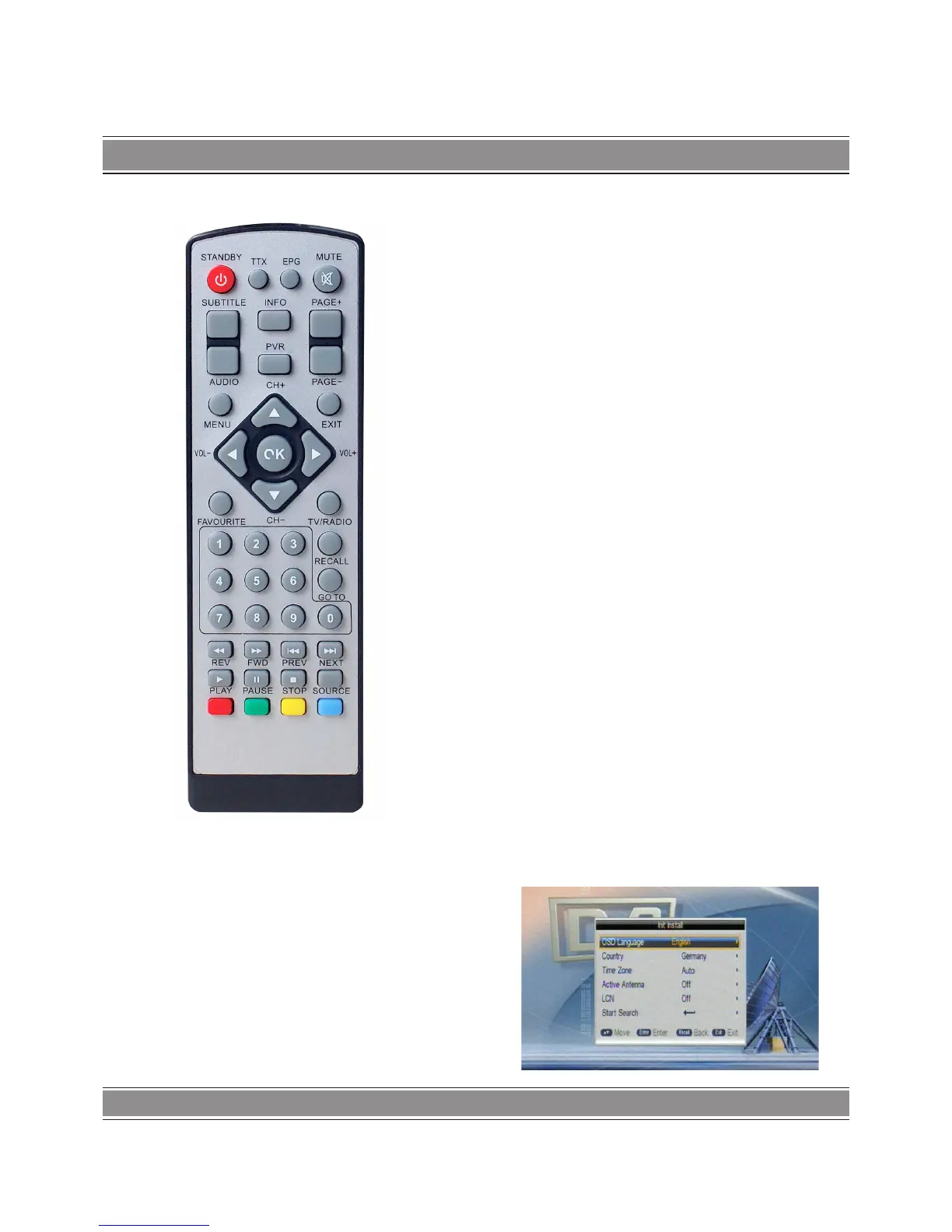
Remote Control
Instruction to keystoke of remote controller
POWER/STANDBY – switch of power supply
TTX – Teletext
EPG – go to EPG
MUTE – mute control
SUBTITLE – Subtitle
INFO
(1).Display information of programs
(2). Display corresponding Extended information at EPG
state
PAGE+/- – Page up/down
AUDIO – audio pid switch and left/right channel
PVR –PVR
EXIT – programs replaying under mode of full screen
MENU – OK main menu
VOL-/+ – volume adjusting
CH+/- – left/right channel
UP/DOWN/LEFT/RIGHT/OK – move high_light and
confirm
FAVOURITE – favourite
TV/RADIO – play previous/next USB Media
RECALL
((1). return to upper menu
(2). Press “RECALL” under state of full-screen to return to the
previous program played.
GOTO – go to
0-9 – Numeric keys
PREV/NEXT – play previous/next USB Media
REV/FWD – speed up/down while USB Media playing
PL AY – play USB Media
PAUSE – Pause ke
STOP – stop playing USB Media
SOURCE – change source between TV and Media
Basic functions
Power on-off
Power on
When it is in “standby” mode, press “power” to power on.
Power off
When it is running, press “power” will OK into “standby”
mode.
First Installation
First installation shall setup some important configures. It
contains several options shown as figures:



 To Next Page