USER’S MANUAL
36
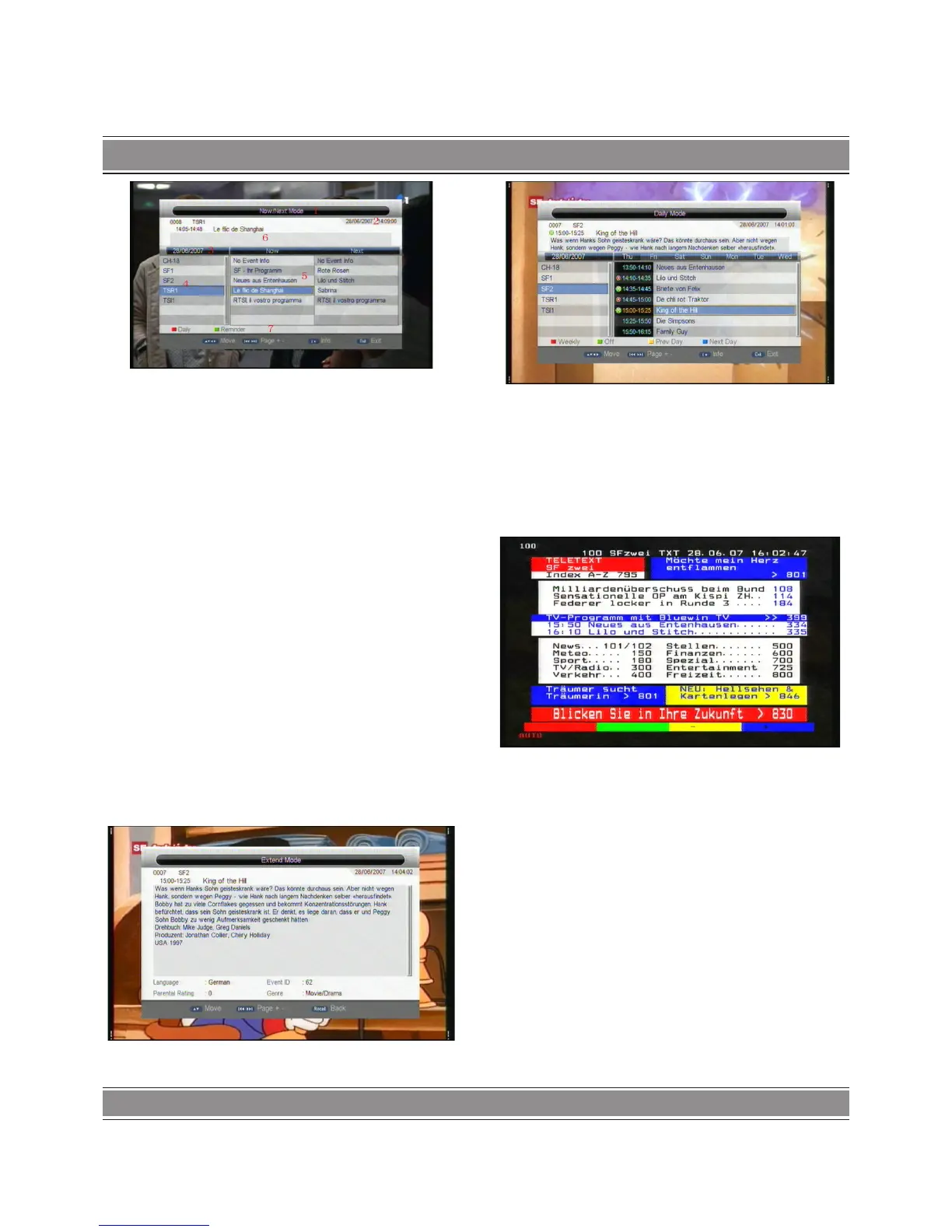
OK into EPG menu default OK Now/Next Mode, menu under
this mode contain 7 parts, As shown in the figure above:
(1).Tab 1 shows the Title ;
(2).Tab 2 shows time and date list;
(3).Tab 3 shows particular date list;
(4).Tab 4 shows program list, press “UP/DOWN” to switch
between programs;
(5).Tab 5 shows the time range and program information;
(6). Tab 6 shows the detailed program information in Tab 5;
(7). Tab 7 shows hint information for keys, corresponding to
the two colors on the remote controller: ZOOM,N/P;
(8).Press “LEFT/RIGHT” to switch between NOW and NEXT;
Press “Zoom” key to OK into Daily/Weekly Mode to display the
programs and program information in different time ranges of
the current program list within one week, as shown below.
(1).Press TIMER & M/F key to switch between Sunday ---Sa-
turday in Tab 3;
(2).Press UP/DOWN key to move upward and downward to
switch between the different programs in Tab 5;
(3).Press LEFT/RIGHT key to choose to view the program in-
formation in different time ranges in Tab 6.
3. When the cursor stops on Tab 5, press the INFO key to
choose the detailed information corresponding to the current
program, as shown below:
4. When the cursor stops on Tab 5, press the green N/P key to
set Timer to book programs, as shown in below:
5. Press “EXIT” to exit from EPG.
Teletext
1. If you want to watch teletext, please press “TEXT” on the
remote controller to OK into EPG page. As shown in the figure
below:
2. Input three digits to go to corresponding page you want;
Press “UP” to go to the previous page, while press “DOWN”
to go to the next page;
Press “OK” to adjust the transparence;
Press “TEXT” or “EXIT” to exit from teletext.
If the country selected UK, Ireland, Austrialia or Newzealand,
There should display MHEG-5 instead of teletext when “TEXT”
key has been pressed and MHEG-5 data exist.
Subtitle
1. Subtitle is defaulted to be off; to see the capitation infor-
mation, press the SUBTITLE key on the remote controller to OK
the Subtitle menu of the current programs,.
Press UP/DOWN key move upward and downward to choose
language.


 To Next Page