USER’S MANUAL
17
Remote Control
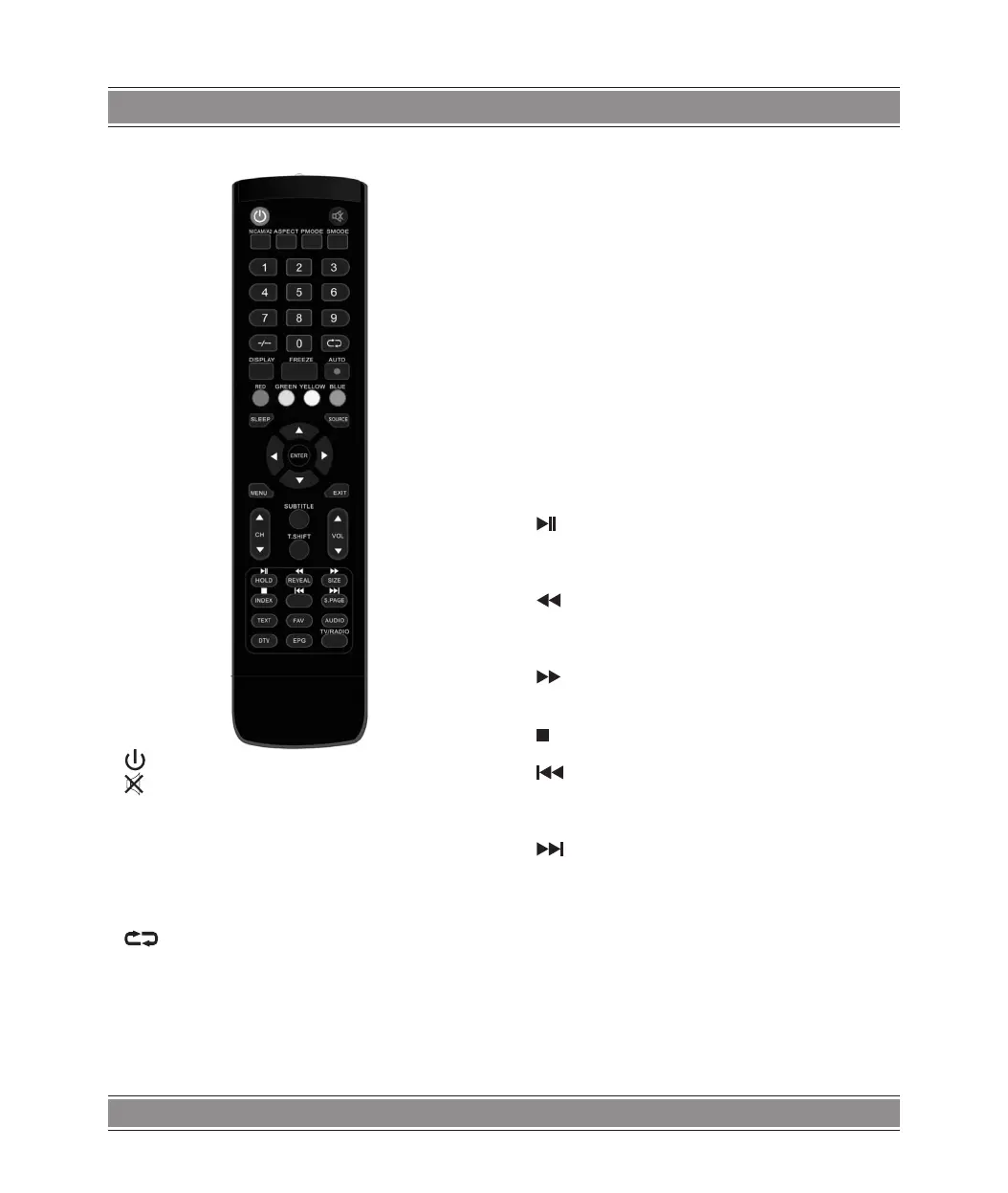
: Press this button to Turn the TV on or off.
: Press this button to mute or restore sound.
NICAM/A2: In the TV condition, press this key to select the
stereo mode.
ASPECT: Press to adjust picture ratio.
PMODE: Select picture mode.
SMODE: Select sound mode.
0-9: Select and switch to a channel using 0 - 9.
-/---: Switch the program digit.
: Switch back and front between the current and previ-
ous channels. Repeat the program in MEDIA
DISPLAY: Display TV information.
FREEZE: Press to hold the picture.
AUTO: Start to record.
(The U disk will be formatted when in burning , please do not
store important files in the U disk )
AUTO: Adjust the picture automatically in pc mode.
RED, GREEN, YELLOW, BLUE: Correspond to the different
colored subjects.
SLEEP: Set the sleep timer.
SOURCE: Press to change signal source.
ENTER: Enter the selected option or execute the selected
operation.
NOTE: press this button to display “channel list” in TV
source.
MENU: Press this button to enter the main menu for various
optional adjustable setting.
EXIT: Exit the OSD (On-screen display).
CH/ CH: Change the channel up and down.
VOL/ VOL: Adjust the volume.
SUBTITLE: Open or close subtitle.
(Used for models with DTV function only)
T.SHIFT: Press the button to pause current DTV program and
start record background
(Used for models with DTV function only)
HOLD: Freeze a multi-page passage on screen in Teletext
mode. (Used for European region only)
: Press to start playing the MEDIA, or to pause playing.
(Used for models with MEDIA function only)
REVEAL: Press this button to reveal the hidden information in
Teletext page. Press again to hide the information.
: Press to play backward
(Used for models with MEDIA function only)
SIZE: Display the top, bottom or all of page to read easily in
Teletext mode.
: Press to play forward.
(Used for models with MEDIA function only)
INDEX: Press this button to go to the index page in Teletext.
: Stop playing the Media.
(Used for models with MEDIA function only)
: Skip to previous chapter
(Used for models with MEDIA function only)
S.PAGE: Carry out the function of SUBCODE in the text while
enter the text display mode.
: Skip to next chapter
(Used for models with MEDIA function only)
TEXT: Press to enter the Teletext mode.
FAV: Switch between customer set “ Favorite List”
AUDIO: Press to select the DTV audio.
(Used for models with DTV function only)
DTV: Press to switch to DTV (Digital TV) mode.
NOTE: press this button to display “Record list” in DTV
EPG: Enter electronic program guide.
(Used for models with DTV function only)
TV/RADIO : Switch between TV and RADIO
(Used for models with DTV function only)



 To Next Page