USER’S MANUAL
18
OSD Basic adjustment
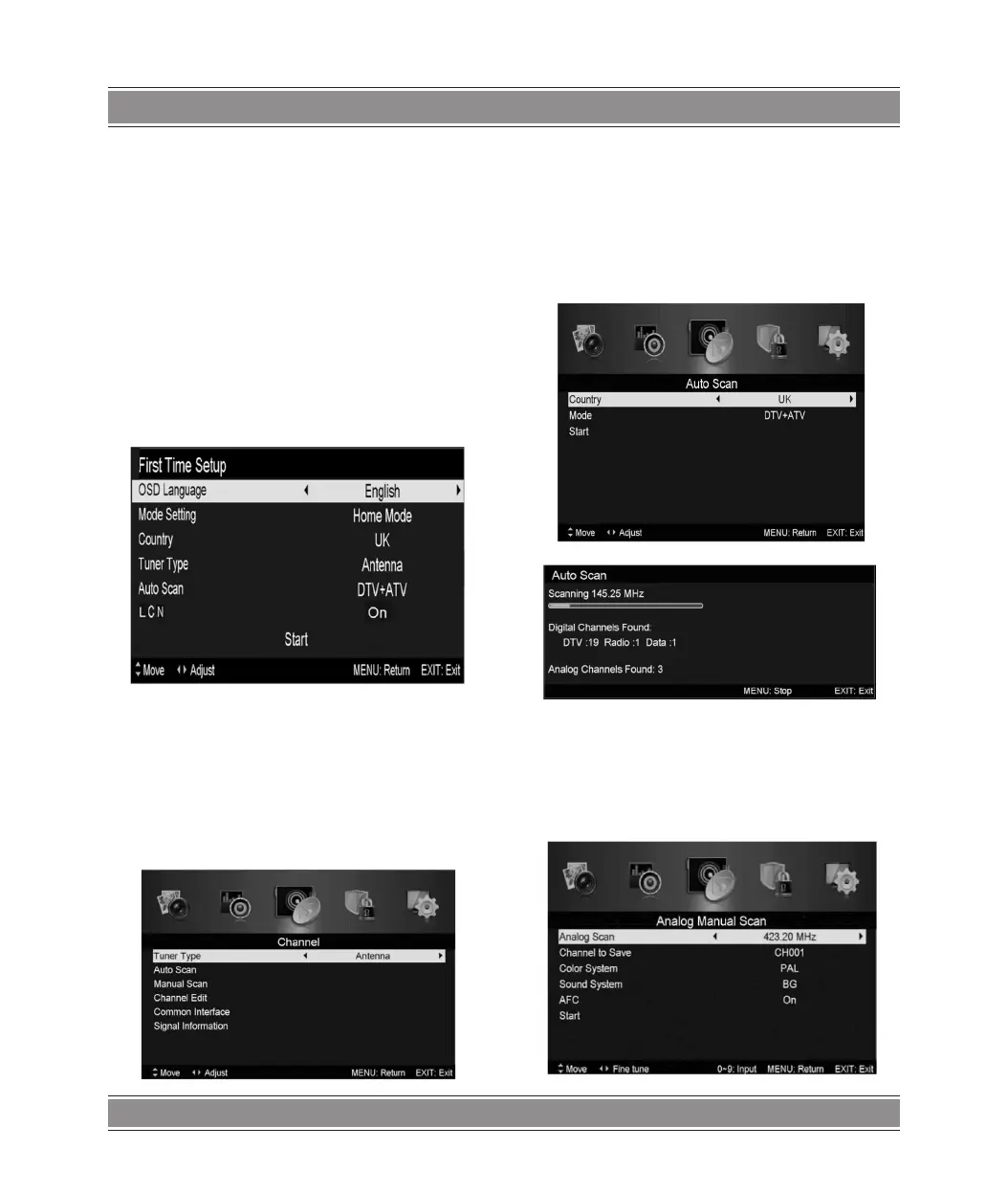
Installation Guide
If this is the first time you are turning on the TV and there are
no programs in the TV memory, the installation Guide menu will
appear on the screen.
1. Press the t / u / / button to select the local language.
2. Press the t / u / / button to select mode.
3. Press the t / u / / button to select the local country
you want to
4. Press the t / u / / button to select Air or cable.
5. Press the t / u / / button to select mode :DTV +
ATV ,DTV , ATV.
6. Press the t / u / / button to select “ON”or “OFF”.
Note:
Searching for platform will take a long time, please be
patient!
Channel
Press MENU button to display the main menu. Press t / u
button to select CHANNEL in the main menu
1.Auto Scan
Press / button to select “Auto Scan”
Press / button to select country and press thet / u
button to select mode.
Press / button“and then press u button to start scanning.
Press “MENU” or “EXIT” button to stop
Note: Searching for platform will take a long time. Please
be patient!
2.Analog Manual Scan
Press / button to select “Manual scan” and press the u
button to Analog manual scan.
Press “MENU” button to return the previous menu. Press “EXIT”
button to exit the menu.



 To Next Page