32L31/37L31/42L31/50L31 中性英文说明书(欧洲模数)(308B方案)T9大板 1304154
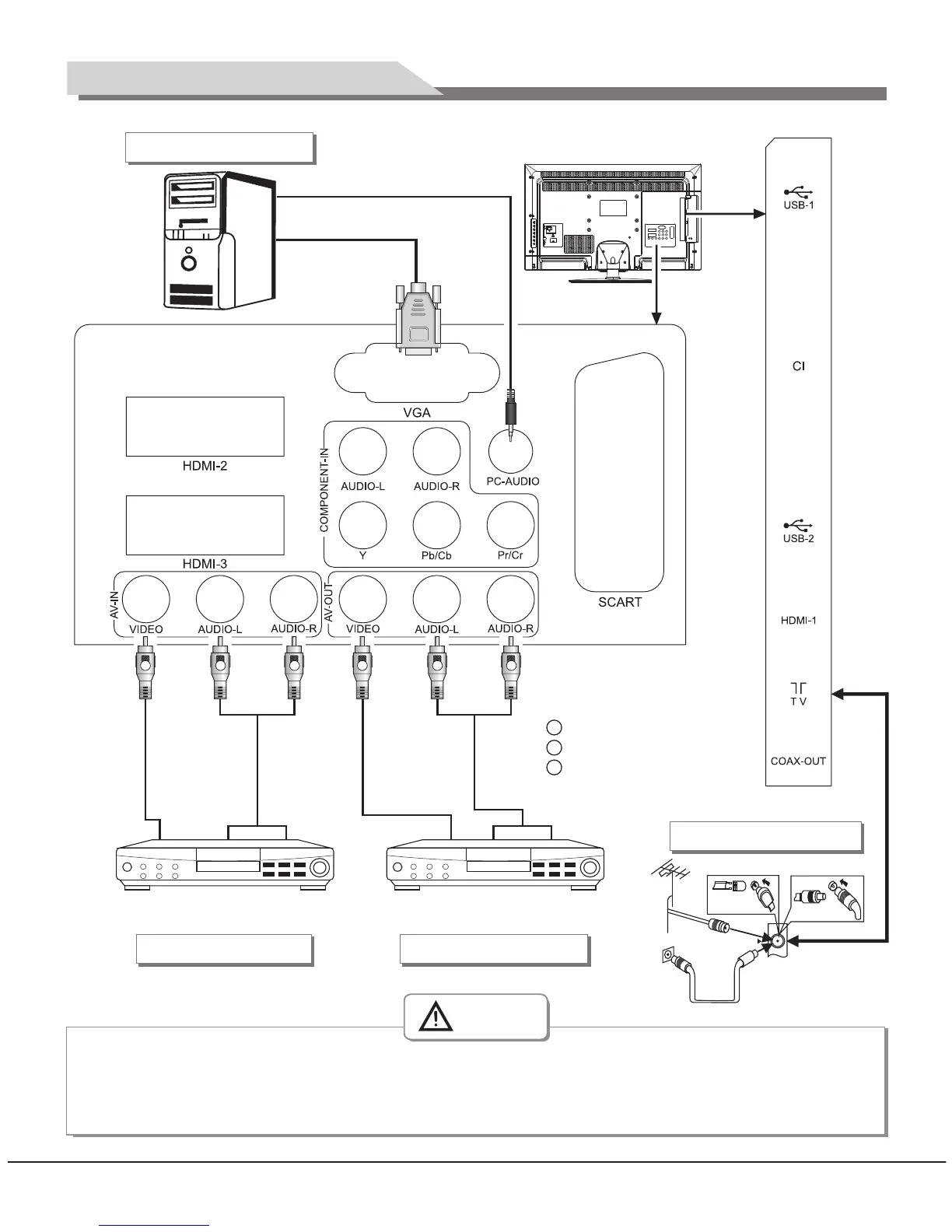
Y Yellow (VIDEO signal cable)
W White(AUDIO-L signal cable)
R Red (AUDIO-R signal cables)
Connect to the devices with AV output
interface (e.g. DVD, VCR, game console)
AV input connection
Video cable
Audio cable
Connect to the devices with AV
input interface (e.g. Monitor)
AV output connection
VGA input connection
PC audio cable
VGA cable
R F
Antenna connection
When connecting outdoor antenna to signal port of the TV set, please turn off the main power switch
of the TV set first. Do not approach the outdoor antenna to high voltage mains power line to avoid
electric shock. The wired network antenna connected to this TV set must be isolated from the
protective grounding, or else it will cause fire or other hazards.
Warning
Video cable
Audio cable
Y
W R R
Y
W
6
Mounting and Connecting



 To Next Page