Need help?
Do you have a question about the Maono AU-AM200 and is the answer not in the manual?
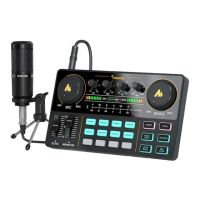
Adjusts the volume of the microphone by rotating the control knob clockwise.
Adjusts the volume of external accompaniment music via control knob rotation.
Modifies the reverb effect level using a fader control.
Adjusts the monitoring volume using a fader, with caution advised for hearing.
Features 8 preset sound effect buttons for live broadcast enhancement.
Allows users to record and import up to 4 custom audio clips as sound effects.
Includes EFFECT, PITCH, MUSIC ONLY, DENOISE, LOOP BACK, and SIDE CHAIN functions.
Switches between 12 different electronic tones using the 'Electrical Tone' area.
Tunes microphone input for deep bass, smooth midrange, and clear treble.
Controls the volume of sound output to live broadcasts.
Indicates the current volume level of the microphone.
Shows remaining battery charge using 4 LED indicators.
Visualizes the current volume level of the accompaniment.
Connects to a smartphone via Bluetooth for live accompaniment playback.
Turns the product on or off by long-pressing for three seconds.
Allows adjustment of the keypad backlight across 6 levels.
Used for charging and data transmission to computers and other devices.
Provides three 3.5mm TRRS output interfaces for multi-platform live streaming.
Connects to external audio playback devices like speakers and headphones.
Connects external audio sources for background music during broadcasts.
Connects a headset with a 3.5mm headphone jack.
Connects to 3.5mm condenser microphones that do not require external power.
Connects smartphone, headphones, and microphone for karaoke setup.
Details connecting phones, microphones, and headphones for mobile streaming.
Guides connecting computers, microphones, and audio for PC-based streaming.
Explains charging via USB-C cable using power banks, computers, or adapters.
Connects to smartphones via Bluetooth for wireless accompaniment playback.
Troubleshooting steps for power issues and device startup problems.
Diagnoses issues related to missing accompaniment music playback.
Resolves problems with no audio output to headphones or headsets.
Troubleshoots issues with the microphone not producing any sound.
Addresses problems related to lack of audio during live streaming.
 General
| Connectivity | USB |
|---|---|
| Compatibility | Windows, macOS |
| Microphone Inputs | 1 x 1/8" / 3.5 mm TRS |
| Headphone Output | 1 x 1/8" / 3.5 mm TRS |
| Line Input | 1 x 1/8" / 3.5 mm TRS |
| Line Output | 1 x 1/8" / 3.5 mm TRS |
| Sampling Rate | 48 kHz |

 To Next Page