5
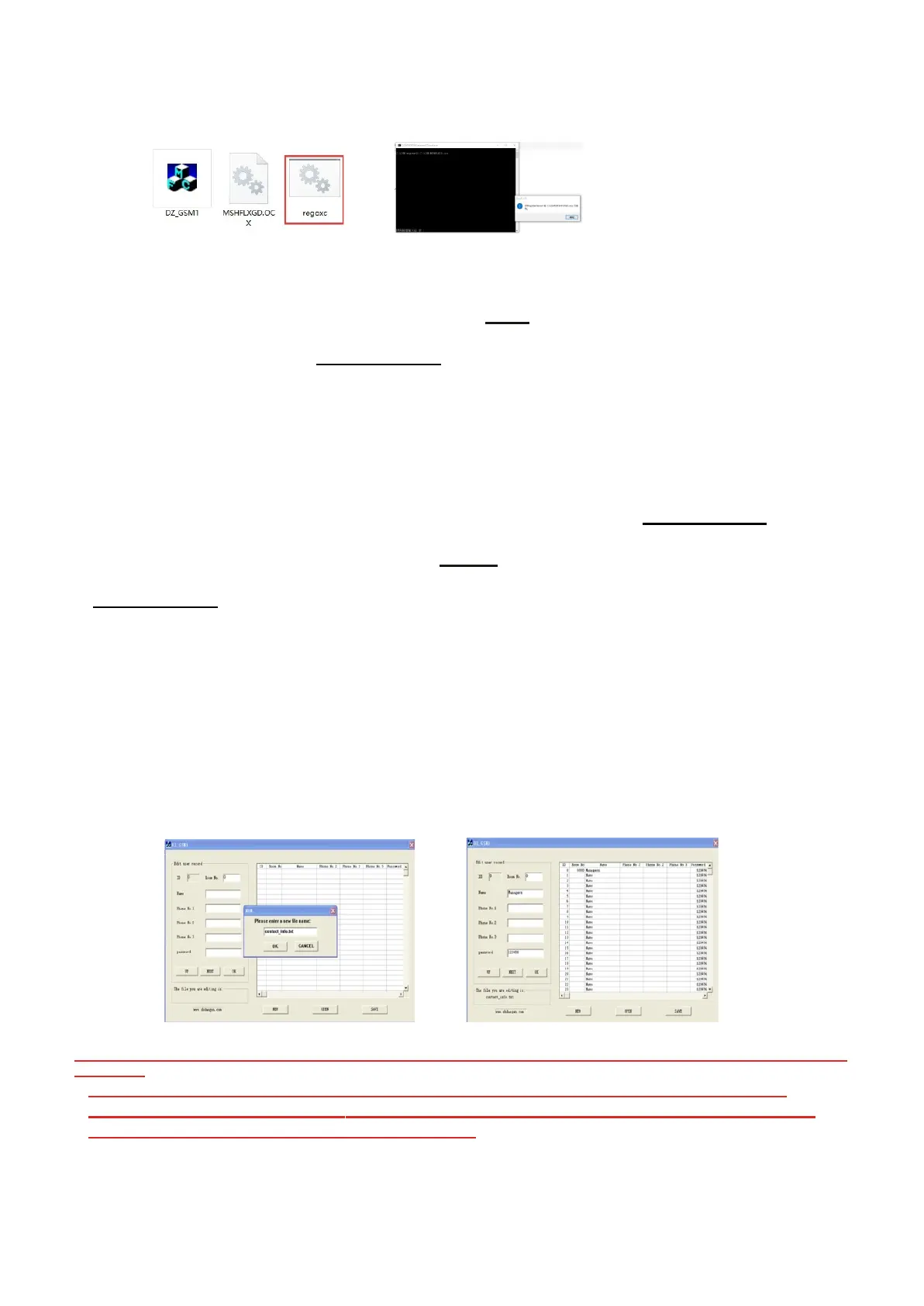
Please note only need open “ regoxc.bat" for one time on same PC.
* Next to open the software “ DZ-GSM1.exe", press-- NEW, could see “please enter a new file
name”, the enter name as --“contact_info.txt" (please note, the name must be same like it) as
below pics, next step could to edit users details.
Please note: Room number “0” is for administrator, which can’t be changed, only could edit
phone numbers, about others users room numbers could be modified accordingly.
After finish edit all users details, press SAVE, will create a new file--"contact_info.txt".
*Connect SD card on PC, create a new folder-- "contact" on SD Card, copy the document ---
"contact_info.txt" under the folder (if exist same document, please instead the old one).
*
Finally input
the
Memory
card
on GSM
device.
Please note: 1. If the second time add contact data, do not need to create the file "contact" again
on Memory card.
2. Please edit the users details according to the device capacity.
3.Could set private unlock password on the software.
4.If system is Win10, please run the software as administration.
Please Note: When set Room number, should set ID number (Index), which depends on GSM
capacity.
For example, if your GSM device is 50 homes, then ID should set from 1 to 50, and then
will enter the page setting Room number, name, and phone numbers. (ID Number can’t be
the same, and Room number can’t be the same).



 To Next Page