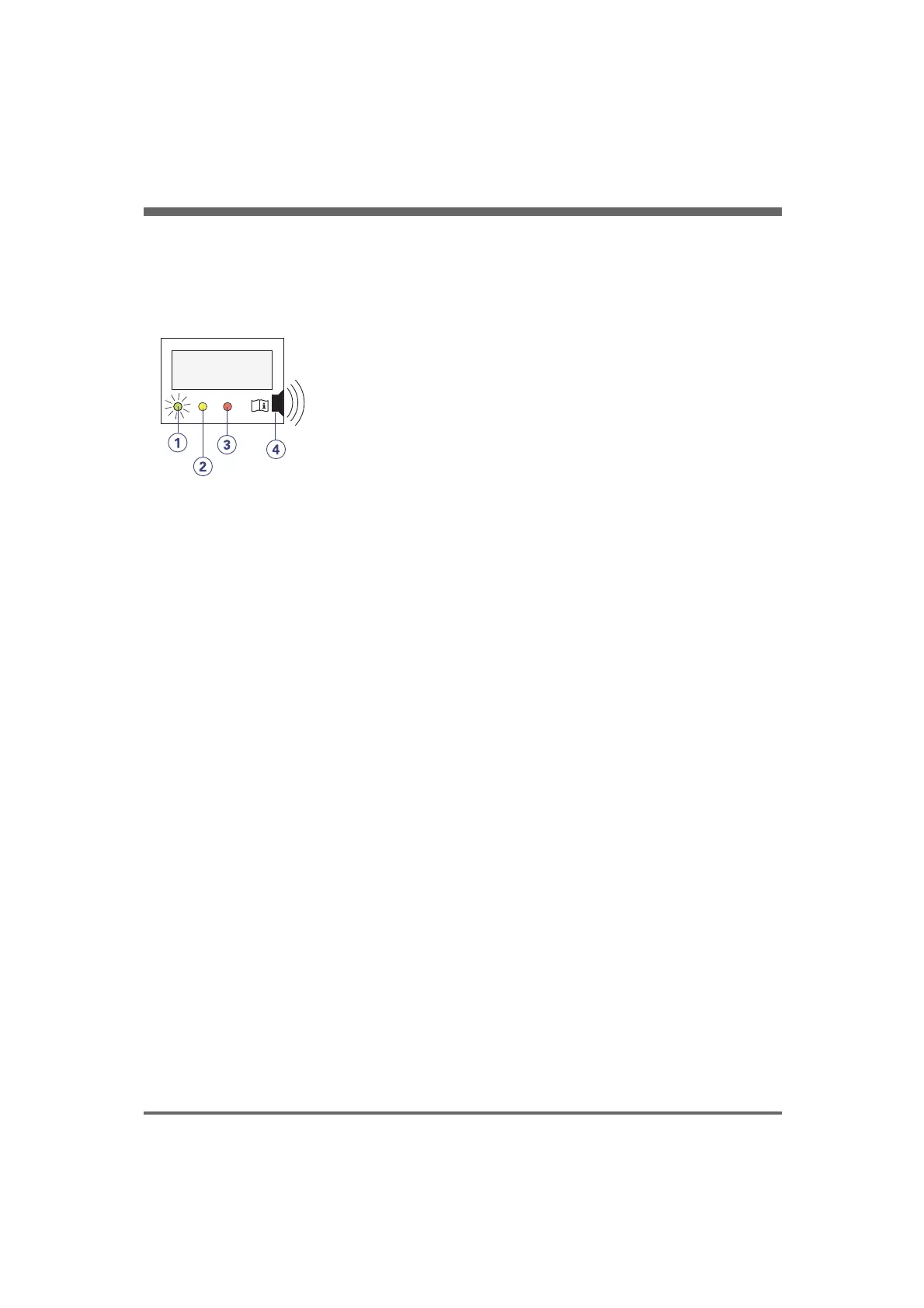
Display LED's
There are three lamps (LEDs), green, yellow
and red, indicating the status shown on the
display above the lamps.
KMP-045
61 psi
12345 hours
On Standby Alarm
1. Green LED - On
The green LED lights up when the
mains switch is on. Display message:
The pressure in the compressor and
elapsed operating hours (when green
LED only).
-
2. Yellow LED - Standby
The yellow Standby LED will be on
while the central compressed air supply
is sufficient from the central air supply
-
to the ventilator via the compressor.
Display message: The central
compressed air pressure and the word
STANDBY.
3. Red LED - Alarms
The red Alarm LED indicates different
alarm situations. Display message:
Shows if the alarm is related to gas
-
distribution, dryer condition or
overheating of the compressor. The
alarms are described in detail in the
Alarms section.
4. Audible alarm
A buzzer for audible alarm signals (3
beeps/second). The buzzer sounds
when an alarm is activated.
-
COMPRESSOR MINI, User´s Manual
English version
28.0
9
2. Device description


 To Next Page