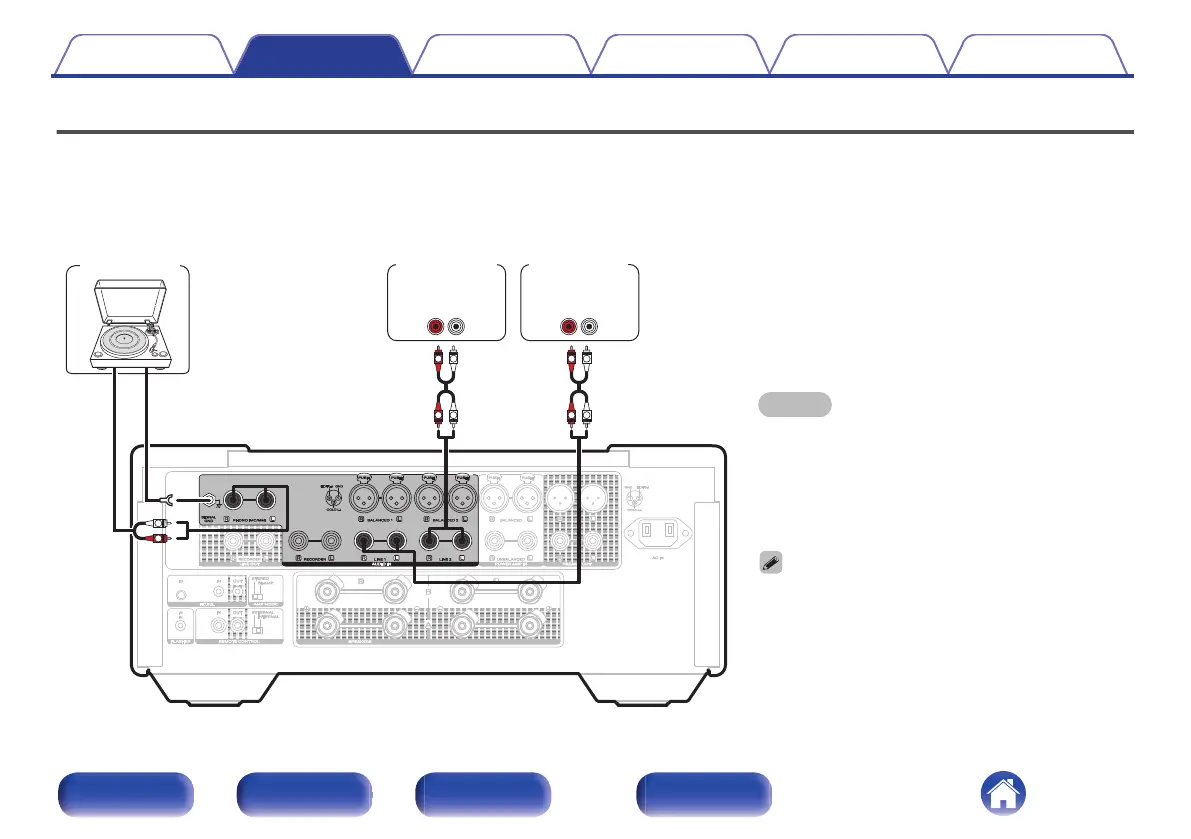
Connecting a playback device
You can connect turntables, network audio players and CD players to this unit. Set the phono equalizer of this unit in the “Phono” section of the setting
menu according to the type of turntable cartridge to be connected. (v p. 50)
If you set this unit’s input source to “Phono” and you accidentally increase the volume without having a turntable connected, you may hear a hum noise
from the speakers.
NOTE
0
The earth terminal (SIGNAL GND) of this unit is not for
safety grounding purposes. If this terminal is connected
when there is a lot of noise, the noise can be reduced.
Note that depending on the turntable, connecting the
ground line may have the reverse effect of increasing
noise. In this case, it is not necessary to connect the
ground line.
0
The PHONO input terminals are equipped with a short-
circuiting pin plug. Remove this plug to connect a record
player. Store the removed short-circuiting pin plug in a
safe place so as not to lose it.
GND
AUDIO
OUT
L
R
AUDIO
OUT
LR
AUDIO
OUT
LR
L
L
R
R
L
L
R
R
Turntable
Network audio
player
CD player
Contents Connections Playback Settings Tips Appendix
21
Front/Top
panel
Rear panel
Remote control
unit
Index



 To Next Page