EasyManua.ls Logo

Marantz 40n - Connecting a USB Flash Drive

Marantz 40n
114 pages
Print Icon
To Next Page IconTo Next Page
To Previous Page IconTo Previous Page
Loading...
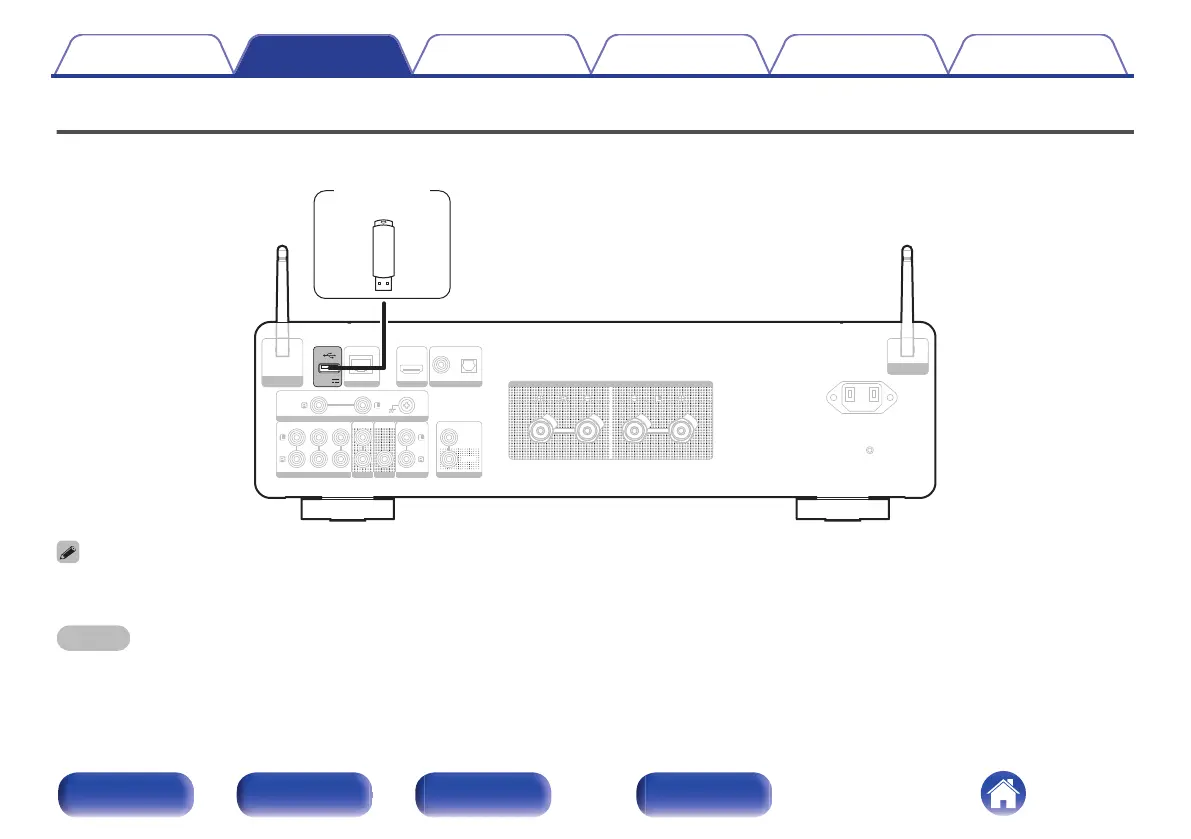
Connecting a USB flash drive to the USB port
For operating instructions see “Playing music from a USB flash drive” (v p. 54).
DIGITAL AUDIO IN
DIGITAL AUDIO IN
AUDIO IN
AUDIO IN
AUDIO IN
AUDIO IN
AUDIO OUT
AUDIO OUT
PRE OUT
PRE OUT
POWER AMP IN
POWER AMP IN
NETWORK
NETWORK
OPTICAL
OPTICAL
COAXIAL
COAXIAL
CD
CD
LINE
LINE
PHONO
PHONO
SIGNAL GND
SIGNAL GND
RECORDER
RECORDER
RECORDER
RECORDER
SUBWOOFER
SUBWOOFER
5V/1A
5V/1A
IN
IN
REMOTE CONTROL
REMOTE CONTROL
OUT
OUT
SPEAKERS
SPEAKERS
AC IN
AC IN
Bluetooth / Wi-Fi
Bluetooth / Wi-Fi
ANTENNA
ANTENNA
Bluetooth / Wi-Fi
Bluetooth / Wi-Fi
ANTENNA
ANTENNA
HDMI ARC
HDMI ARC
USB flash
drive
0
Marantz does not guarantee that all USB flash drives will operate or receive power. When using a portable USB hard disk drive (HDD) which came with an AC adapter, use
that device’s supplied AC adapter.
NOTE
0
USB flash drives will not work via a USB hub.
0
It is not possible to use this unit by connecting the unit’s USB port to a PC via a USB cable.
0
Do not use an extension cable when connecting a USB flash drive. This may cause radio interference with other devices.
Contents Connections Playback Settings Tips Appendix
27
Front panel Rear panel
Remote control
unit
Index

Other manuals for Marantz 40n

Related product manuals