EasyManua.ls Logo

Marantz PM5004 - User Manual

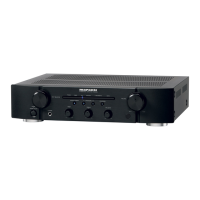
Marantz PM5004
23 pages
Print Icon
To Next Page IconTo Next Page
Loading...
Integrated Amplier
PM5004
ENGLISHDEUTSCHFRANÇAISITALIANOESPAÑOLNEDERLANDSSVENSKA
1.PM5004NENG校了.indd11.PM5004NENG校了.indd1 2010/05/2020:24:432010/05/2020:24:43

Other manuals for Marantz PM5004

Questions and Answers

  • M
    Michael VillarrealAug 12, 2025
    What to do if my Marantz PM5004 has no sound when powered on?
    • A
      Anthony RhodesAug 13, 2025
      If your Marantz Amplifier turns on but produces no sound, several factors could be at play. First, check that the speaker and input cables are securely connected. Ensure the INPUT SELECTOR knob is set correctly and the VOLUME is at an audible level. Also, verify the SPEAKERS A/B switches are on for the connected speaker system and that the mute function isn't activated (the MUTE indicator will be lit if it is). If the MUTE indicator is lit, press MUTE on the remote control to cancel muting.
  • B
    Brent GrayAug 16, 2025
    How to fix a Marantz PM5004 that won't turn on?
    • J
      James WalkerAug 16, 2025
      If your Marantz Amplifier isn't powering on, start by ensuring the power cord is firmly plugged into the outlet. If it's in standby mode, turn the INPUT SELECTOR knob or press POWER ON on the remote. If the STANDBY indicator is blinking, the protection circuit may be activated; turn off the power, wait at least one minute, and then turn it back on.
  • T
    thomasmillerAug 20, 2025
    Why does the volume of my Marantz PM5004 drop automatically?
    • D
      David MyersAug 20, 2025
      The volume of your Marantz Amplifier might drop automatically if the protection circuit is activated. To resolve this, turn off the power, wait for at least one minute, and then turn it back on.
  • M
    Michelle BurnettAug 25, 2025
    How to troubleshoot a Marantz PM5004 remote control that isn't working?
    • R
      rodriguezjorgeAug 25, 2025
      If your Marantz Amplifier isn't responding to the remote control, first replace the batteries with new ones, ensuring they're inserted correctly according to the polarity markings. Make sure you're within the remote's operational range and that there are no obstacles between the remote and the unit. Verify you're pressing the correct button. Also, ensure the remote sensor function on the unit is enabled and that the remote control code matches the unit's code. If all else fails, make sure the remote control sensor function is enabled and set the same remote control code for both the unit and remote control.
  • G
    gallagherashleyAug 27, 2025
    Why is sound only coming from one speaker on my Marantz PM5004 Amplifier?
    • R
      Roberto BeckAug 27, 2025
      If sound is only coming from one speaker on your Marantz Amplifier, check the speaker cable connections to ensure they are properly connected. Also, verify that the BALANCE control knob is set to the appropriate position.
  • R
    Robert RogersAug 31, 2025
    How to correct reversed left and right channels on a Marantz Amplifier?
    • M
      Michael DavisAug 31, 2025
      If the left and right channels are reversed on your Marantz Amplifier, the issue is likely with the speaker or input cable connections. Double-check that both the left and right speakers, as well as the left and right input cables, are connected correctly.
  • A
    Anthony TuckerSep 4, 2025
    How do I eliminate noise during record playback with my Marantz PM5004?
    • Z
      Zachary FitzgeraldSep 4, 2025
      To eliminate noise during record playback with your Marantz Amplifier, ensure the turntable's ground wire is properly connected to the PHONO GND terminal. Also, check that the PHONO input terminals are correctly connected. If a TV is nearby, try relocating it or the turntable, as it may be causing interference.
  • M
    Mark ChapmanSep 7, 2025
    What can I do about audio feedback when playing records on my Marantz Amplifier?
    • T
      Thomas DiazSep 8, 2025
      To address audio feedback when turning up the volume during record playback on your Marantz Amplifier, try to maximize the distance between the turntable and the speakers. If the turntable is on a vibrating surface, consider using an insulating pad beneath it.

Summary

Safety Precautions

Electrical Shock Hazard Warning

Warning against opening the unit to prevent electric shock.

Fire and Moisture Exposure Warning

Keep the unit dry to prevent fire or electric shock hazards.

Hot Surface Contact Alert

Caution that external surfaces can become hot and should not be touched.

General Usage and Handling Precautions

Environmental Conditions and Ventilation

Advice on temperature, ventilation, and keeping the unit clean and dry.

Handling, Maintenance, and Modifications

Guidelines for cord care, avoiding disassembly, and foreign objects.

Compliance and Installation Guidelines

Installation Placement Recommendations

Advice on positioning for heat dispersal and power access.

Getting Started

Essential Handling and Safety Tips

Important advice for safe and proper operation of the unit.

Unit Handling and Remote Operation

Safe Unit Operation and Handling Practices

Cautions on power, condensation, mobile phones, and moving the unit.

Basic Connection Procedures

Speaker Connection and Protection Circuit

Instructions for connecting speakers and understanding the protection circuit.

Power Connection and Basic Operation

Unit Power On, Standby, and Off Procedures

Steps for turning the unit on, putting it in standby, and turning it off.

Advanced Connection Strategies

Advanced Operational Settings

Troubleshooting Common Issues

Problem Diagnosis and Resolution Guide

Guide to diagnosing and resolving common operational problems and symptoms.

Technical Specifications

Detailed Product Performance Data

Detailed technical data including power output, distortion, frequency response, and dimensions.

Marantz PM5004 Specifications

General IconGeneral
Damping factor100
Amplifier class-
Frequency range10 - 50000 Hz
Input sensitivity200 mV
Audio output channels2.0 channels
Peak power per channel- W
Signal-to-Noise Ratio (SNR)85 dB
Total Harmonic Distortion (THD)0.0001 %
Dynamic power per channel (4 Ohm)60 W
Dynamic power per channel (8 Ohm)45 W
RMS power output per channel (4 Ohm)55 W
RMS power output per channel (8 Ohm)40 W
Bridge-mode power output per channel (4 Ohm)80 W
AC (power) inYes
Audio (L/R) in6
Audio (L/R) out2
Headphone outputs1
Speakers connectivity typeRCA
PurposeHome
Product colorBlack
Connectivity technologyWired
Power consumption (standby)0.4 W
Power consumption (typical)110 W
Weight and Dimensions IconWeight and Dimensions
Depth369 mm
Width440 mm
Height105 mm
Weight6700 g

Related product manuals