o
Contents
Connecting speakers 20
Connecting a playback device 23
Connecting a recording device 24
Connecting to a device with digital audio connectors 25
Connecting a USB flash drive to the USB port 27
Connecting to a home network (LAN) 28
Connecting a pre-amplifier 30
Connecting devices with remote control connectors 31
Connecting the power cord 32
NOTE
0
Do not plug in the power cord until all connections have been completed.
0
Do not bundle power cords with connection cables. Doing so can result in
humming or noise.
o
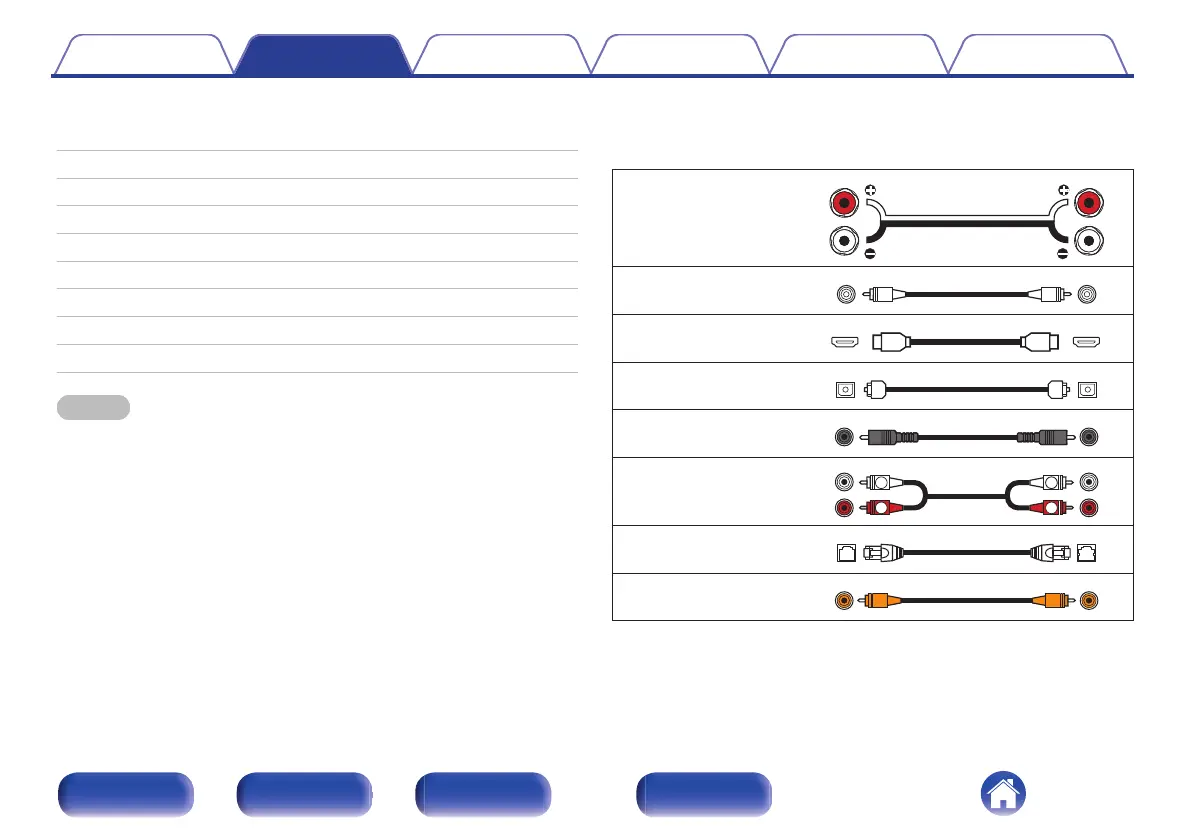
Cables used for connections
Provide necessary cables according to the devices you want to
connect.
Speaker cable
Subwoofer cable
HDMI cable
Optical cable
Coaxial digital cable
Audio cable
LAN cable
Remote connector cable
Contents Connections Playback Settings Tips Appendix
19
Front panel Rear panel
Remote control
unit
Index


 To Next Page