EasyManua.ls Logo

Marantz 5010 - Page 13

Marantz 5010
48 pages
Print Icon
To Next Page IconTo Next Page
To Previous Page IconTo Previous Page
Loading...
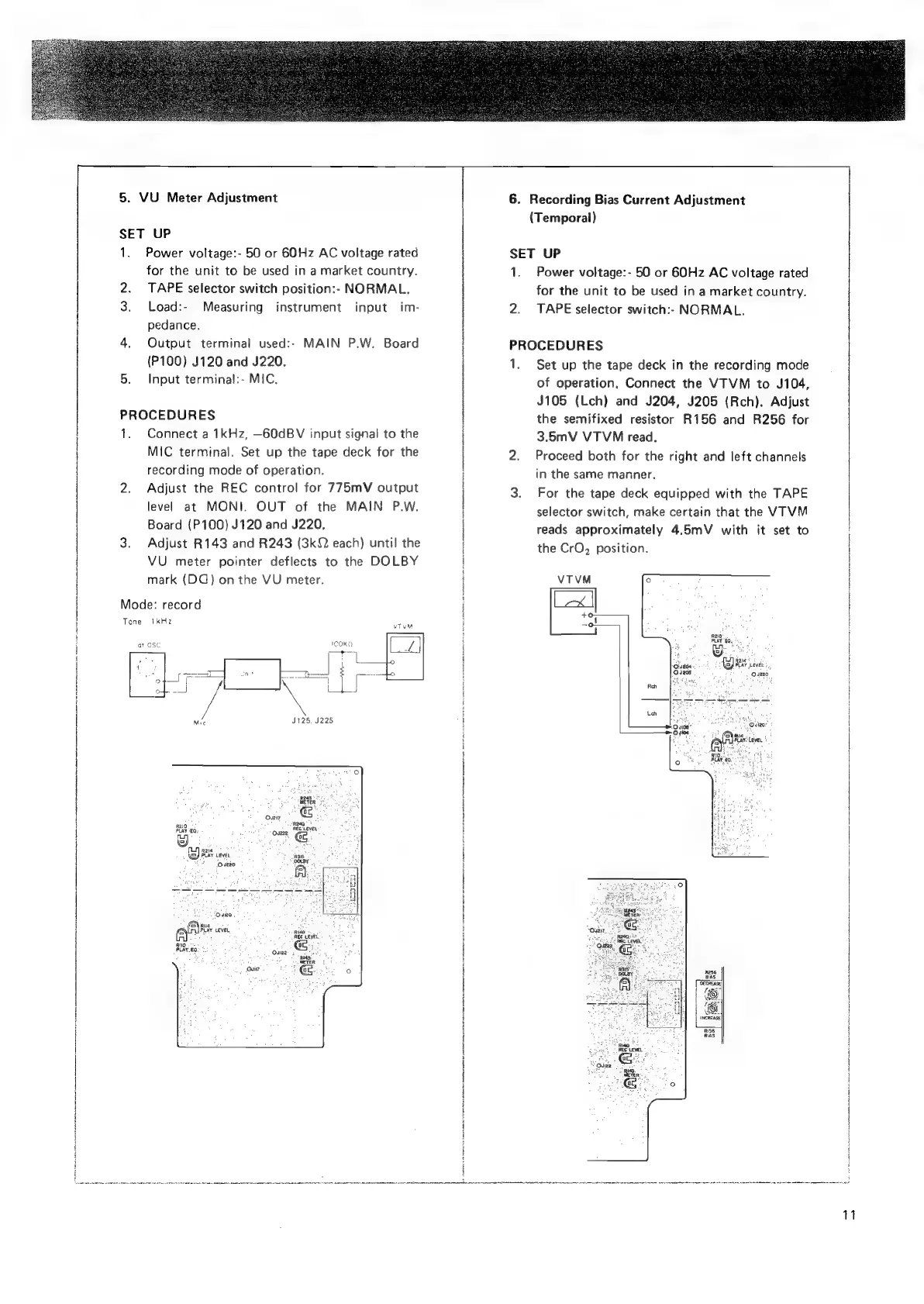
5.
VU
Meter
Adjustment
SET
UP
1.
Power
voltage:-
50
or
60Hz
AC
voltage
rated
for
the
unit
to
be
used
in
a
market
country.
2.
TAPE
selector
switch
position:-
NORMAL.
3.
Load:-
Measuring
instrument
input
im-
pedance.
4.
Output
terminal
used:-
MAIN
P.W.
Board
(P100)
J120
and
J220.
5.
Input
terminal:-
MIC.
PROCEDURES
1.
Connect
a
1kHz,
—60dBV
input
signal
to
the
MIC
terminal.
Set
up
the
tape
deck
for
the
recording
mode
of
operation.
2.
Adjust
the
REC
control
for
775mV
output
level
at
MONI.
OUT
of
the
MAIN
P.W.
Board
(P100)
J120
and
J220,
3.
Adjust
R143
and
R243
(3kQ
each)
until
the
VU
meter
pointer
deflects
to
the
DOLBY
mark
(DQ)
on
the
VU
meter.
Mode:
record
Tone
IkHz
at
Ose
nik
J125.
S225
(Beas:
METER
2
Over
R210
°
PLAY
EQ,
Be
Ouzee
R2ia
*
.
(
<
DOLBY
*
Ouezo
Rea"
+
REC
LEVEL,
be
Ogio,
a
(@
Ria
°
ah
LEVEL,
BND
aoa
PLAYEQ!
os
A
6.
Recording
Bias
Current
Adjustment
(Temporal)
SET
UP
1.
Power
voltage:-
50
or
60Hz
AC
voltage
rated
for
the
unit
to
be
used
in
a
market
country.
2.
TAPE
selector
switch:-
NORMAL.
PROCEDURES
1.
Set
up
the
tape
deck
in
the
recording
mode
of
operation,
Connect
the
VTVM
to
J104,
J105
(Lch)
and
J204,
J205
(Rech).
Adjust
the
semifixed
resistor
R156
and
R256
for
3.5mV
VTVM
read.
Proceed
both
for
the
right
and
left
channels
in
the
same
manner.
For
the
tape
deck
equipped
with
the
TAPE
selector
switch,
make
certain
that
the
VTVM
reads
approximately
4.5mV
with
it
set
to
the
CrO,
position.
R210,
PLAY
EQ,
*
ms
~
os,
Al)
gare?
Ousdq
od
SE
{eye
LEVEL
/.,
Os205
Qve20
Lrg
EE
ei
_—__——t
0
yios
é
14
;
a
Ate
teveL
rn
Soe
BRAY’
EQ.
11

Related product manuals