EasyManua.ls Logo

Marantz 5010 - Page 16

Marantz 5010
48 pages
Print Icon
To Next Page IconTo Next Page
To Previous Page IconTo Previous Page
Loading...
14
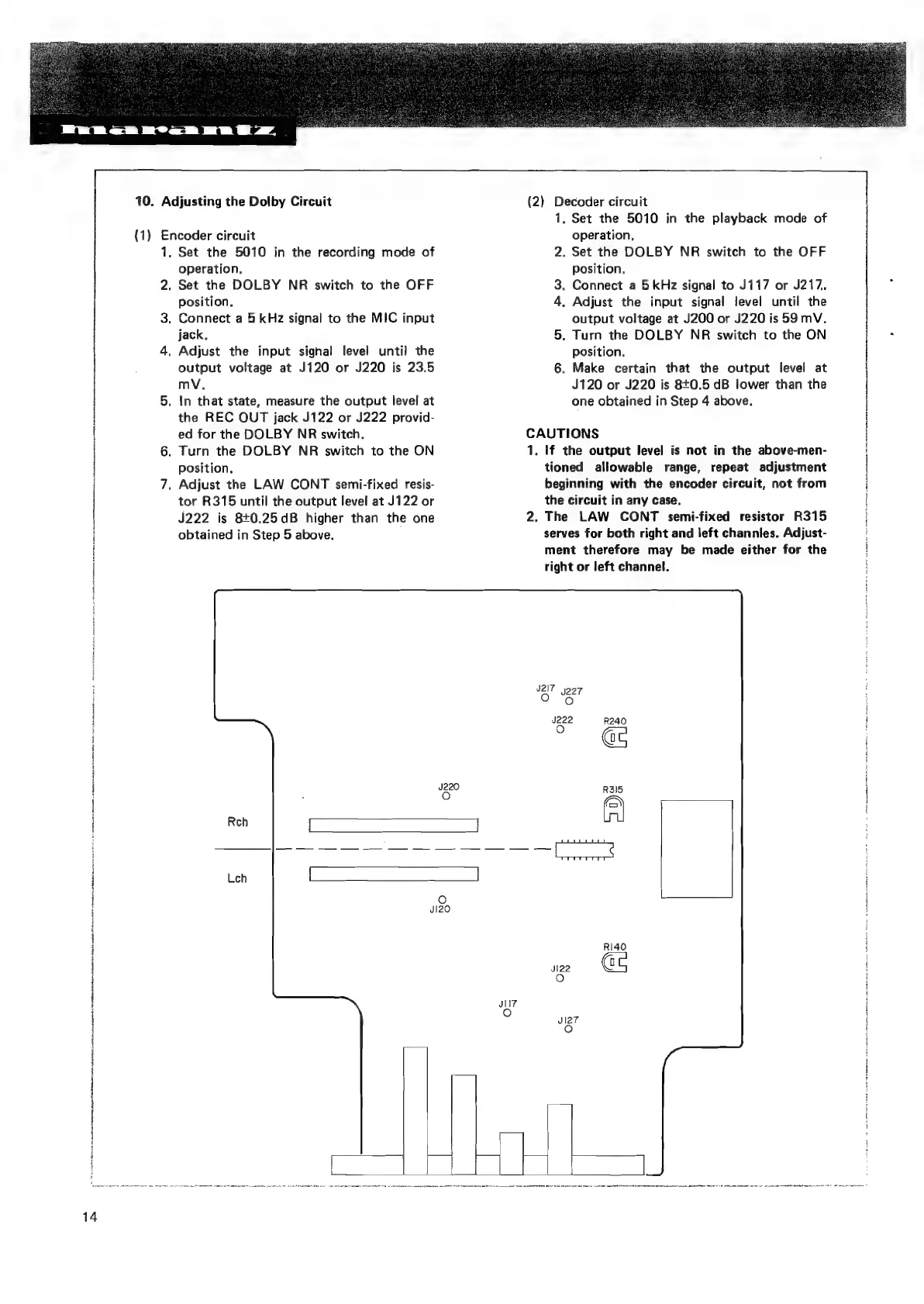
10.
Adjusting
the
Dolby
Circuit
(1)
Encoder
circuit
.
Set
the
5010
in
the
recording
mode
of
operation.
.
Set
the
DOLBY
NR
switch
to
the
OFF
position.
.
Connect
a
5
kHz
signal
to
the
MIC
input
jack,
.
Adjust
the
input
signal
level
until
the
output
voltage
at
J120
or
J220
is
23.5
mV,
.
In
that
state,
measure
the
output
level
at
the
REC
QUT
jack
J122
or
J222
provid-
ed
for
the
DOLBY
NR
switch.
.
Turn
the
DOLBY
NR
switch
to
the
ON
position.
.
Adjust
the
LAW
CONT
semi-fixed
resis-
tor
R315
until
the
output
level
at
J122
or
J222
is
8+0.25dB
higher
than
the
one
obtained
in
Step
5
above.
(2)
Decoder
circuit
1.
Set
the
5010
in
the
playback
mode
of
operation.
2.
Set the
DOLBY
NR
switch
to
the
OFF
Position.
3.
Connect
a
5
kHz
signal
to
J117
or
J217.
4,
Adjust
the
input
signal
level
until
the
output
voltage
at
J200
or
J220
is
59
mV.
5.
Turn
the
DOLBY
NR
switch
to
the
ON
position.
6.
Make
certain
that
the
output
level
at
J120
or
J220
is
8+0.5
dB
lower
than
the
one
obtained
in
Step
4
above.
CAUTIONS
1,
If
the
output
level
is
not
in
the
above-men-
tioned
allowable
range,
repeat
adjustment
beginning
with
the
encoder
circuit,
not
from
the
circuit
in
any
case.
2.
The
LAW
CONT
semi-fixed
resistor
R315
serves
for
both
right
and
left
channles.
Adjust-
ment
therefore
may
be
made
either
for
the
right
or
left
channel.

Related product manuals