10
EN
FR
ES
Install the Windows driver software
Windows OS
System requirements : Windows 10 or Windows 11
Download the dedicated driver from the “Download”
section of the CD 50n page of the Marantz website
(www.marantz.com) onto your PC.
Install the driver.
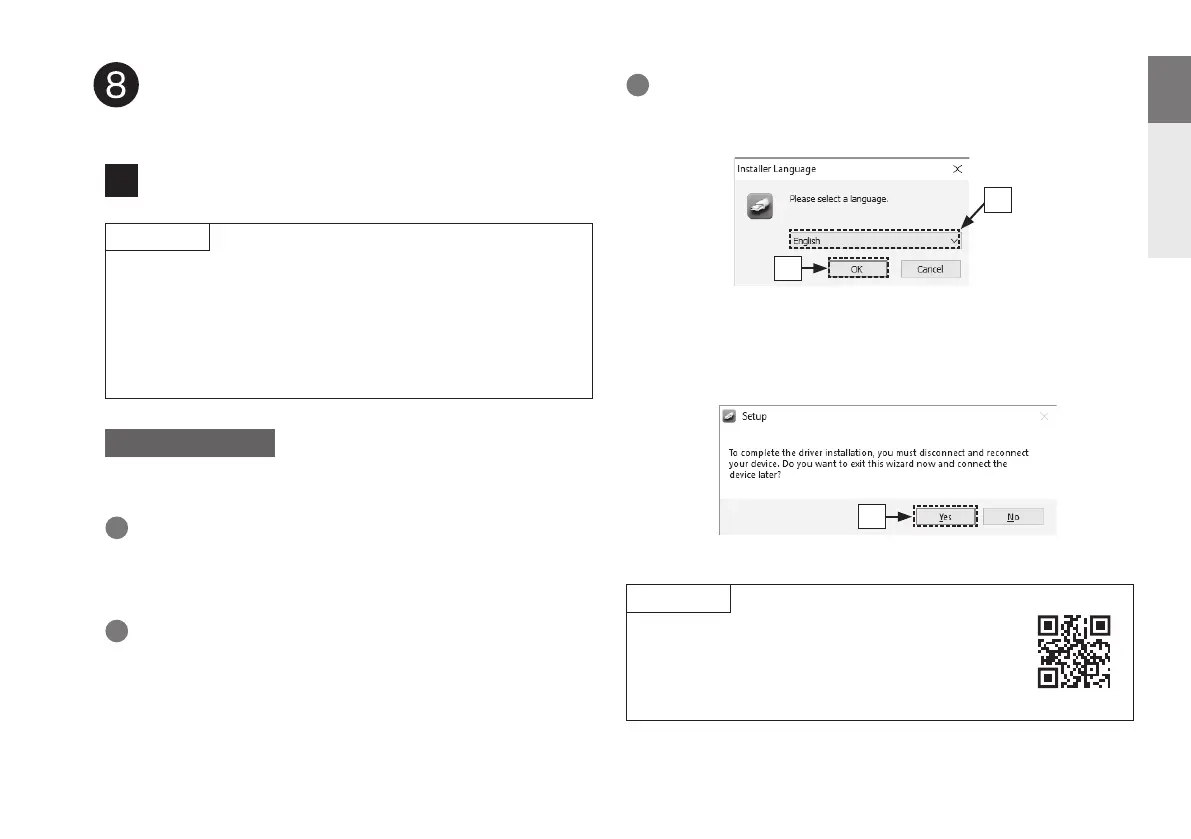
q Select the language to use for the installation.
w Click “OK”.
e The wizard menu is displayed. Follow the instructions on the
screen.
r When the wizard is completed, click “Yes”.
Unzip the downloaded le, and double-click the exe le.
1
3
2
q
w
Please see the FAQ at www.marantz.com if you
experience any issues getting audio to play from your
computer through the CD 50n. You may also want to
check the support pages for audio player application.
r
The installation of the driver software is not necessary in the following cases.
• When you do not play back the music from a PC using USB-DAC of this unit.
• When using a macOS.
The driver software cannot be installed correctly if your PC is connected to
the unit by a USB cable. If the unit and your computer are connected by a
USB cable and the computer is switched on before installation, disconnect
the USB and restart the computer.
NOTE
NOTE
1
Listen to computer audio via
USB-DAC
1.CD50nU_QSG_ENG_10A_231122.indd 101.CD50nU_QSG_ENG_10A_231122.indd 10 2023/11/30 10:12:312023/11/30 10:12:31



 To Next Page