11
Listen to audio from PC or Mac
Power on.
Press USB-DAC to switch the
input source to “USB-DAC”.
Set the audio signal destination to this unit on the computer.
1
2
3
Windows OS
q Open the “Control Panel” on the PC.
• The control panel setting list is displayed.
w Click the “Sound” icon.
• The sound menu window is displayed.
3
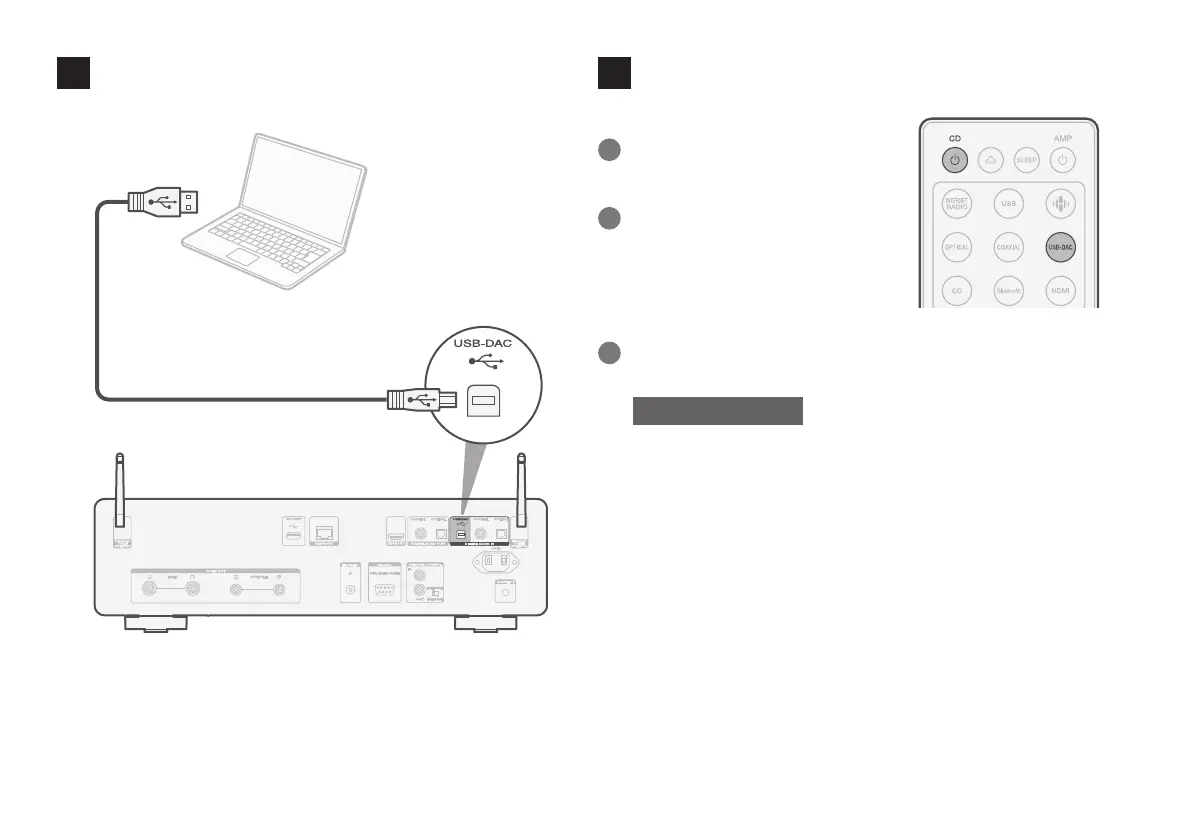
Computer on which the driver
software and audio player
software are installed
USB 2.0 cable
(not included)
Type B
Connect to PC or Mac
2
1.CD50nU_QSG_ENG_10A_231122.indd 111.CD50nU_QSG_ENG_10A_231122.indd 11 2023/11/30 10:12:312023/11/30 10:12:31



 To Next Page