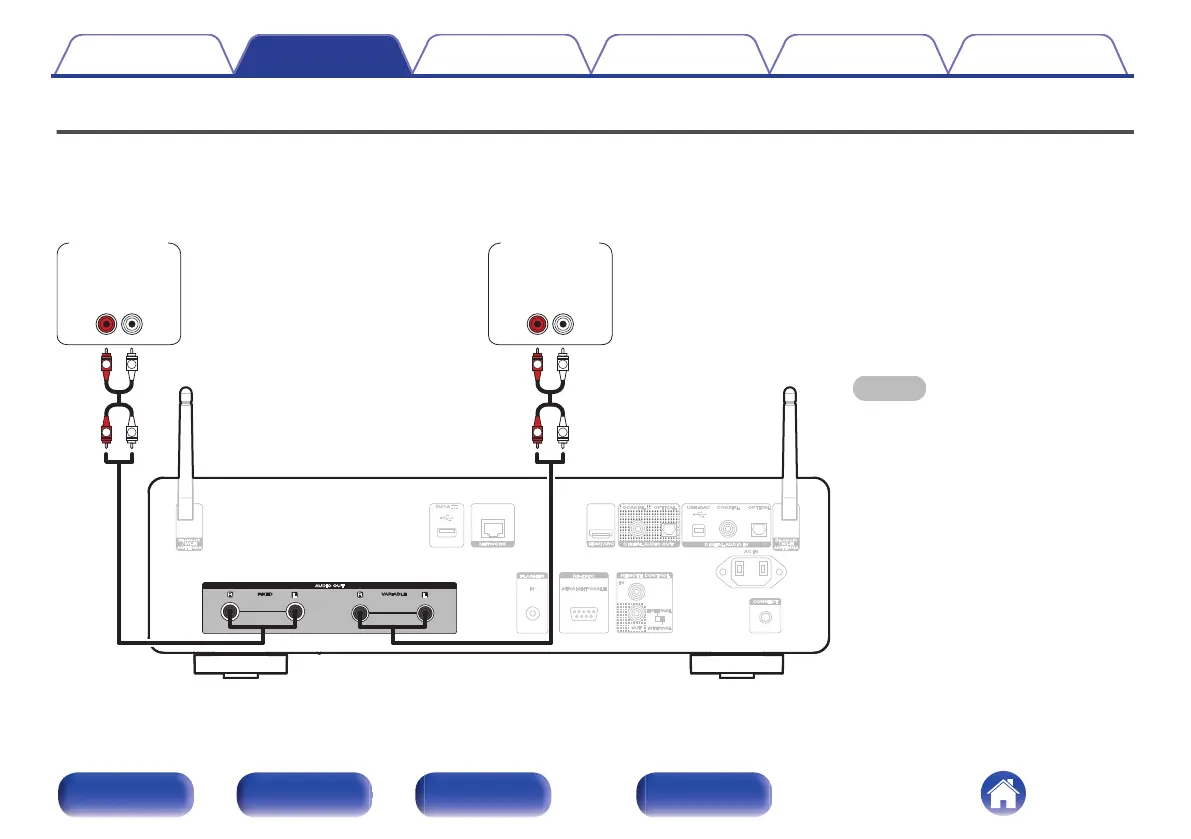
Connecting an amplifier
In addition to the normal analog audio output connectors (FIXED) this unit has analog audio output connectors (VARIABLE) that allow you to adjust the
volume of the audio signal output from this unit. Connect the power amplifier to the analog audio output connectors (VARIABLE) and press the VOLUME
no buttons on the remote control to adjust the volume of the audio signal output from this unit.
NOTE
0
Do not connect a power amplifier to the
analog audio output connectors (FIXED).
Connecting a power amplifier may cause
damage to the speakers.
0
In the settings menu, set the audio output
terminal for “Line Out Level” to “Variable”
or “Fixed”. (v p. 98)
0
To adjust the volume of the audio signal
output from the analog audio output
connectors (VARIABLE) of this unit using
the remote control, set the remote control
operation mode of the volume buttons to
network CD player operation mode.
(v p. 109)
0
While using HDMI ARC for TV connection
it is highly recommended for the best
volume control experience to use the
variable output from this unit to connect to
the amplifier.
R
L
R
L
R
L
R
L
AUDIO
LR
IN
AUDIO
LR
IN
Pre
Amplifier
Power
Amplifier
Contents
Connections Playback Settings Tips Appendix
21
Front panel Rear panel
Remote control
unit
Index



 To Next Page