12
11. 本機から電源ケーブルを外します。
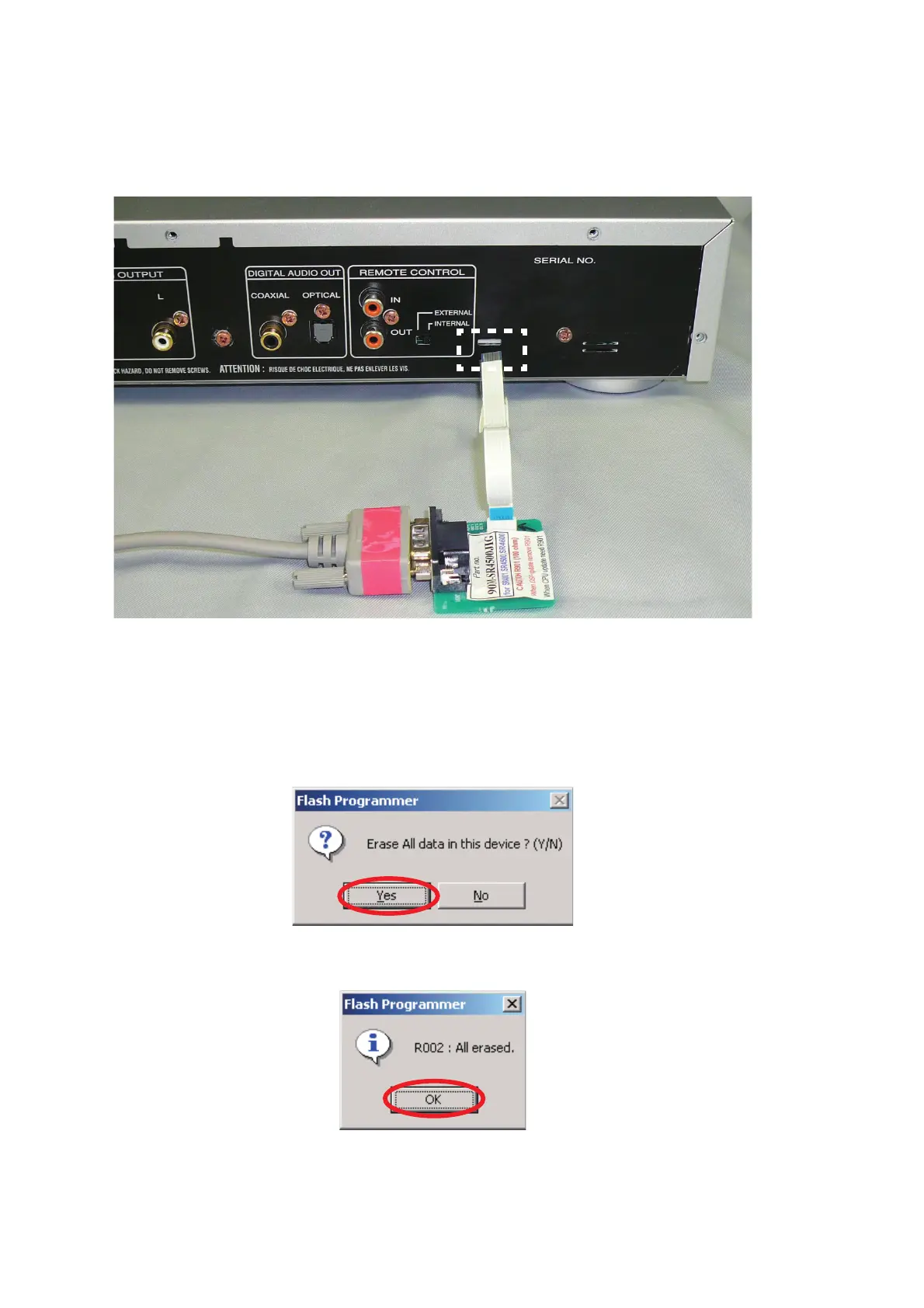
12. 接続冶具のRS-232C端子とPCのSerialポートをRS-
232C
ケーブルで接続します。
13. 本機のリアパネルに接続冶具のFFC をコンタクト面を上に
して差し込みます。
14. 本機に電源ケーブルを接続します。
15. Flash Programmerが通信接続に成功すると"Erase All data
in this devise? (Y/N)"
と書かれたダイアログボックスが自動
的に表示されます。接続に失敗するとエラーメッセージが
表示されます。(例:
E000)
Yesをクリックします。
16. OKをクリックします。
11. Disconnect the mains cord from the unit.
12. Connect the RS-232C on the connection JIG and the
Serial Port of windows PC with RS-232C cable.
13. Connect FFC (upside contact) to the rear panel of the
unit from connection JIG.
14. Connect the mains cord into the unit.
15. If the connection with the Flash Programmer is
successfully made, a dialogue box saying "Erase All
data in this devise? (Y/N)" appears automatically. If the
connection fails, error message will appear. (Ex.: E000)
Click Yes.
16. Click OK.



 To Next Page