Example
display
push and release the MENU/STORE button.
L
R
ANALOG
TOTAL
CD - R
CD
Example
display
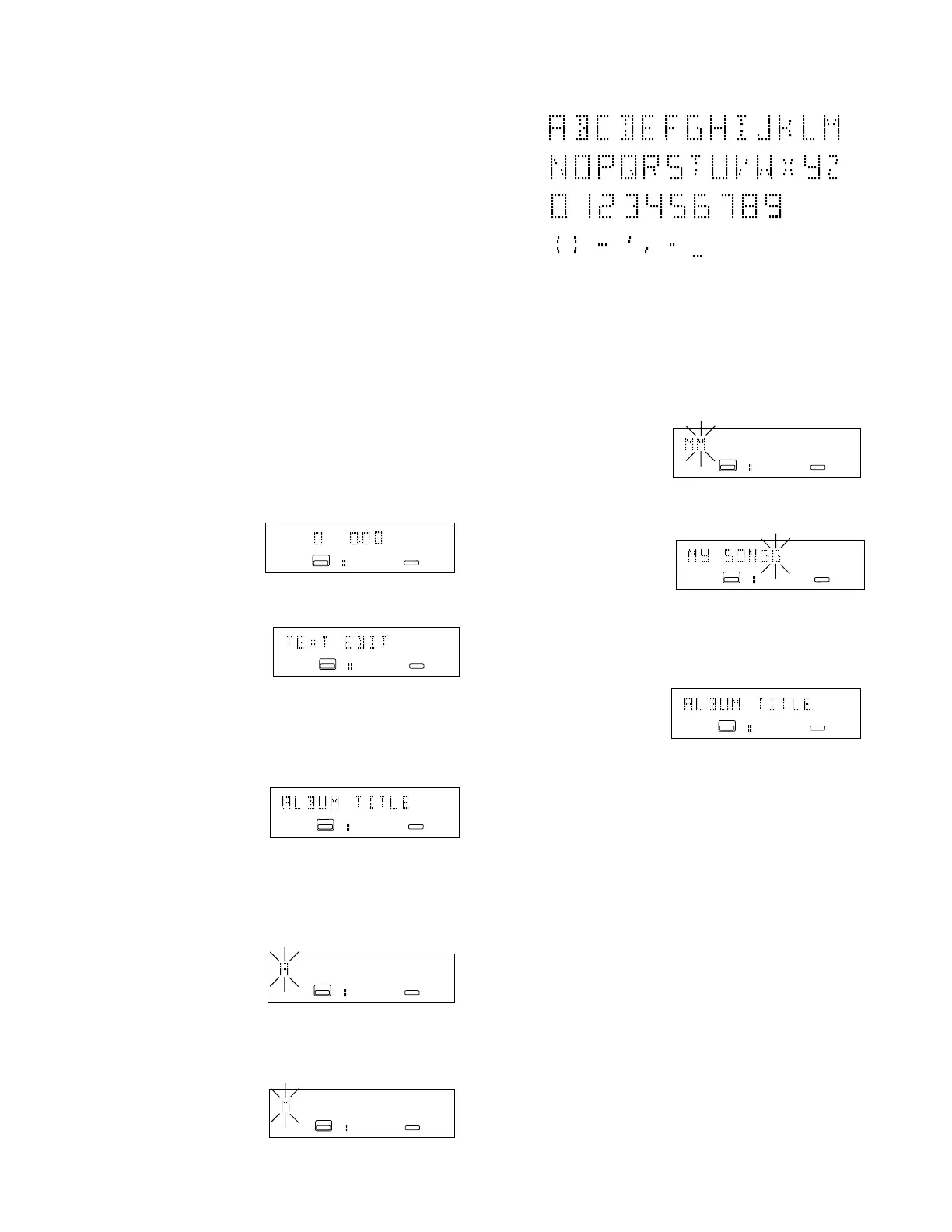
TEXT EDIT is displayed as a menu choice.
2. Push and release the
REC LEVEL / SELECT
control to accept the TEXT EDIT menu choice.
L
R
ANALOG
CD - R
CD
Example
display
ALBUM TITLE is displayed.
L
R
ANALOG
CD - R
CD
To make a menu change:
1. Push and release MENU/STORE button to
enter Menu mode.
2. Turn the REC LEVEL/SELECT control to
advance through the menu choices.
3. When the menu choice you want to change
is displayed, push and release the REC
LEVEL/SELECT control to enter that choice.
4. Then turn the REC LEVEL/SELECT control
to adjust or change the menu setting.
5. When the desired setting is displayed, push
and release the REC LEVEL/SELECT
control to confirm the new menu setting.
The display returns to the menu choice.
6. Push and release the MENU/STORE button
to exit menu mode.
TEXT EDIT (How to edit CD Text)
1. With the CDR drive selected and an unfinal-
ized CD-R or CD-RW detected in the CDR
drive,
3. Push and release the
REC LEVEL / SELECT
control to accept the ALBUM TITLE menu
choice. 'A' flashing is displayed.
Example
display
L
R
ANALOG
CD - R
CD
4. Turn the REC LEVEL / SELECT control to
select the first character of your album title.
Example
display
L
R
ANALOG
CD - R
CD
L
RANALOG
CD - R
CD
The available characters are.
To enter a space select the underline.
A maximum of 60 characters can be entered
per title.
5. When correct, push and release the REC
LEVEL / SELECT control to accept the charac-
ter. The next character space will be flashing.
Example
display
6. When your album title is complete and
correct,
push and release the MENU/STORE button to
store. The display returns to the ALBUM
TITLE menu choice.
L
RANALOG
CD - R
CD
L
R
ANALOG
CD - R
CD
Example
display
Example
display
7. Turn the REC LEVEL / SELECT switch to
another menu choice or press and release
the CANCL/DELETE button to exit menu
mode.
CD Text information is not retained if the CDR10
is turned off, or if the unfinalized disc is removed
from the CDR drive.
- 29 -


 To Next Page