6
ENGLISH
INSTALLATION D-BUS CONNECTION
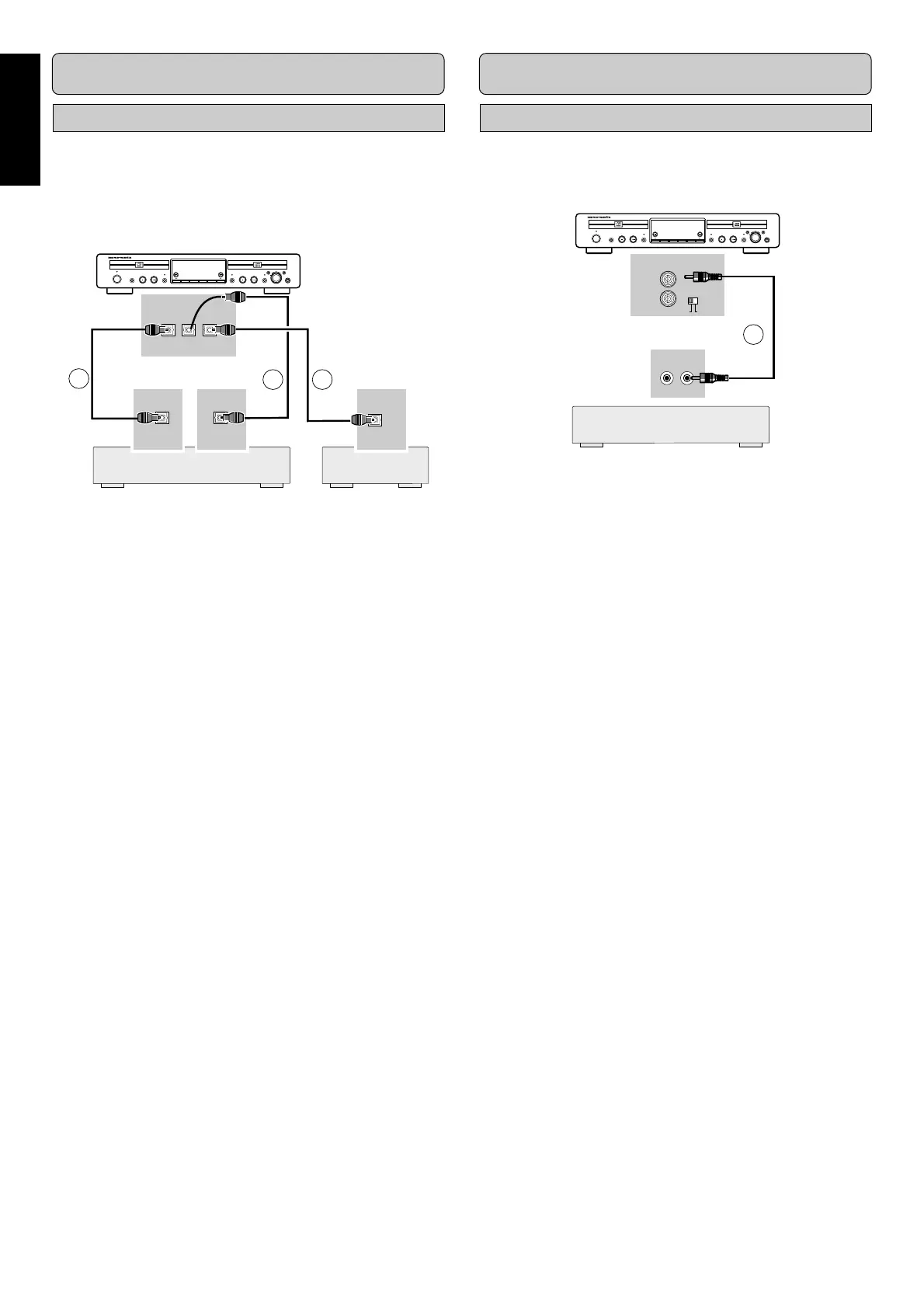
Digital Optical connections
For recording and playing, connect (using the suitable fiber-op-
tic cable, available from your supplier) the CD-Recorder to a
digital amplifier or other equipments based on the diagram be-
low. Before connection the cables, remove the dust caps from
the digital optical connections. We recommend that you save
the caps.
Recordable
ReWritable
SOURCEREC TYPE
CLOSE
OPEN/
CLOSE
OPEN/
ERASE FINALIZE
POWER ON/OFF
PLAY/PAUSESTOP
REC
CDR
CD RECORDER DR6050
PLAY/PAUSESTOP
CD DJ MODE
EASY JOG
PUSH ENTER
CANCEL/DELETESTORE/MENU
PHONES
OUTPUT INPUT INPUT
OPTICAL
INPUT OUTPUT
CDR/CD CD
789
1 For external recording, connect a fiber-optic cable u be-
tween the DIGITAL OPTICAL INPUT of the CD-Recorder
and the DIGITAL OPTICAL OUTPUT of an external ampli-
fier or CD player.
2 For playback, connect cable i between the OPTICAL CD/
CDR OUTPUT-socket on the CD-Recorder and the DIG-
ITAL OPTICAL INPUT-socket of an amplifier e.g. CD or
AUX.
3 For DJ-Mode playback (See page 15), connect a fiber-optic
cable o between the OPTICAL CD OUTPUT-socket on
the CD-Recorder and the DIGITAL OPTICAL INPUT-
socket of an amplifier e.g. CD or AUX.
- DJ-Mode playback is the function that the deck 1 and the
deck 2 on this CD-Recorder can play the songs separately at
the same time.
Note:
For playback, the digital coaxial outputs or analog outputs of
the CD Player and CD-Recorder should be connected to an
amplifier
Remote control cable connections
By connecting DR6050 to the Marantz amplifier using a D-BUS
remote control cable 0, you can operate the operations of
DR6050 from the remote control of the amplifier. Set the re-
mote control selector to ‘EXTERNAL’.
Recordable
ReWritable
SOURCEREC TYPE
CLOSE
OPEN/
CLOSE
OPEN/
ERASE FINALIZE
POWER ON/OFF
PLAY/PAUSESTOP
REC
CDR
CD RECORDER DR6050
PLAY/PAUSESTOP
CD DJ MODE
EASY JOG
PUSH ENTER
CANCEL/DELETESTORE/MENU
PHONES
INTERNALEXTERNAL
CONTROL
REMOTE
IN
OUT
REMOTE
CONTROL
OUT
IN
10
Note:
When you don’t use the D-BUS connection, ALWAYS set the
remote control selector to ‘INTERNAL’.
Amplifier 1 Amplifier 2
Marantz Amplifier



 To Next Page