18
ENGLISH
MENU MODE
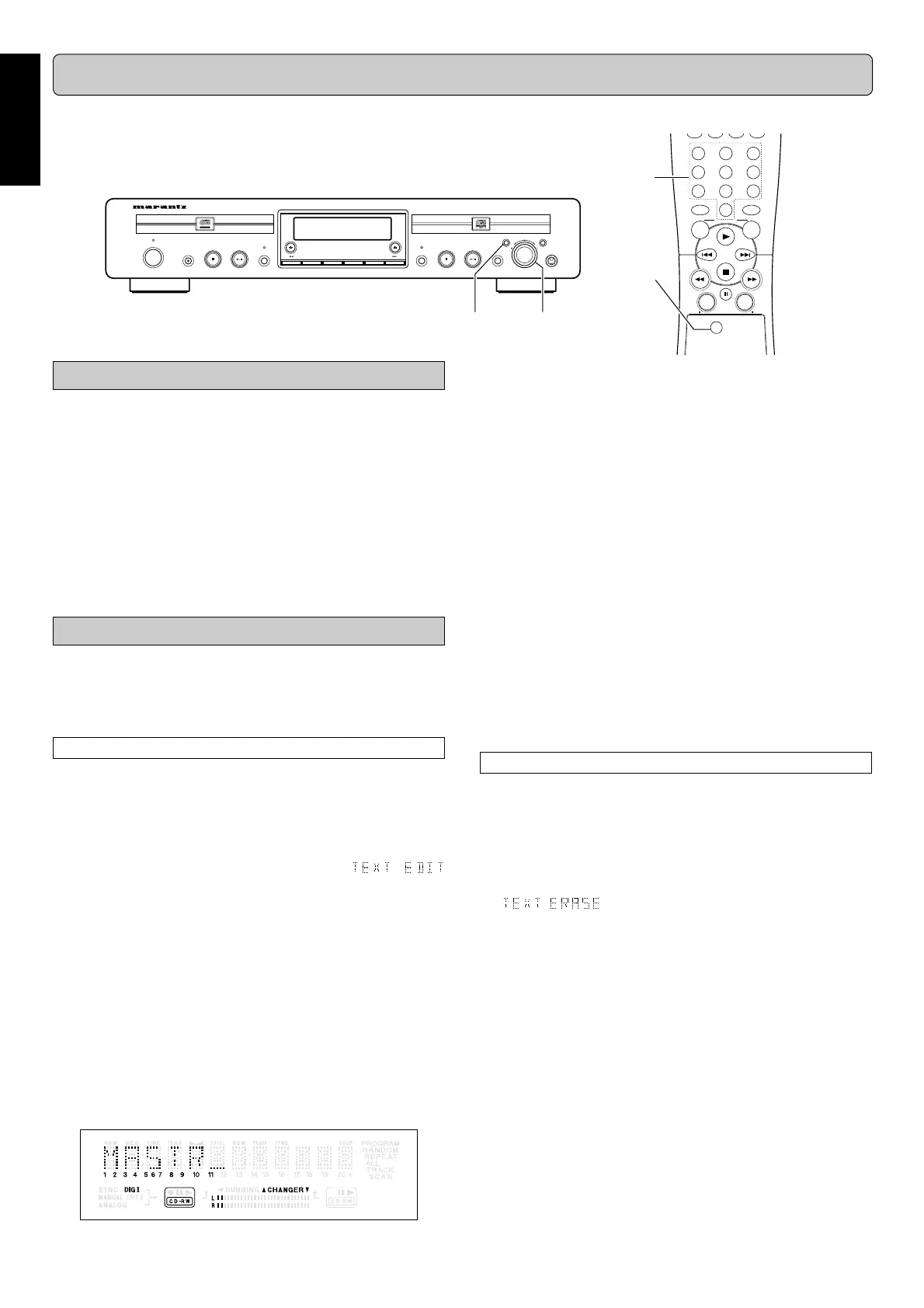
The numbers between parentheses refer to the fold-out.
Note:
- A maximum of 60 characters can be stored per item.
- With the Q (10, 76) R (15, 81) keys you can move to a
required cursor position.
- With the
CANCEL/DELETE
(20, 80) you can delete a character.
ii
ii
i
Press
PUSH ENTER
(19) or
ENTER
(79) on the remote
control to store the characters and move to the next
cursor position.
oo
oo
o
Press
STORE/MENU
(18, 78) to store a name you have
entered and return to the submenu or
9 9
9 9
9
STOP
(5) to
exit.
Note:
- By pressing the
PUSH ENTER
(19) or
ENTER
(79) on the
remote control without selecting a character first, you can in-
sert a space between characters.
- When an artist’s name has been stored for a certain track,
the name will automatically be copied for the next track. The
name can be confirmed by pressing
STORE/MENU
(18, 78)
or a new name can be entered as described above.
Erasing names
qq
qq
q
In stop mode, select
CDR
(7).
ww
ww
w
Press
STORE/MENU
(18, 78) on the deck or the remote
control to enter Menu mode.
ee
ee
e
Rotate
EASY JOG
(19) to select the submenu TEXT
ERASE.
appears on the display.
rr
rr
r
Press
PUSH ENTER
(19) or
ENTER
(79) on the remote
control to confirm.
tt
tt
t
Rotate
EASY JOG
(19) to select the required option in
the submenu: All Text, CD Title, CD Artist, Track 1 Title,
Track 1 Artist, etc.
yy
yy
y
Press
PUSH ENTER
(19) or
ENTER
(79) on the remote
control to confirm.
The display will ask you to reconfirm your selection.
uu
uu
u
Press
PUSH ENTER
(19) or
ENTER
(79) on the remote
control to reconfirm.
ii
ii
i
Press
STORE/MENU
(18, 78) to return to the submenu
or
9 9
9 9
9
STOP
(5, 82) to exit.
MENU/
STORE
CANCEL/
DELETE
0
987
654
321
CD
CDR
ABC DEF GHI
JKL MN OPQ
RST UVW XYZ
DISPLAY
SPACE
SCROLL
FUNCTION
ENTER
Recordable
ReWritable
SOURCEREC TYPE
CLOSE
OPEN/
CLOSE
OPEN/
ERASE FINALIZE
POWER
ON/OFF
PLAY/PAUSESTOP
REC
CDR
CD RECORDER DR6050
PLAY/PAUSESTOP
CD DJ MODE
EASY JOG
PUSH ENTER
CANCEL/DELETESTORE/MENU
PHONES
STANDBY
ert
yui
wo
y
i
u
EX: Storing names of Text settings
MENU MODE can set up:
• Text setting ................. adding erasing the CD text
• Recording setting ....... Auto track increment ON/OFF and
adjustment of the right-left-volume
balance adjustment during the re-
cording
• All settings (except Balance) made in Menu mode will be
stored in the deck’s memory and can be called up and
changed at any time.
Note:
Text can only be edited for unfinalized discs. (finalized CD-RW
discs must be unfinalized first)
Text settings
The TEXT submenus allows you to enter text information on the
CD-R(W); for example the CD titles, the artist names, the track
names and so on. During the playback, the TEXT will be ap-
peared on the display.
Storing names
qq
qq
q
In Stop mode, select
CDR
(7, 73).
ww
ww
w
Press
STORE/MENU
(18, 78) on the deck or the remote
control to enter Menu mode.
TEXT EDIT appears on the display.
ee
ee
e
Rotate
EASY JOG
(19) to select the
submenus.
rr
rr
r
Press
PUSH ENTER
(19) or
ENTER
(79) on the remote
control to confirm.
tt
tt
t
Rotate
EASY JOG
(19) to select the required option in the
submenu: CD Artist, CD Title, Track 1 Artist, Track 1 Title,
etc.
yy
yy
y
Press
PUSH ENTER
(19) or
ENTER
(79) on the remote
control to confirm.
uu
uu
u
Select the characters by rotating the
EASY JOG
(19) or
by pressing the corresponding numeric/alphabet key
on the remote control.



 To Next Page