21
GETTING STARTED USING YOUR DVD PLAYER
ENGLISH
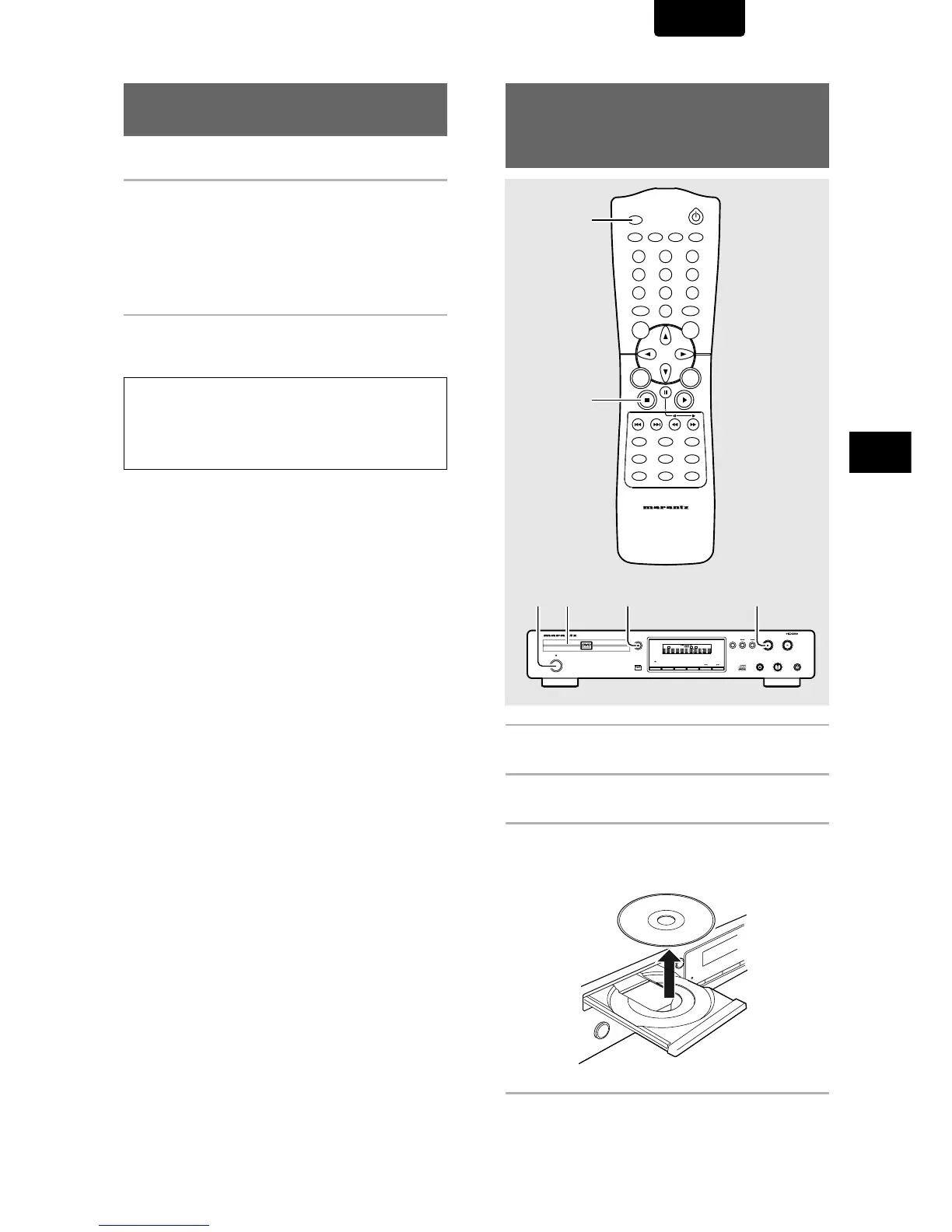
1 Press STOP
77
77
7.
Playback stops.
2 Press OPEN/CLOSE.
The disc tray comes out.
3 Remove the disc.
Be sure to press the OPEN/CLOSE button to closs the
disc tray after you remove the disc.
4 Press Power button on the front panel.
Stopping Playback and
Switching Power Off
– DVD/Video CD/CD
Resuming playback from
where you stopped – DVD/Video CD
Use the resume feature to restart playback from the point that
the disc was stopped last time.
Press STOP
77
77
7 once.
The display shows “RESUME” and the stop position is
memorized.
• The resume position remains memorized as long as the
disc is in the player — even if you switch the power off.
• Pressing STOP 7 twice causes the disc to return to the
beginning when PLAY 3 is pressed again. The display
shows the disc type (DVDs or Video CDs)
Press PLAY
33
33
3.
Playback starts from the resume position.
Notes
• The actual restart position may be slightly before or after the
resume position.
• If you want to remove the disc, but still want to resume playback
from the last stopped position, use the LAST MEMORY feature
instead (page 43).
DIMMER
ENTER
RETURN
T-C
RANDOMREPEAT
MENU
TOP
MENU
AUDIO
SUBTITLE
ANGLE
OSDPROGRAM
SETUP
LAST
MEMORY
CONDITION
MEMORY
CLEAR
0
987
654
321
A-B
OPEN/CLOSE
REMOTE CONTROLLER
RC7010DV
VIDEO ON/OFF
1
2
+10
DIMMER
OSD
VIDEO OFF
FL OFF
PAUSE
STANDBY
LEVEL
REPEAT
PHONES
DVD PLAYER DV7010
STOP
POWER
ON/OFF
OPEN/CLOSE
PLAY
-+
VIDEO
1
DIGITAL OUT
CHAPTER
TITLE
TRACK
TRACK
TIME
TOTAL
FTS
SVCD
CHAPTER
TRACK
SCAN
PBC
A-B
TITLE
REPEAT
DTS
SHUFFLE
4 2 13


 To Next Page