11
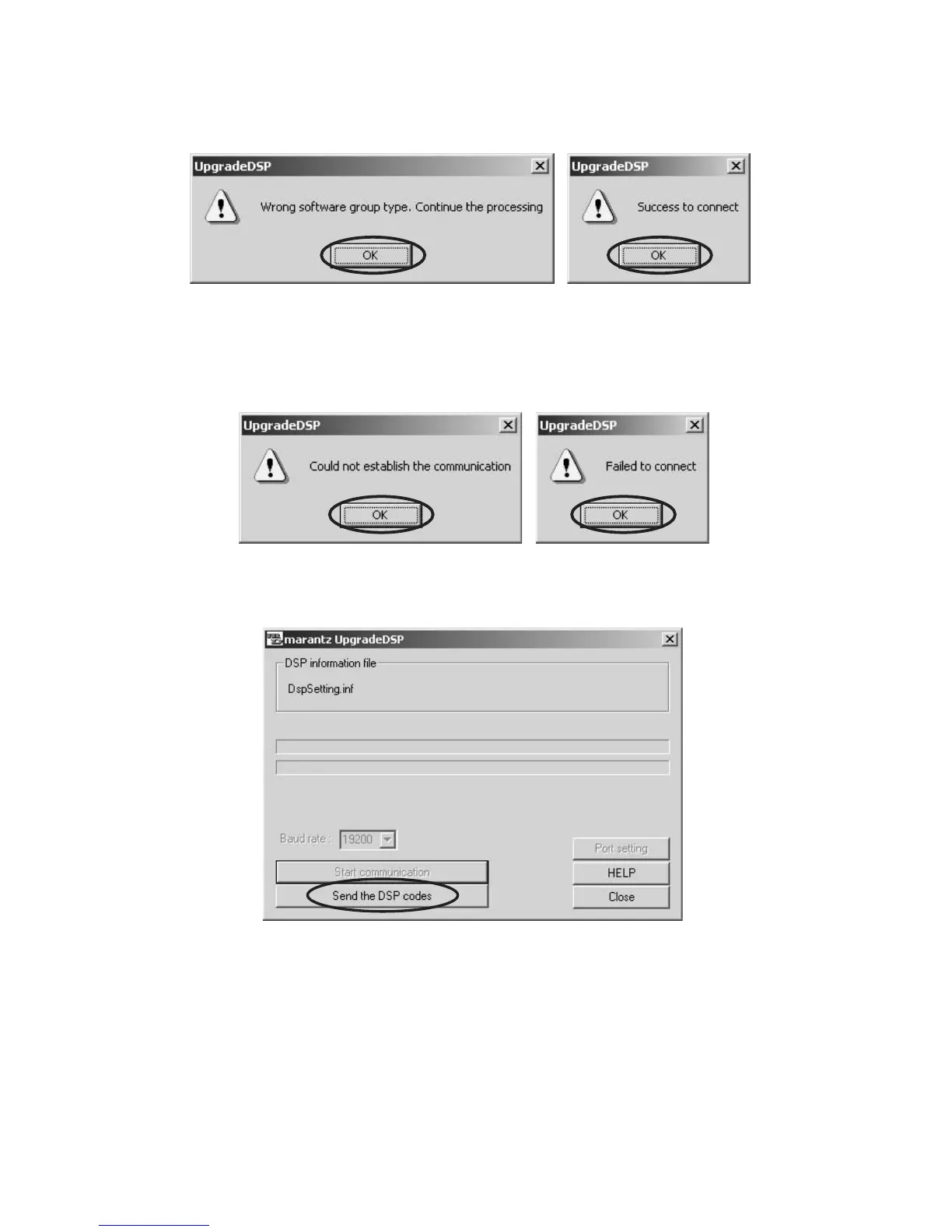
8. Select 19200 in the Baud rate.
9. Click Start communication.
10. If it succeeds in connection, the following comments come
out. Click OK, and close.
8. Baudrate:を 19200 に設定します。
9. Startcommunication をクリックします。
10. DVDPlayerと接続が成功すると下記のようなコメントが
出ますので OK をクリックしてください。
12. Click Send the DSP codes. 12. DVDPlayerと接続に成功したらSendtheDSPcodesを
クリックします。
11. If connection goes wrong, the following comments come
out. Check the Port setting and Band rate of software again.
Click OK, and close.
11. もしも下記のコメントが出たときは、COMport 設定ま
たは転送レートが PC の設定とあっていませんのでそれ
ぞれ OK をクリックした後に Bandrate:と Portsetting
を PC の設定にあわせてください。
13. Software to Flash ROM is written in.
At this time, the front display indicates “DSP_ERASING”.
And next, the front display indicates “DSP_WRITING”.
13. データの転送が行われ書き込み状態が表示されます。
このとき DVD Player のフロントディスプレイには
DSPERASING と表示され、次に DSPWRITINGと表示
されます。



 To Next Page