10
8. Press the ENTER button, and save the result of adjustment
to the non-volatile memory. ("EFB=
SAVE" will be dis-
played for a moment. Then "EFBAL
MO-P" will be dis-
played.)
9. Press the ENTER button.
10. The optical pick-up moves to the pit area automatically and
servo is imposed.
11. Use the JOG dial until the wave-forms of the oscilloscope
moves closer to the specified value.
In this adjustment, waveform varies at intervals of approx.
2%. Adjust the waveform so that the specified value is satis-
fied as much as possible.
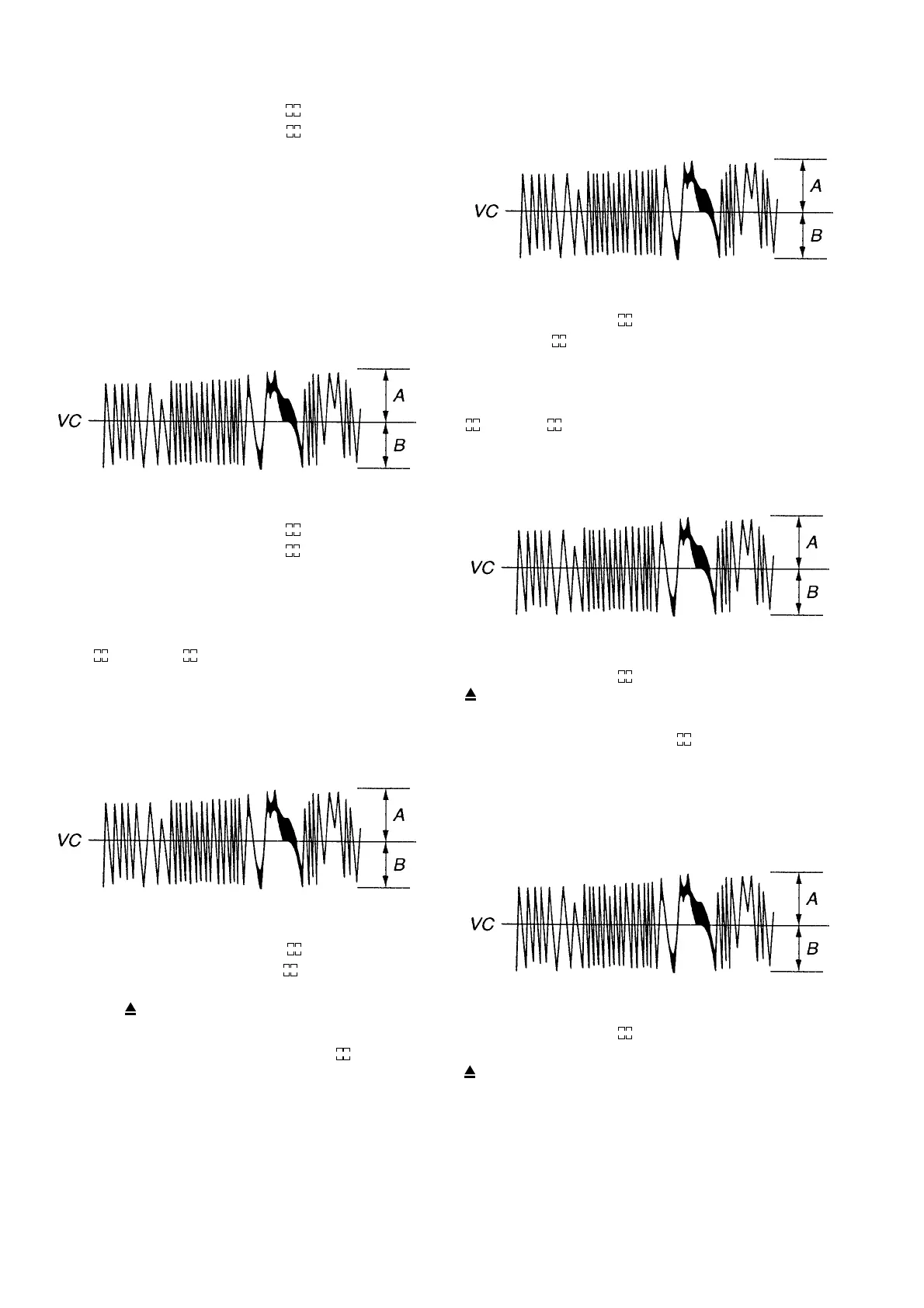
(Traverse Waveform)
specification : A = B
12. Press the ENTER button, and save the result of adjustment
to the non-volatile memory. ("EFB=
SAVE" will be dis-
played for a moment. Then " EFBAL
MO-W" will be dis-
played.)
13. Press the ENTER button.
14. Use the JOG dial so that the waveforms of the oscilloscope
becomes the specified value. (When the the JOG dial is Used,
the "
" of "EFB=
MO-W" changes and the waveform
changes.) In this adjustment, waveform varies at intervals of
approx. 2%. Adjust the waveform so that the specified value
is satisfied as much as possible.
(MO write power traverse adjustment)
(Traverse Waveform)
specification : A = B
15. Press the ENTER button, and save the result of adjustment
to the non volatile memory. ("EFB=
SAVE" will be dis-
played for a moment. Then "EFB=
MO-P" will be dis-
played.)
16. Press the button and remove the low reflection disc.
17. Load the test disc. ( High reflection disc TMD-381 )
18. Press the ENTER button and display " EFBAL
CD". Servo
is imposed automatically.
19. Press the ENTER button.
20. Use the JOG dial until the wave-forms of the oscilloscope
moves closer to the specified value.
In this adjustment, waveform varies at intervals of approx.
2%. Adjust the waveform so that the specified value is satis-
fied as much as possible.
11. この時のオシロスコープの波形が規格値に近づくように
ジョジョ
ジョジョ
ジョ
ググ
ググ
グ(
JOGJOG
JOGJOG
JOG)ダイヤルを回して調整する。この調整は約2%刻みで変
化し、最も規格値に近づくように調整する。
(トラバース波形規格:A=B)
12.
ENTERENTER
ENTERENTER
ENTER ボタンを押して不揮発性メモリに調整結果をセーブす
る。(この時、一瞬 "EFB=
SAVE" と表示される。)
その後 "EFBAL
MO‑W" と表示される。
13. 再度、
ENTERENTER
ENTERENTER
ENTER ボタンを押します。
14.オシロスコープの波形が規格値になるように
ジョグジョグ
ジョグジョグ
ジョグ(
JOGJOG
JOGJOG
JOG)ダイ
ヤルを回して調整する。(
ジョグジョグ
ジョグジョグ
ジョグ(
JOGJOG
JOGJOG
JOG)ダイヤルを回すと、"EFB=
MO‑W" の "
" 数字が変化し、波形も変化します。)
この調整は約2%刻みで変化し、最も規格値に近づくように調
整する。
(MO ライトパワートラバース調整)
(トラバース波形規格:A=B)
15.
ENTERENTER
ENTERENTER
ENTER ボタンを押して不揮発性メモリに調整結果をセーブす
る。(この時、一瞬 "EFB=
SAVE" と表示される。)
16.
ボタンを押して低反射ディスクを取り出す。
17. テストディスク高反射ディスク A‑BEXTMD‑381 を挿入する。
18.
ENTERENTER
ENTERENTER
ENTERボタンを押して表示を "EFBAL
CD"にする。自動的に
サーボがかかる。
19. 再度、
ENTERENTER
ENTERENTER
ENTER ボタンを押します。
20.オシロスコープの波形が規格値に近づくように
ジョグジョグ
ジョグジョグ
ジョグ(
JOGJOG
JOGJOG
JOG)ダ
イヤルを回して調整する。この調整は約 2% 刻みで変化し、最
も規格値に近づくように調整する。
(トラバース波形規格:A=B)
21.
ENTERENTER
ENTERENTER
ENTER ボタンを押して不揮発性メモリに調整結果をセーブす
る。(この時、一瞬 "EFB=
SAVE" と表示される。)
その後に "EFBALADJUST" と表示される。
22.
ボタンを押してテストディスク高反射ディスクA‑BEXTMD‑
381 を取り出す。



 To Next Page